

Lindy 7 Port USB 3.1 Charging 43228 Manual
PDF manual · 2 Pages
English



Quick check
Incorrect answer, please try again.
Chat with your Lindy 7 Port USB 3.1 Charging 43228 manual using AI
Get instant AI answers from your Lindy 7 Port USB 3.1 Charging 43228 manual
Ask anything about the Lindy 7 Port USB 3.1 Charging 43228. Answers come from this manual, with the pages they are based on.
Ask a Question
Do you recommend 7 Port USB 3.1 Charging 43228?
Yes NoFrequently Asked Questions
The hub connects to your computer using a USB A (computer side) to USB B (hub side) cable, matching the hub's USB-B 3.0 Socket connection. Once connected and powered, your computer should recognize the new hardware and install any needed drivers automatically.
Is this answer helpful?
It supports SuperSpeed USB transfer rates up to 5Gbps. This makes it suitable for connecting multiple USB peripherals, including storage devices, when your devices and ports support USB 3.0/USB 3.1 Gen 1 operation.
Is this answer helpful?
Yes. All 7 ports support USB Battery Charging 1.2. Charging capability can reach up to 1.5A per port, but it is limited by the hub's maximum shared total charging output of 36W.
Is this answer helpful?
Charging power is shared across the 7 ports. While each port supports USB Battery Charging 1.2, the hub limits total charging to 36W, so multiple high-demand devices may receive less power than the maximum per-port figure.
Is this answer helpful?
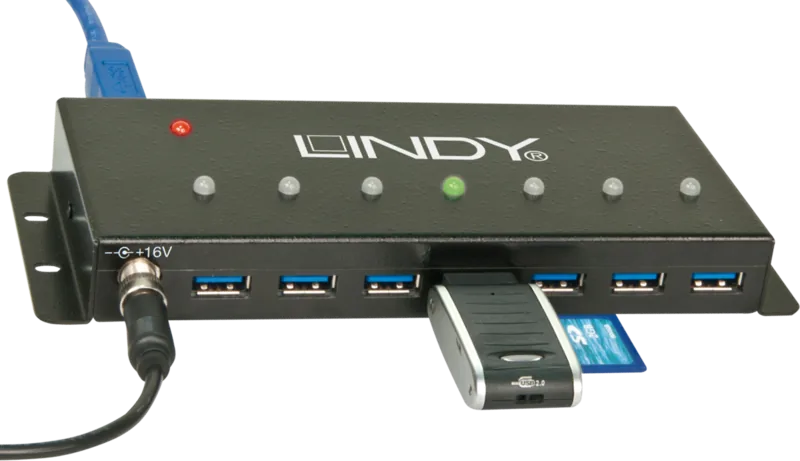
Yes. The hub includes 7 LEDs, one for each USB port, providing status indication. This helps you quickly confirm that connected devices are getting power and are recognized through the hub.
Is this answer helpful?
In typical use, your computer will recognize the hub hardware and install any required drivers automatically. The hub is described as compatible with USB operating systems that support USB.
Is this answer helpful?
The hub uses an included multi-country 12V DC 3A power supply with adapters for EU/UK/US/AUS. Connect it to the hub's power socket and then to a wall outlet before attaching USB devices.
Is this answer helpful?
Advantages and Disadvantages
Advantages

- 7-port SuperSpeed hub with USB Type A expansion for multiple peripherals
- Supports SuperSpeed data transfer rates up to 5Gbps
- USB Battery Charging 1.2 supported on all ports for compatible devices
- Up to 1.5A charging capability per port, depending on total power budget
- 7 status LEDs plus an On/Off power switch for simple monitoring
Disadvantages

- Total charging output is limited to 36W shared across all 7 ports
- Charging performance per device may drop when multiple devices draw power
- Needs the included external 12V DC 3A power supply to operate
Product Specification
Type
USB-Hub
Form factor
1x external wired
Host connection
1x USB-B 3.0 (port, 5Gb/s), 1x USB-A 3.0 (male via cable, 5Gb/s, 3.61 ft cable length)
Ports
7x USB-A 3.0 (port, individually switchable)
Output ports
7x USB-A 3.0 (port, 5Gb/s, USB BC 1.2, 5V/1.5A/7.5W), USB Total power: 36W
Power supply
Power supply not via host connection, mains connection (1x barrel connector), external power adapter required and included
Chipset
Realtek RTS5411 (USB-Hub, USB 3.0)
Dimensions
6.69x2.80x6.02in (WxHxD)
Weight
0.25 lb
Housing color
black
Compatibility
universal
Manufacturer warranty
two years
USB Notation
Link
Product Description
Lindy USB-Hub: 7x USB-A 3.0 with USB-B 3.0 Socket Manual
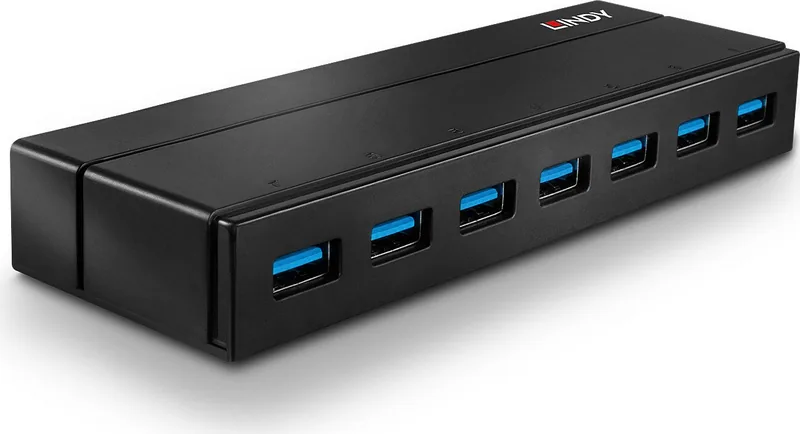
The Lindy USB-Hub is a powered 7-port SuperSpeed hub designed to expand a single USB connection into a full workstation. With 7x USB-A 3.0 ports for peripherals, it keeps everyday devices like storage, adapters, and accessories running smoothly while bringing a clear, practical charging function for USB Battery Charging 1.2 devices.
Whether you are setting up a home office or a compact desktop environment, the hub is built for reliable day-to-day use. It is designed around the USB 3.1 Gen 1 / USB 3.0 platform, supporting SuperSpeed data transfer rates up to 5Gbps. That makes it a strong choice for moving files to and from external drives, connecting multiple USB peripherals, and reducing cable clutter at your desk.
A standout feature is built-in charging support. Each of the 7 ports supports USB Battery Charging 1.2 with charging capability up to 1.5A per port, subject to overall power limits. Because the hub shares a maximum total charging output of 36W across all ports, actual charging performance depends on what else is connected and how much power each device requests. For quick monitoring, there are 7 LEDs that indicate the status of each USB port, plus an On/Off power switch for simple control.
What is included
- 7-port USB 3.1 Gen 1 / USB 3.0 hub
- 110 cm USB A male to B male cable (for the USB-B 3.0 Socket connection)
- Multi-country 12V DC 3A power supply with adapters (EU/UK/US/AUS)
- Manual and documentation (Lindy USB-Hub, 7x USB-A 3.0, USB-B 3.0 Socket Manual)
Top takeaways (most important results)
- 7 SuperSpeed USB Type A ports support data transfer up to 5Gbps
- USB Battery Charging 1.2 on all ports for compatible devices
- Shared 36W total charging power helps you manage multiple charging needs
- 7 status LEDs and a power switch improve day-to-day usability
Notes
- Charging power is shared across ports, so high-demand devices may reduce available output to others.
- The hub is powered via the included 12V DC adapter, supporting stable performance for both data and charging.
Pros and cons (based on the provided information)
Pros
- 7-port expansion with SuperSpeed USB performance
- Up to 5Gbps data transfer support
- Charging via USB Battery Charging 1.2 on each port
- Port status LEDs and an On/Off switch
Cons
- Total charging output is limited to 36W shared across all 7 ports
- Charging current per port can be constrained by connected devices and power budget
- Requires the included external 12V power supply
Search for 67,706 Manuals online


Type-in Brand or Model