
Lindy 2-Port USB 32165 Manual
PDF manual · 17 Pages
English



Quick check
Incorrect answer, please try again.
Chat with your Lindy 2-Port USB 32165 manual using AI
Get instant AI answers from your Lindy 2-Port USB 32165 manual
Ask anything about the Lindy 2-Port USB 32165. Answers come from this manual, with the pages they are based on.
Ask a Question
Do you recommend 2-Port USB 32165?
Yes NoFrequently Asked Questions
Yes, the Lindy 2-Port USB KM Switch is fully cross-compatible. It allows you to control two PCs running different operating systems, such as Windows and Mac, using a single shared keyboard and mouse setup.
Is this answer helpful?
No, the feature that allows switching computers by moving the mouse cursor is limited to Windows and Mac OS. Linux users can only switch ports using the designated hotkeys.
Is this answer helpful?
For basic operation, you can use the hotkeys immediately after connecting the hardware. However, installing the provided software is necessary to enable advanced features like mouse movement switching and the graphical interface menu.
Is this answer helpful?
If the program does not launch, navigate to your Applications folder, locate the file named KMSwitcher.app, and double-click it to start the program manually.
Is this answer helpful?
The Lindy 2-Port USB KM Switch is bus-powered. It draws all necessary power directly from the connected USB ports, so no external power adapter is required.
Is this answer helpful?
Advantages and Disadvantages
Advantages

- True Transparent USB emulation allows full recognition of specific keyboard and mouse models without function loss.
- Seamless cross-platform compatibility works effortlessly across Windows, Mac, and Linux operating systems.
- Intuitive software enables switching computers by simply moving the mouse cursor between monitors on supported OS.
- Compact and bus-powered design requires no external power adapter and saves valuable desk space.
- Hotkey switching provides a reliable backup method for instant port selection without software dependency.
Disadvantages

- Mouse movement switching feature is completely unavailable when used with Linux operating systems.
- Requires manual software installation on each computer to access advanced switching capabilities.
- Linux users are restricted to hotkey switching only, lacking the fluidity of mouse-over transitions.
- Mac users may occasionally need to manually launch the KMSwitcher.app if the program fails to start automatically.
- Cable length is fixed at 1.1 meters, which may limit placement options for some large desk setups.
Product Specification
Type
KVM Switch
Ports
2
Monitor
N/A
Keyboard/Mouse
USB
Audio
N/A
LAN
N/A
Resolution
N/A
Product Description
Mastering Multi-PC Workflows with the Lindy 2-Port USB KM Switch
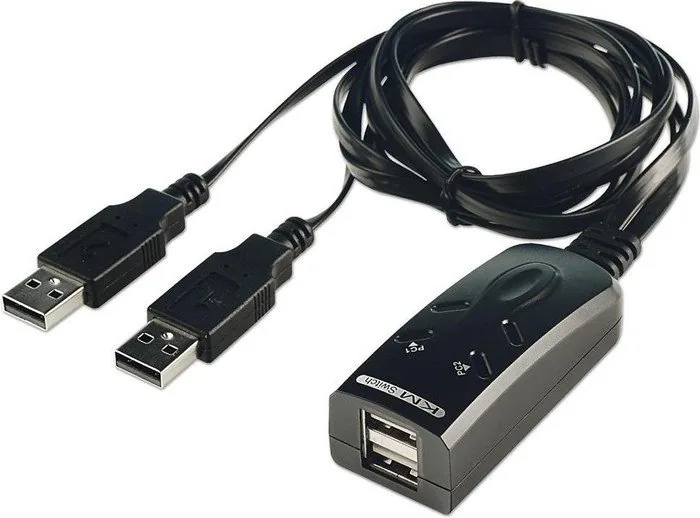
In today's dynamic digital environment, managing multiple computers efficiently is a necessity rather than a luxury. The Lindy 2-Port USB KM Switch stands out as a robust solution for professionals, educators, and home users who need to control two distinct PCs using a single keyboard and mouse setup. This device bridges the gap between different operating systems, offering seamless cross-compatibility across Windows, Mac, and Linux platforms. Whether you are an IT specialist testing software on different environments or a creative professional juggling design and coding tasks, this switch simplifies your workspace by reducing cable clutter and enhancing productivity.
The core innovation of this product lies in its True Transparent USB emulation technology. Unlike standard switches that might limit functionality, this feature ensures that specific keyboard and mouse models are fully recognized by both connected computers. Users retain access to all advanced functions and special keys, creating a near-universal compatibility experience. For Windows and Mac users, the included software adds a layer of sophistication by allowing computer switching simply by moving the mouse cursor from one monitor to another. While Linux users benefit from hotkey switching, the Windows and Mac integration offers a fluid, intuitive workflow that feels natural and immediate.
Installation is designed to be hassle-free, requiring no power-down of connected systems. The compact dimensions of 28 x 80 x 20mm ensure it fits discreetly under any desk, while the bus-powered design eliminates the need for external adapters. With pre-installed drivers available on the included software disc, setting up the system takes mere minutes. The unit supports USB 2.0 interfaces and comes with two 1.1-meter cables for connecting host computers, making it ideal for education sectors, small to medium enterprises, and professional offices alike.
Key Notes for Optimal Performance
- Software installation is required to unlock advanced features like mouse-based switching on Windows and Mac systems.
- Linux support is limited to hotkey switching only; mouse movement switching is not available on this OS.
- The device must be used with shielded cables to maintain compliance with electromagnetic compatibility standards.
- Mac users experiencing issues should locate the KMSwitcher.app file in their application folder and launch it manually if needed.
Search for 67,732 Manuals online


Type-in Brand or Model