
Liebherr CNef 5735-20 Comfort NoFrost Manual
PDF manual · 28 Pages
English



Quick check
Incorrect answer, please try again.
Chat with your Liebherr CNef 5735-20 Comfort NoFrost manual using AI
Get instant AI answers from your Liebherr CNef 5735-20 Comfort NoFrost manual
Ask anything about the Liebherr CNef 5735-20 Comfort NoFrost. Answers come from this manual, with the pages they are based on.
CNef 5735-20 Comfort NoFrost Maintenance Schedule
Replace the FreshAir filter every 12 months to ensure optimum air quality. Confirm the change in the menu.
Clean the ventilation grid at least once a year with a vacuum cleaner or soft cloth to ensure proper ventilation.
Free maintenance reminders
Timed to your purchase date. Always free, unsubscribe anytime.
Ask a Question
Do you recommend CNef 5735-20 Comfort NoFrost?
Yes NoFrequently Asked Questions
No. Its NoFrost system automatically manages defrosting in the freezer. Moisture is removed from the evaporator and periodically defrosted, helping prevent ice buildup and eliminating routine manual defrosting.
Is this answer helpful?
The recommended refrigerator setting is 5 C, while the recommended freezer setting is -18 C. The refrigerator can be set between 1 C and 9 C, and the freezer can be adjusted between -16 C and -26 C.
Is this answer helpful?
SuperCool temporarily boosts cooling performance to chill large quantities of fresh food more quickly. It is useful after shopping or when placing warm food inside after it has cooled to room temperature.
Is this answer helpful?
SuperFrost rapidly freezes fresh food through to its core. For small amounts, activate it about six hours before loading. For the maximum freezing load, activate it around 24 hours in advance.
Is this answer helpful?
Yes. The VarioSpace design allows freezer drawers and shelves to be removed. This creates extra space for large poultry, bulky meat cuts, tall baked goods, and other oversized frozen items.
Is this answer helpful?
Some versions may include an IceMaker supplied by a refillable water tank in the refrigerator compartment. Use only cold drinking water, clean the tank regularly, and discard the first batches after initial operation or long inactivity.
Is this answer helpful?
Advantages and Disadvantages
Advantages

- NoFrost technology automatically defrosts the freezer, avoiding manual ice removal.
- VarioSpace lets users remove freezer drawers and shelves for large or awkwardly shaped foods.
- SuperCool and SuperFrost support rapid cooling and freezing after grocery shopping.
- Touch controls, child lock, alarms, and maintenance reminders improve everyday convenience.
- BioCool humidity control and flexible shelves support organized fresh-food storage.
Disadvantages

- Energy consumption can increase with colder settings, frequent door openings, or poor ventilation.
- Smart home features require an optional SmartDevice-Box and compatible network setup.
- IceMaker availability depends on the specific model version and requires regular tank cleaning.
- The large 700 mm-wide format requires sufficient kitchen space and ventilation clearance.
Product Specification
Type
Freestanding
Previous energy efficiency class
A+++ (A+++ to D)
Previous energy consumption
183 kWh/year
Front color
Stainless steel
Side color
Stainless steel
Refrigerator compartment capacity
78.19 gal (top)
Freezer compartment capacity
28 gal (bottom)
Total capacity
106.19 gal
Star rating
4
Freezing capacity in 24 hr
35.27 lb
Storage time during power failure
24 hr
Display
Touchscreen
Special features
Vegetable drawer, NoFrost, rapid cooling, rapid freezing, dynamic cooling, LED lighting, bottle rack, split glass shelf, door alarm, anti-fingerprint, vacation mode
Smart home
Optional app control (Wi-Fi, SmartDevice)
Climate class
SN/N/ST/T
Noise level
38 dB(A)
Door system
Right-hinged door, reversible
Dimensions
27.56 x 79.13 x 26.18 in (W x H x D)
Product Description
Liebherr CNef 5735-20 Comfort NoFrost - Read, Download & Print Free
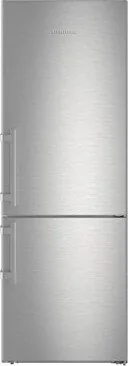
The Liebherr CNef 5735-20 Comfort NoFrost is a spacious fridge-freezer designed for households that want reliable food storage, flexible organization, and convenient temperature management. Its tall, wide format provides generous room for fresh groceries and frozen supplies, while the stainless-steel-look finish gives the appliance a clean, modern appearance that suits many kitchen styles.
Practical cooling for everyday routines
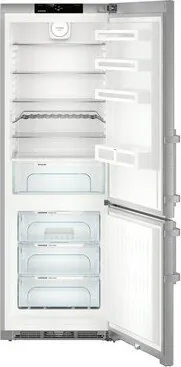
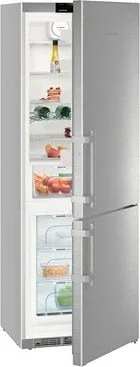
The refrigerator compartment uses LED interior lighting to make food easy to find. Adjustable shelves, a split shelf, bottle storage, door racks, and a removable egg tray help organize items of different sizes. The coldest zone is ideal for perishable foods such as meat and prepared meals, while the BioCool box includes humidity control to support fruit and vegetable storage.
A built-in fan can improve air circulation when room temperatures or humidity are high. For fast cooling after a large shop, the SuperCool function temporarily increases cooling performance. The temperature can be adjusted from 1 C to 9 C, with 5 C listed as the recommended setting.
Flexible freezing with NoFrost convenience
The freezer section is built for both long-term storage and meal preparation. NoFrost technology automatically manages defrosting, so manual ice removal is not needed. SuperFrost helps freeze fresh food quickly, preserving quality by lowering the freezer temperature before larger quantities are added.
With VarioSpace, drawers and glass shelves can be removed to make room for bulky items, including large cuts of meat, poultry, or tall baked goods. The recommended freezer setting is -18 C, and the adjustable range extends from -16 C to -26 C. Selected versions can include an IceMaker with a refillable water tank for household ice production.
Intuitive controls and connected options
A touch display provides direct access to refrigerator and freezer temperatures, operating modes, alarms, and maintenance reminders. Useful settings include child lock, Sabbath Mode, temperature unit selection, SuperCool, SuperFrost, and fan control. The appliance is also prepared for SmartDevice integration, enabling compatible smart-home and service features through an optional SmartDevice-Box.
Door and temperature alarms add reassurance during daily use, while reminders can be activated for FreshAir filter replacement and ventilation grille cleaning. Proper installation remains important: keep ventilation areas clear, position the appliance away from direct heat sources, and allow it to stand level for dependable performance.
Notes
- Optional equipment, including the IceMaker, may vary by version.
- The appliance is intended for household and similar indoor environments.
- Energy use depends on room temperature, door-opening habits, and selected temperature settings.
Search for 67,706 Manuals online


Type-in Brand or Model