
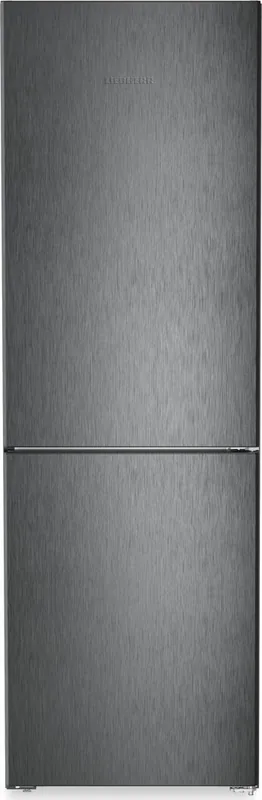
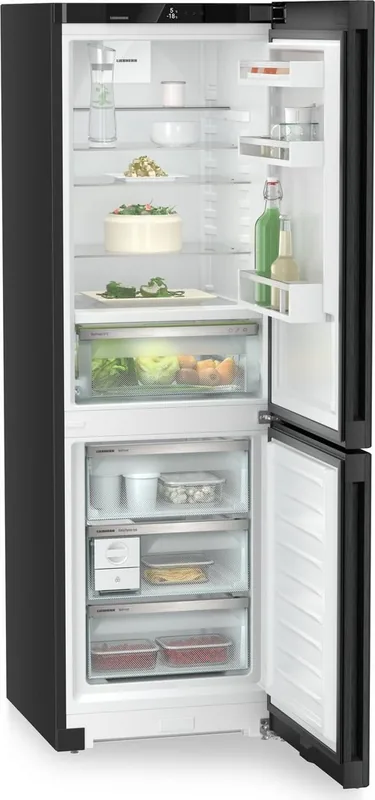
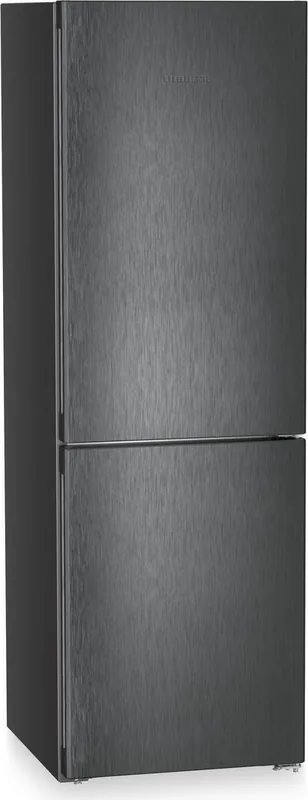
Liebherr CBNbda 5223-22 Plus BioFresh NoFrost Manual
PDF manual · 32 Pages
English



Quick check
Incorrect answer, please try again.
Chat with your Liebherr CBNbda 5223-22 Plus BioFresh NoFrost manual using AI
Get instant AI answers from your Liebherr CBNbda 5223-22 Plus BioFresh NoFrost manual
Ask anything about the Liebherr CBNbda 5223-22 Plus BioFresh NoFrost. Answers come from this manual, with the pages they are based on.
CBNbda 5223-22 Plus BioFresh NoFrost Maintenance Schedule
Replace the carbon filter every six months to guarantee air quality. A message appears when the filter needs changing.
For refrigerators with heat exchangers, dust the metal grid on the back of the appliance once a year to prevent increased energy consumption.
Clean the drain opening regularly to ensure proper drainage during automatic defrosting.
Free maintenance reminders
Timed to your purchase date. Always free, unsubscribe anytime.
Ask a Question
Do you recommend CBNbda 5223-22 Plus BioFresh NoFrost?
Yes NoFrequently Asked Questions
BioFresh creates a near-0 °C storage environment with adjustable humidity in separate safes (Meat & Dairy and Fruit & Vegetable). This slows spoilage and extends shelf life for perishables compared with standard refrigeration, but avoid settings that let temperatures drop well below 0 °C to prevent freezing.
Is this answer helpful?
No. Models with the NoFrost designation use an automatic system that deposits moisture on the evaporator and periodically evaporates it, eliminating the need for manual defrosting and reducing maintenance.
Is this answer helpful?
EasyTwist-Ice uses a removable water tank to produce ice cubes; fill it with cold potable or filtered water. Filtered or decarbonised water improves ice taste and reduces impurities. Clean the unit before first use and periodically per the manual.
Is this answer helpful?
SuperCool rapidly lowers fridge temperatures to chill large fresh-food loads; use when stocking many new groceries. SuperFrost aggressively lowers freezer temperatures to quickly freeze fresh items and protect food quality; activate 6–24 hours before freezing depending on quantity.
Is this answer helpful?
Yes, WiFi control is available via the SmartDevice app. Some models require the SmartDeviceBox accessory. Availability may vary by country, and initial setup requires the app, registration and possibly the SmartDeviceBox.
Is this answer helpful?
Liebherr recommends replacing the FreshAir carbon filter approximately every six months to maintain internal air quality. The display can prompt you when replacement is due.
Is this answer helpful?
SabbathMode suppresses many alerts, so after a power failure check frozen and refrigerated food carefully. Do not consume thawed or suspect items. The manual warns about food safety risks and recommends inspecting contents and contacting service if needed.
Is this answer helpful?
Advantages and Disadvantages
Advantages

- BioFresh zones with adjustable humidity extend freshness of produce and perishables.
- NoFrost freezer eliminates manual defrosting and reduces maintenance.
- Touch display with multiple modes (SuperCool, SuperFrost, PartyMode) for flexible operation.
- SmartDevice/WiFi compatibility for remote monitoring and control via app.
- VarioSpace, adjustable shelves and VarioSafe allow versatile storage for bulky items.
Disadvantages

- SmartDeviceBox required for some models to enable WiFi, not included.
- Advanced menu access protected by code may limit quick changes for some users.
- Replacement FreshAir carbon filters and upkeep (every ~6 months) add running costs.
- SabbathMode and demo mode can mask alerts—requires care after power failures.
- EasyTwist-Ice production time is temperature-dependent and relatively slow without SuperFrost.
Product Specification
Type
Freestanding appliance
Energy efficiency class
A (A to G)
Energy consumption
109kWh/year
Front color
stainless steel (dark inox)
Side color
black
Fridge compartment capacity
57.59 gal (top)
Freezer compartment capacity
27.21 gal (bottom)
Total capacity
84.80 gal
Star rating
4
Freezing capacity in 24h
22.05lb
Storage time in case of malfunction
20h
Display
yes
Special features
Vegetable compartment (BioFresh), NoFrost, fast cooling, fast freezing, dynamic cooling, LED lighting, bottle rack (integrated), divisible glass shelf, soft-close door with damping, door alarm, manual ice cube dispenser (internal)
Smart Home
App control optional
Climate class
SN/N/ST/T
Noise level
34dB
Noise emission class
B (A to D)
Door system
Right-hand hinged door, reversible
Dimensions
23.50x73.03x26.57in (WxHxD)
Product Description
Liebherr CBNbda 5223-22 Plus BioFresh NoFrost Manual
The Liebherr CBNbda 5223-22 Plus brings together modern convenience, efficient preservation and intuitive controls. Designed for household use, this fridge-freezer combines BioFresh technology, NoFrost freezing and a touchscreen interface to keep food fresher longer while reducing maintenance. It’s aimed at users who want flexible storage, precise temperature control and smart connectivity.
Key product highlights
The unit features a dedicated BioFresh zone that maintains temperatures near 0 °C with adjustable humidity levels, extending the shelf life of fruit, vegetables, dairy and meats. The NoFrost freezer eliminates manual defrosting by keeping the evaporator free of ice buildup. Adjustable glass shelves, VarioSafe drawers and telescopic rails provide versatile internal layouts for bulky or awkward items. The EasyTwist-Ice accessory offers an on-board ice maker with a removable water tank for easy filling and cleaning.
Controls and smart features
Operation relies on a responsive touch display with clearly structured menus: a status screen, settings menu and an advanced menu protected by a code. Predefined modes—SuperCool, SuperFrost, PartyMode, HolidayMode, SabbathMode and E-Saver—allow rapid adaptation for large food loads, energy savings or special use cases. WiFi compatibility via SmartDevice or SmartDeviceBox enables remote monitoring and app-based control. Safety and maintenance prompts (door alarm, filter replacement, water tank alerts) are shown on the display and accompanied by audible reminders.
Practical storage and maintenance
The fridge section offers distinct temperature zones, an adjustable bottle shelf and a VarioSafe compartment for small items. BioFresh includes separate Meat & Dairy and Fruit & Vegetable safes with humidity adjustment to suit different produce. The freezer provides multi-drawer storage, VarioSpace by removing shelves/drawers, and freezer packs for added protection during power interruptions. Cleaning is straightforward: NoFrost eliminates freezer defrosting, while interior components, glass shelves and detachable elements are easy to remove and wash. FreshAir carbon filtration improves internal air quality and should be replaced approximately every six months.
Safety and installation notes
The appliance is intended for domestic and similar household-like environments; it is not a built-in unit and should not be used for medical or explosive-risk applications. Follow climate class guidance for ambient temperatures, observe ventilation clearances, and let the unit reach recommended temperatures before stocking food. The manual details electrical safety, refrigerant handling, disposal procedures and troubleshooting steps for fault messages.
Notes
- BioFresh B-value can be adjusted for slightly cooler or warmer settings; avoid letting BioFresh fall below 0 °C for sensitive produce.
- EasyTwist-Ice requires initial cleaning and filtered potable water for best results.
- SabbathMode disables certain electronic responses while maintaining cooling; monitor food safety after power interruptions.
Search for 67,706 Manuals online


Type-in Brand or Model