
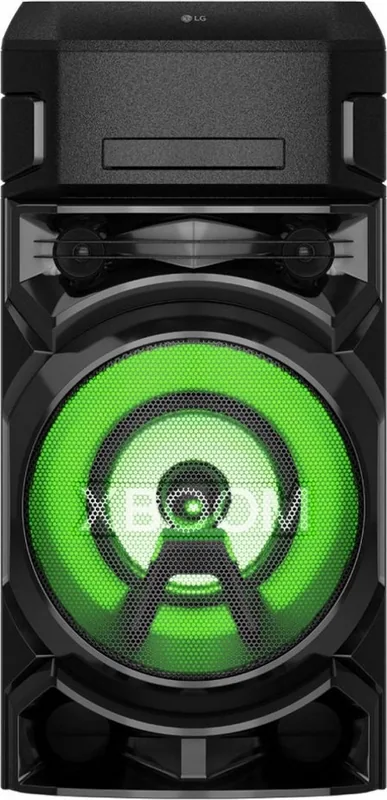
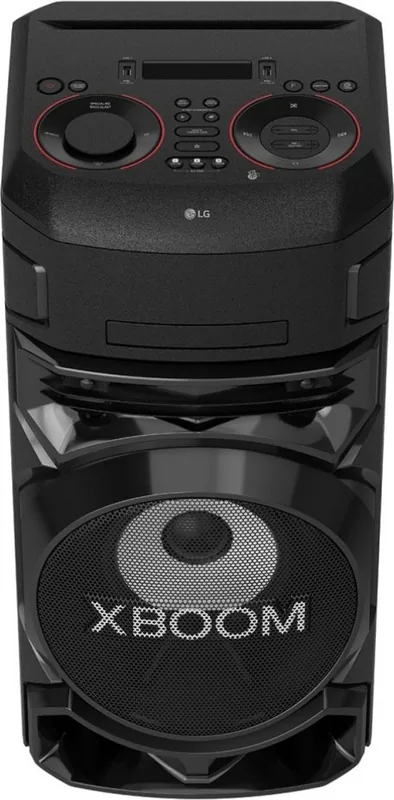
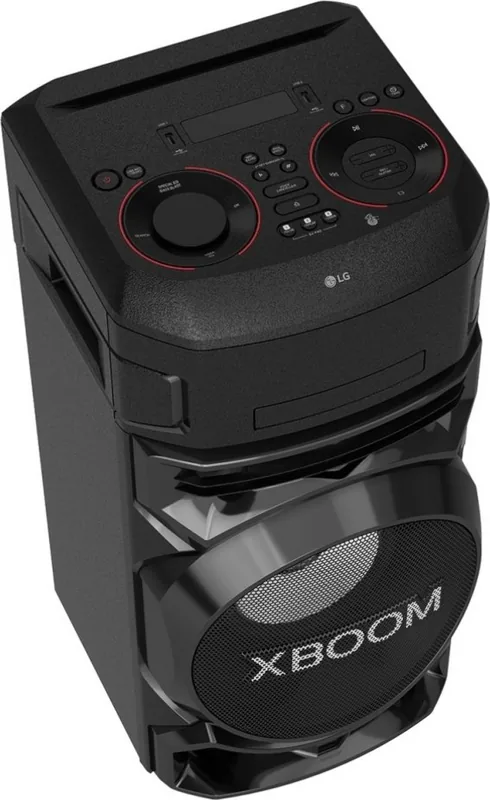
LG XBoom ON5 Manual
PDF manual · 47 Pages
English


Quick check
Incorrect answer, please try again.
Chat with your LG XBoom ON5 manual using AI
Get instant AI answers from your LG XBoom ON5 manual
Ask anything about the LG XBoom ON5. Answers come from this manual, with the pages they are based on.
XBoom ON5 Maintenance Schedule
Wipe the disc from the center to the edge with a clean cloth to remove fingerprints and dust before playing.
Inspect cables for damage or wear; if found, unplug the device and have a qualified service replace the cable.
Ask a Question
Do you recommend XBoom ON5?
Yes No
Jonas Mueller
7 months ago
Is the sound system powerful enough for small parties with good bass?

Manual.ly
7 months ago
Yes, multiple users confirm the sound is loud, clear, and features deep penetrating bass suitable for small parties. The design is modern with easy operation. Customers praise the unbeatable price and highly recommend the item for its performance and build quality.
Frequently Asked Questions
Yes, plug the 6.3mm cable into the Guitar In jack on the back panel. Adjust the Guitar volume using the MIC/GUITAR controls on the device. Ensure the speaker distance is correct to avoid feedback.
Is this answer helpful?
No, it only supports FAT16 and FAT32 file systems. If your drive is NTFS, you must reformat it to FAT32 for compatibility. NTFS may cause the device to show an error or not recognize the drive.
Is this answer helpful?
Use the Tuning keys to search for stations manually or automatically. Press the Jukebox/Memory button followed by a preset number to save the selected frequency. You can store up to fifty FM stations.
Is this answer helpful?
Yes, use Wireless Party Link to connect two compatible units. Set one unit as Main and the other as Other using the Twin mode. Note that this requires another compatible speaker unit to function correctly.
Is this answer helpful?
Insert two R03 batteries properly. Aim the remote towards the sensor on the device front. Keep within seven meters without obstacles. Press buttons like Play, Pause, or Volume to adjust settings.
Is this answer helpful?
Advantages and Disadvantages
Advantages

- Wireless Bluetooth Streaming allows easy music playback from smartphones.
- USB Recording capabilities let users capture audio directly to drive.
- DJ Pad functions provide club and drum effects for parties.
- Wireless Party Link connects two speakers for stereo sound.
- Built-in FM and DAB+ Tuner offers diverse radio listening.
Disadvantages

- Large Dimensions may not fit well in small spaces.
- No USB NTFS Support limits file system compatibility.
- Cannot Record directly from an external PC connection.
- Limited Microphone Input requires specific hardware setup.
- Speaker Output Cannot Be Expanded Beyond Wireless Pairing.
Product Specification
Power
220W Peak
Speakers
3 (2x 2" Tweeters, 1x 8" Woofer)
Tuner
FM
Audio Connections
Mic In (0.25" Jack), Instrument In (0.25" Jack)
Additional Connections
2x USB-A
Wireless
Bluetooth
Karaoke Functions
Echo, Voice Effects, Vocal Remover, Transposition
Features
Remote Control, Light Effects, Audio Effects (Bass Boost), App Control, Integrated CD Player
Dimensions
12.99x26.97x13.54" (WxHxD)
Weight
31.09 lbs
Product Description
Discover the World of High-Fidelity Sound with the LG XBoom ON5
The LG XBoom ON5 Manual provides comprehensive guidance for users seeking to maximize their audio experience. This mini Hi-Fi audiosystem combines powerful sound with versatile connectivity options. Whether you enjoy streaming music wirelessly or playing CDs and MP3s, this device meets various needs. It is designed to bring entertainment into your home with ease and quality for all listeners.
Wireless Connectivity and Control
One standout feature is the built-in Bluetooth 4.0 technology. It allows seamless streaming from smartphones or tablets. The LG Xboom app enhances control over settings. Users can connect up to three devices simultaneously. This flexibility ensures music plays without interruption. The auto power function switches on the unit when a signal is detected. This convenience saves energy and simplifies usage significantly for the user.
Versatile Media Playback
The system supports USB and CD playback options extensively. USB recording capabilities let you capture digital audio directly from radio or other sources easily. File formats like MP3 and WMA are compatible with the hardware. The device handles folders efficiently for large libraries. However, some file systems like NTFS on USB drives are not supported by this player. FAT32 is recommended for portable drives to ensure correct operation. Juakbox allows creating playlists for continuous listening without manual intervention.
Advanced Audio Effects
DJ Pad functions offer club and drum effects for parties. Users can mix sounds in real time with the available controls. Voice Canceller mode assists in karaoke sessions effectively. Guitar and Microphone inputs are available for live performances. Equalizer settings allow custom tuning for different genres and preferences. You can even adjust the tone key for singing along comfortably. Vocal effects add a fun twist to audio tracks for entertainment.
Radio and Connectivity
The device includes FM and DAB+ tuners for broadcast radio. Store stations for quick access later during usage. DAB+ offers clearer digital sound quality compared to standard FM. Improving signal reception requires proper antenna placement and extension. The signal strength may be low in buildings, requiring manual tuning. Wireless Party Link connects two speakers for improved stereo sound. LG Sound Sync lets you control the system from your TV screen.
Safety and Maintenance
Proper usage prevents physical damage or electrical issues. Avoid exposing the unit to water or moisture to stay safe. Do not cover ventilation slots on the surface. Keep children away from speaker openings to prevent injury. Ensure the power cord remains accessible in emergencies for power down. Regularly inspect cables for wear to ensure safe electrical connections. Cleaning should be done with a dry cloth to avoid liquids. Keep the original packaging for transport safety if moving items.
Conclusion
Understanding the device helps prevent common issues and errors. Refer to detailed setup instructions for optimal performance and audio clarity. Enjoy rich bass with Bass Blast or Bass Blast Plus modes effectively. The lighting effects create a dynamic party atmosphere visually. Sleep timers help automate shutdown times to save energy. This robust system supports various entertainment styles effectively and reliably for years.
Search for 67,706 Manuals online


Type-in Brand or Model
Thomas Klein
6 months ago
I plan to use this speaker for small parties. Is the bass actually deep and loud enough without losing clarity?
Manual.ly
6 months ago
Yes, this speaker is designed for high impact. User reviews confirm it delivers deep, penetrating bass and clear, loud audio output. It is suitable for all occasions, including parties. The device features premium materials and an unbeatable price, ensuring satisfaction with the quality and performance for gatherings.