
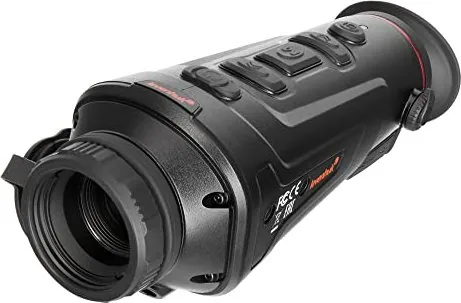
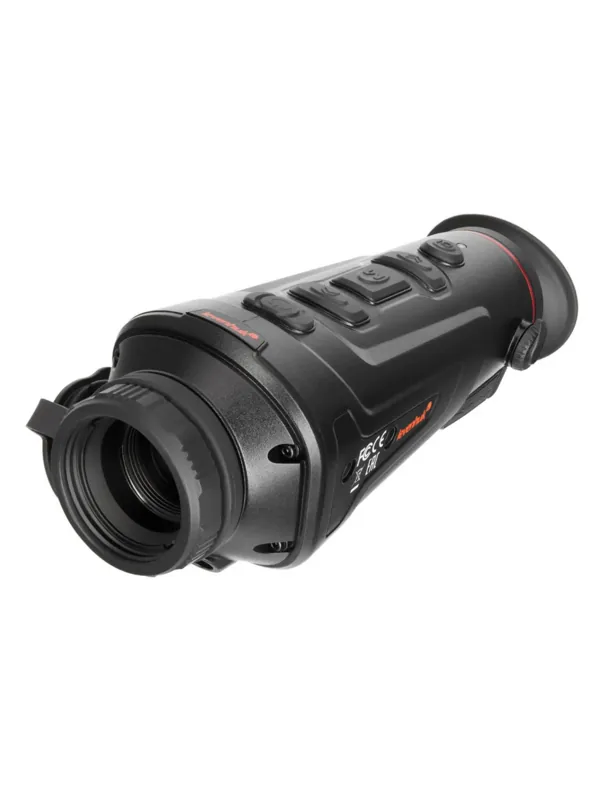
Levenhuk Fatum Z500 Manual
PDF manual · 37 Pages
English



Quick check
Incorrect answer, please try again.
Chat with your Levenhuk Fatum Z500 manual using AI
Get instant AI answers from your Levenhuk Fatum Z500 manual
Ask anything about the Levenhuk Fatum Z500. Answers come from this manual, with the pages they are based on.
Ask a Question
Do you recommend Fatum Z500?
Yes NoFrequently Asked Questions
Connect the power cable to the device and DC adapter via USB. Connect to AC power. Charge for at least four hours on the first use.
Is this answer helpful?
Download the TargetIR app from App Store or Google Play for remote control and Wi-Fi connectivity features.
Is this answer helpful?
Levenhuk products carry a two-year warranty against defects. Accessories are warranted for six months from purchase.
Is this answer helpful?
The device operates from minus ten to plus fifty degrees Celsius. Humidity range is ten to ninety-five percent.
Is this answer helpful?
IR resolution is 400x300 pixels. Display resolution is 1280x960 pixels on the FLCOS screen.
Is this answer helpful?
Press MENU plus DOWN buttons to toggle the laser indicator on or off. Do not look directly at the beam.
Is this answer helpful?
Yes. Use the Micro HDMI port to connect to an external monitor while keeping power connected simultaneously.
Is this answer helpful?
Advantages and Disadvantages
Advantages

- High resolution infrared sensor for clear images
- Built-in Wi-Fi for remote control via app
- Large 16GB internal memory for storage
- Long-lasting 6000mAh battery capacity
- Multiple color palettes for visibility
Disadvantages

- Manual focus only requires user skill
- Laser safety warning requires careful handling
- Voltage standards vary by region
- Digital zoom has limitations on quality
- No automatic image stabilization
Product Specification
Type
Monocular
Technology
Digital low-light, Thermal imaging
Magnification
1-7x
Entrance Pupil
0.98 inches
Viewing Range
1859.14 yards
Field of View
15.4 deg
Runtime
5 hours
Features
Tripod Mount Thread, Video Output, WiFi
Product Description
Exploring the Levenhuk Fatum Z500 Thermal Monocular
Unveiling Advanced Thermal Imaging Technology
The Levenhuk Fatum Z500 represents a significant step forward in personal thermal vision equipment. This handheld device allows users to see heat signatures in total darkness or low light conditions with precision. The core of this capability lies in its infrared resolution, which provides clear images regardless of ambient light levels. Whether you are hunting wild game, camping in remote areas, or inspecting property for heat leaks, understanding this Levenhuk Fatum Z500 Manual will help you maximize the potential of your investment.
Key Features and Specifications
Operating on a broad spectral range of eight to fourteen microns, the unit captures thermal data effectively in challenging environments. The IR resolution stands at 400 by 300 pixels, ensuring detailed imagery of moving targets. Users benefit from a built-in sixteen gigabyte memory to store valuable photos and videos locally. The device supports Wi-Fi connectivity, allowing remote control via the TargetIR app on smartphones and tablets. This feature is particularly useful for capturing images without physically being close to the subject.
Power and Usability Design
The unit is powered by two built-in 18650 batteries, totaling a capacity of 6000 mAh for extended field use. For new users, it is essential to charge the device for at least four hours before the first operation cycle begins. The operating temperature range spans from negative ten to positive fifty degrees Celsius. This robust build enables usage in various weather conditions including cold winters and hot summers. However, strict safety warnings are critical for all users. Never look directly at the sun or laser pointer through the optics to prevent permanent retinal damage and blindness.
Menu System and Control Buttons
Navigating the menu is straightforward using the dedicated physical buttons on the side of the housing. Users can switch between six different color palettes to suit their preference including black hot, white hot, and iron red options. Zoom functions allow both optical and digital enlargement of the image for closer inspection. A built-in laser indicator assists in ranging targets up to two hundred meters away accurately. Keeping this Levenhuk Fatum Z500 Manual close ensures proper operation and maintenance guidelines are followed at all times for longevity.
Connectivity and Storage Expansion
An HDMI port is available for connecting external monitors or screens for shared viewing experiences. This interface also allows simultaneous external power supply connection during use. Users can estimate distances to targets using the built-in ranging function with animal reference heights. The device features manual focus adjustment which requires user skill to align the image correctly. Regular maintenance extends the life of the instrument significantly over time. Avoid touching optical surfaces with fingers and keep the device away from water.
Care Instructions and Safety
Proper care instructions are vital for maintaining the device. Avoid touching optical surfaces with fingers and keep the device away from water and high humidity. The manufacturer includes a two-year warranty for defects in materials and workmanship. Remember to remove batteries if storing the device for extended periods to prevent leakage and corrosion. Automatic power off helps conserve energy after fifteen, thirty, or sixty minutes of inactivity. Dioptric adjustment allows users to customize focus for their eyesight ranging from negative four to positive two diopters.
Notes: Always observe local laws regarding thermal imaging use. The manufacturer reserves the right to change specifications without prior notice. Do not use in explosive environments.
Search for 67,706 Manuals online


Type-in Brand or Model