

Levenhuk Atom Digital DNM100 Manual
PDF manual · 30 Pages
English



Quick check
Incorrect answer, please try again.
Chat with your Levenhuk Atom Digital DNM100 manual using AI
Get instant AI answers from your Levenhuk Atom Digital DNM100 manual
Ask anything about the Levenhuk Atom Digital DNM100. Answers come from this manual, with the pages they are based on.
Atom Digital DNM100 Maintenance Schedule
Remove batteries first. Use only dry, lint-free cloths. Do not use cleaning fluids or touch optical surfaces with fingers.
Clean the battery contacts and those of the device prior to installing new batteries.
Remove batteries from the device if it has not been used for a long time to prevent leakage or damage.
Ask a Question
Do you recommend Atom Digital DNM100?
Yes NoFrequently Asked Questions
Connect the power cable to the device and the DC adapter via a USB plug, then connect to AC power supply. Note that computer USB ports do not provide sufficient voltage.
Is this answer helpful?
Yes, for color image recording. However, do not use IR illumination during the day as the image may appear monochromatic or color when IR is off, depending on settings.
Is this answer helpful?
You can observe targets up to 200 meters in complete darkness and 3 to 1000 meters in weak light conditions. The device supports a close focus distance of 10 meters to 32.8 feet.
Is this answer helpful?
The device supports memory cards class 10 up to 128GB. Users must purchase a compatible microSD card separately and format it before starting use for better compatibility.
Is this answer helpful?
No, do not scratch or touch optical surfaces with your fingers. Use only dry, lint-free cloths to wipe outer parts to avoid electronics damage and scratching lenses.
Is this answer helpful?
All Levenhuk telescopes and optics carry a lifetime warranty against defects in materials. Accessories are warranted for six months from the purchase date.
Is this answer helpful?
Yes, you can copy files by inserting the memory card into a card reader or connecting the device to a PC using a standard USB cable for data transfer.
Is this answer helpful?
Advantages and Disadvantages
Advantages

- Digital zoom up to 32x offers flexible magnification options.
- Lifetime warranty available on optical products for reliability.
- IR illumination allows night visibility up to two hundred meters.
- Records HD video and high res photos on microSD cards.
- Lightweight design ensures comfortable handling during long observation sessions.
Disadvantages

- Requires AC power adapter for charging as USB voltage is insufficient.
- Specific 16340 battery type needed for optimal performance and power.
- IR light disables color mode so night images appear black and white.
Product Specification
Type
Monocular
Technology
Low-light digital
Magnification
1-8x
Entrance Pupil
1.38 in
Viewing Range
656.17 ft
Field of View
10.4 deg
Minimum Focus Distance
32.81 ft
Battery Life
3 hours
Features
Tripod thread, Recording function, Wi-Fi
Dimensions
7.09x3.15x1.89 in (WxHxD)
Weight
9.24 oz
Product Description
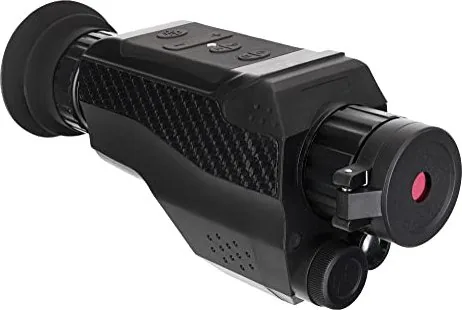
Levenhuk Atom Digital DNM100 Product Overview
Introduction to Night Vision
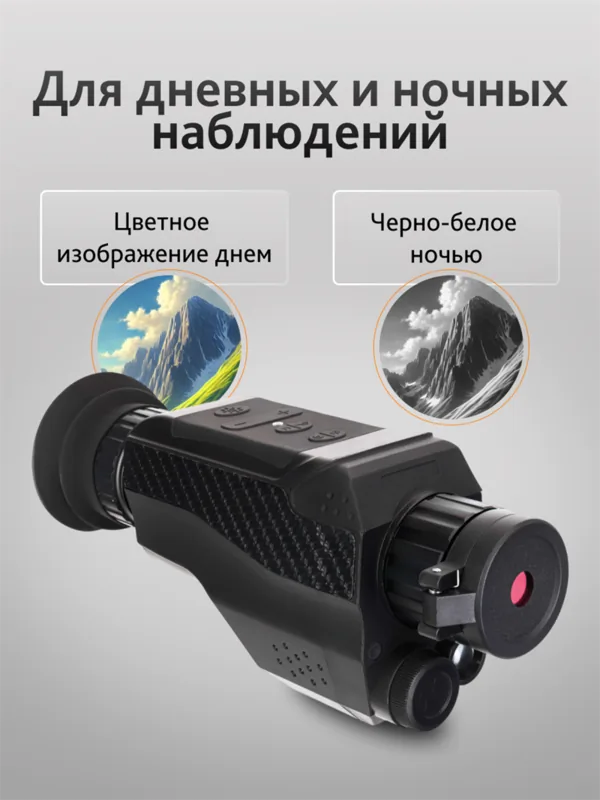
Discover unparalleled night vision with the Levenhuk Atom Digital DNM100. This advanced monocular transforms your nighttime exploration experience by utilizing technology designed for clarity and durability. Equipped with a powerful objective lens, users can observe distant targets up to one kilometer away in weak light conditions. The digital magnification ranges from one to eight times, while optical zoom provides a steady four times closer view without blur.
Recording your adventures is effortless with built-in capabilities to capture high-quality still images and videos. Photos reach high resolution in JPEG format, ensuring sharp detail for memory cards. Video recordings are stored in AVI format at a resolution of 1080p. You do not need to worry about power running out quickly because the device supports a 700 milliamp hour battery cell. Safety remains a top priority. Never look directly at the sun or lasers, as permanent retinal damage is possible. The infrared illumination feature allows visibility in pitch blackness up to two hundred meters. A red indicator light signals active infrared lighting above the screen. Users can customize settings like language and date through the intuitive menu system.
Connectivity is straightforward via USB or SD card slot. Transferring files to a smartphone or computer becomes seamless for sharing moments. Cleaning requires care; only use dry lint-free cloths to protect optical surfaces. Remove batteries during storage to prevent leakage. This instrument comes with a lifetime warranty against defects, guaranteeing long term reliability. Whether for wildlife observation or security patrol, the Atom Digital Monocular offers robust performance. It operates within a temperature range of minus twenty to sixty degrees.
Installation involves inserting the power cell correctly following polarity marks. Charging requires a DC adapter connected to AC power because computer USB ports lack sufficient voltage. Adjust focus by turning the focusing wheel until the image sharpens. The menu button allows switching between photo and video modes. Experience Starlight mode detects infrared light below 1200 nanometers. Keeps you undetected in specific conditions. If battery power drops below twenty five percent, maximum brightness levels adjust automatically. This intelligent feature protects the user from unexpected shutdowns in critical moments.
The lightweight design fits comfortably in hand during extended use. Tripod threads allow stable mounting on fixed positions for stationary observation tasks. Remember to format the memory card before starting to improve compatibility. Perfect for enthusiasts seeking high definition night vision without bulk. It meets rigorous quality standards established by Levenhuk. Protect your eyes and enjoy the clear views provided by this premium optical device.
Notes
- Do not look at sun directly
- Remove batteries for storage
- Use AC adapter for charging
- Format memory card before use
- Protect lens from scratches
Search for 67,706 Manuals online


Type-in Brand or Model