
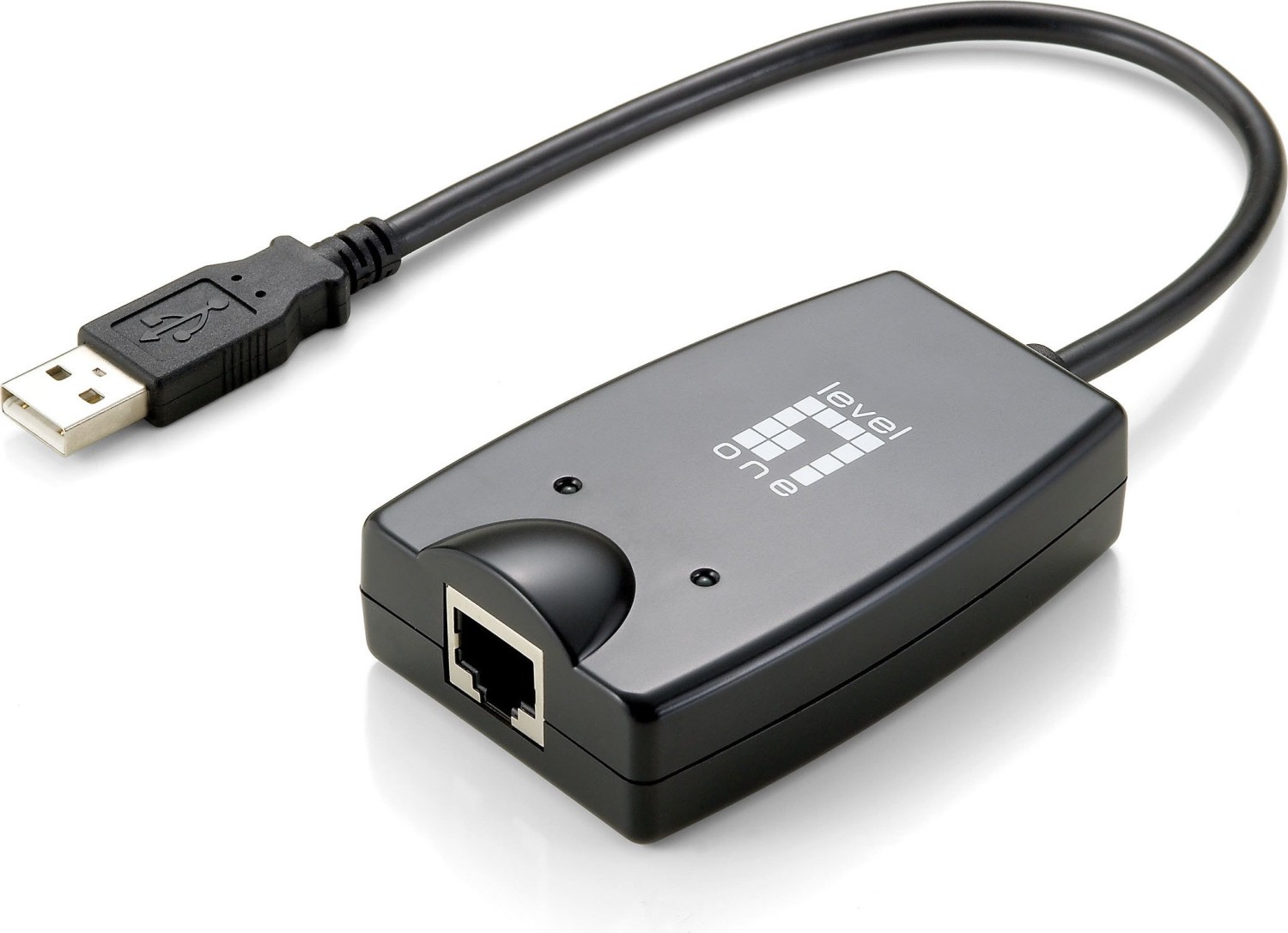
LevelOne USB-0401 Rev. 1 LAN adapter, RJ-45, USB-A 2.0 [plug] Manual
PDF manual · 16 Pages
English


Advantages and Disadvantages
Advantages

- Adds Gigabit Ethernet via a single USB-A 2.0 port without opening the PC
- Plug-and-play with hot swapping and Wake-on-LAN support
- Low power consumption suitable for laptops
- LED indicators for speed, link/activity and USB status
- Broad legacy OS driver support for Windows and Mac
Disadvantages

- USB 2.0 bandwidth may limit sustained gigabit throughput in some scenarios
- Bundled drivers target older OS versions; modern OS support may require downloads
- Requires an available USB-A port and a CD-ROM for bundled installer
- Physical size and cable can block adjacent USB ports on cramped systems
- No built-in advanced features like VLAN tagging or hardware offload
Ask a Question
Frequently Asked Questions
While the adapter supports 10/100/1000 Mbps on the Ethernet port, USB 2.0 has a theoretical limit (~480 Mbps) which can bottleneck sustained gigabit transfers. For many everyday tasks you’ll see significantly improved stability over Wi‑Fi, but true 1 Gbps throughput may be constrained by the USB interface.
Is this answer helpful?
The adapter ships with drivers for Windows 2000, XP, Vista and 7, and Mac OS 10.3/10.4 (32/64-bit and PowerPC). For modern OS versions, check LevelOne’s support site for updated drivers or rely on built-in OS drivers where available.
Is this answer helpful?
There are three LEDs: a 10/100/1000M LED (green for 100/1000 Mbps, off for 10 Mbps), a Link/Act LED (green for valid link, blinking for activity, off for no link), and a USB Link LED (green when the adapter has a valid USB connection).
Is this answer helpful?
Use Category 3/4/5 for 10BASE-T, Category 5 for 100BASE-TX, and Category 6 (or better) for reliable 1000BASE-T performance. Proper cabling ensures stable link negotiation at the intended speeds.
Is this answer helpful?
The device complies with CE, FCC and VCCI Class B electromagnetic emission standards. In residential settings it must not cause harmful interference; if interference occurs, the user may need to resolve it as required by FCC rules.
Is this answer helpful?
Yes. The adapter is USB‑bus powered and designed for low power consumption, making it suitable for laptops. However, very old or low‑power USB ports may limit performance or require a powered hub.
Is this answer helpful?
Yes, the LevelOne USB-0401 supports Wake-on-LAN, allowing compatible systems and drivers to wake the host over the network when configured properly in the OS and BIOS.
Is this answer helpful?
Product Description

LevelOne USB-0401 Rev. 1 LAN adapter — Compact USB-A 2.0 Gigabit Ethernet
The LevelOne USB-0401 Rev. 1 LAN adapter is a compact USB-A 2.0 to RJ-45 network adapter designed to bring wired Gigabit connectivity to laptops and desktops without opening the case. Supporting USB 1.0/1.1/2.0 and IEEE 802.3 standards, it delivers reliable 10/100/1000 Mbps connections with low power draw, making it especially useful for mobile users who need stable network access for file transfers, VoIP, streaming, or conference calls.
This plug-and-play adapter features LEDs for link speed, link/activity and USB connection status so you can quickly diagnose link conditions. It supports full and half duplex modes, IEEE 802.3x flow control, Wake-on-LAN and hot swapping for convenient deployment. The package typically includes the adapter, a driver & manual CD, and a quick installation guide.
Hardware-wise the USB-0401 uses a single USB-A port and one RJ-45 gigabit Ethernet port. It accepts UTP Category 3–6 cabling depending on the negotiated speed and reports activity through dedicated LEDs. System requirements are modest: a Pentium-class or better PC, an available USB port, and a CD-ROM drive for bundled drivers. Native driver support is provided for Windows 2000/XP/Vista/7 and Mac OS 10.3/10.4 (32/64-bit and PowerPC variants), with step-by-step installation via auto-install or the Found New Hardware wizard.
Installation is straightforward: plug the adapter into a USB port, connect an Ethernet cable to a switch or hub, and follow the OS-specific driver prompts. The adapter supports low-power USB bus operation and is CE/FCC/VCCI Class B certified for electromagnetic compatibility and emissions, ensuring suitability for both home and commercial environments when used per instructions.
Small and portable, the USB-0401 is ideal for users needing a dependable wired alternative to wireless networks, offering a simple way to add gigabit Ethernet to ultrabooks, older laptops, or systems lacking built-in NICs. Its LED indicators and broad compatibility make it a practical tool for IT technicians and end users alike.
Notes
- Choose cable categories per speed: Cat3/4/5 for 10BASE-T, Cat5 for 100BASE-TX, Cat6 for 1000BASE-T.
- Ensure drivers match your OS version; bundled CD contains installers for legacy systems.
- Device complies with FCC Part 15 and CE EMC requirements; operation may require interference correction in residential environments.
Search for 370 Manuals online


Type-in Brand or Model