
LevelOne GSW-1657/GSW-2457 Manual
PDF manual · 15 Pages
English



Quick check
Incorrect answer, please try again.
Chat with your LevelOne GSW-1657/GSW-2457 manual using AI
Get instant AI answers from your LevelOne GSW-1657/GSW-2457 manual
Ask anything about the LevelOne GSW-1657/GSW-2457. Answers come from this manual, with the pages they are based on.
Ask a Question
Do you recommend GSW-1657/GSW-2457?
Yes NoFrequently Asked Questions
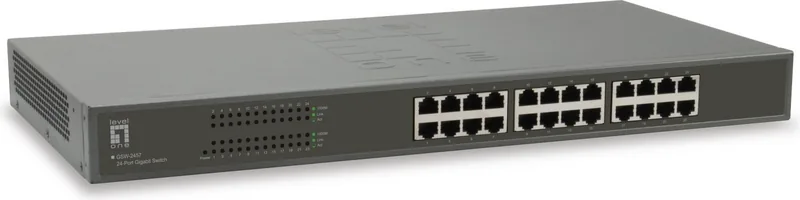
The GSW-2457 version is identified as a 24-port Gigabit switch with 24 RJ-45 Ethernet connections for compatible wired network devices.
Is this answer helpful?
Yes. The switch is designed for rack mounting and may also be installed on a flat surface when a rack setup is not needed.
Is this answer helpful?
A solid Link/Activity LED means the corresponding port has detected an active physical network connection.
Is this answer helpful?
A blinking Link/Activity LED indicates that the port is transmitting or receiving network data.
Is this answer helpful?
The installation information gives Cat-5e Ethernet cable as an example. Use appropriate Ethernet cabling for the connected devices and desired network performance.
Is this answer helpful?
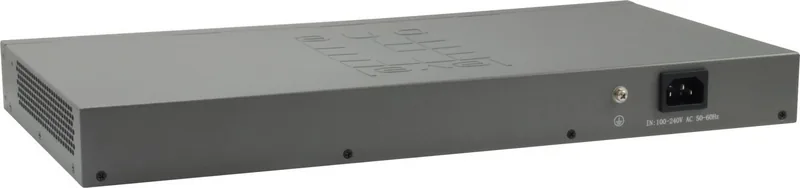
The switch supports an AC input range of 100-240V at 50/60Hz. Ensure the power connection is secure before connecting network equipment.
Is this answer helpful?
Advantages and Disadvantages
Advantages

- Twenty-four RJ-45 ports support centralized connections for numerous wired network devices.
- Rackmount design helps organize switch placement in network racks and equipment cabinets.
- Power and Link/Activity LEDs provide quick visibility into power, connection, and traffic status.
- Supports Ethernet connections using cables such as Cat-5e and accepts 100-240V, 50/60Hz AC input.
Disadvantages

- The provided details do not specify managed features, VLAN support, PoE, or advanced traffic controls.
- No port speed LEDs or detailed diagnostic indicators are described.
- Rack hardware and Ethernet cables are not confirmed as included.
- The installation information focuses on basic connectivity rather than advanced configuration options.
Product Specification
Function
Switch
Type
Standalone, rackmount (via mounting brackets)
Network ports
24x RJ-45
Speeds
24x RJ-45 (10/100/1000Base-T)
PoE
N/A
Backplane
48 Gb/s, 35.71 Mpps, 9 KB jumbo frames, 512 KB packet buffer, 8K MAC addresses
Officially supported standards
802.3, 802.3ab, 802.3az, 802.3u
Configuration
Unmanaged
Cooling
Passive
Dimensions (W x H x D)
17.32 x 1.73 x 8.66 in, 1U
Weight
4.41 lb
Color
Black
Special features
Metal housing, removable mounting brackets
Note
Various revisions available.
Product Description
LevelOne GSW Rackmount Gigabit Switch, 24x RJ-45 - Read, Download & Print Free
The LevelOne GSW Rackmount Gigabit Switch, 24x RJ-45 is designed to provide straightforward wired network expansion for offices, workgroups, retail locations, classrooms, and other environments that need many Ethernet connections in one central location. Its rackmount-ready design helps keep network equipment organized, while the 24 RJ-45 ports offer a practical foundation for connecting computers, printers, access points, servers, and other compatible network devices.
Simple Gigabit Network Connectivity
Gigabit Ethernet capability supports fast local data transfers between connected devices, making the switch a useful choice for everyday network traffic. Connect equipment using suitable Ethernet cables, such as Cat-5e, then power on the switch to begin building a dependable wired network. The installation approach is uncomplicated: connect the power supply, attach network devices, and check the front-panel indicators.
The switch can also be placed on a flat surface when rack installation is not required. This flexibility is useful for small network closets, temporary work areas, or environments where a standard equipment rack is unavailable. Its AC power input supports 100-240V at 50/60Hz, allowing it to fit a range of common power environments.
Clear Status Monitoring
Power and Link/Activity LEDs provide an immediate visual overview of operating status. The Power LED shows whether the unit is receiving power. For each Ethernet connection, a steady Link/Activity light indicates that a port is connected, while a blinking light shows that data is being transmitted or received. An unlit port indicator means that no network connection is detected.
These indicators make basic troubleshooting easier. If a connected device is not communicating, users can quickly check the cable, device connection, and port status before investigating more complex network settings. This practical feedback is especially valuable in installations with multiple endpoints.
Built for Organized Deployments
With 24 RJ-45 connections, this LevelOne switch helps reduce the need for multiple smaller switches and supports cleaner cable management in a centralized setup. It is suited to users who want a focused, wired networking solution without unnecessary complexity. Pair it with quality Ethernet cabling and compatible network devices to create a stable connection point for daily operations.
Note: Verify cable connections and power before use. A solid Link/Activity LED confirms a connected port, while blinking indicates active network traffic.
Search for 67,706 Manuals online


Type-in Brand or Model