
LevelOne FSW-1650/FSW-2450 Manual
PDF manual · 11 Pages
English



Quick check
Incorrect answer, please try again.
Chat with your LevelOne FSW-1650/FSW-2450 manual using AI
Get instant AI answers from your LevelOne FSW-1650/FSW-2450 manual
Ask anything about the LevelOne FSW-1650/FSW-2450. Answers come from this manual, with the pages they are based on.
Ask a Question
Do you recommend FSW-1650/FSW-2450?
Yes NoFrequently Asked Questions
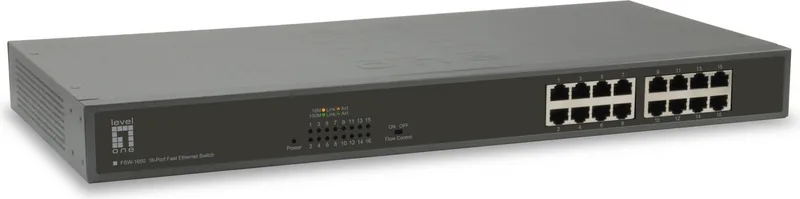
The FSW-1650 provides 16 RJ-45 Ethernet ports for connecting wired network devices.
Is this answer helpful?
Yes. The product is designed for rackmount installation and can also be placed on a flat surface.
Is this answer helpful?
A steady Link/Act LED indicates that a port is connected. A blinking LED indicates data is being transmitted or received. An unlit LED means the port is not connected.
Is this answer helpful?
Ethernet cables such as Cat-5e can be used to connect network devices to the switch.
Is this answer helpful?
The DIP switch enables or disables flow control. This function can help regulate traffic handling between connected devices during network activity.
Is this answer helpful?
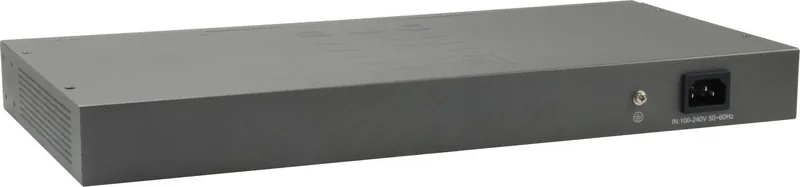
The listed power input is AC 100-240V at 50/60Hz, allowing use with compatible mains power in many regions.
Is this answer helpful?
Advantages and Disadvantages
Advantages

- 16 RJ-45 Gigabit ports support centralized connections for multiple wired devices.
- Rackmount and flat-surface installation options support flexible placement.
- Power and Link/Act LEDs provide quick visibility into power, connections, and traffic.
- DIP-switch flow control can be enabled or disabled without software setup.
Disadvantages

- The supplied information does not describe advanced management, VLAN, or monitoring features.
- The 16-port layout may be limiting for networks that need more endpoint connections.
- Flow control is controlled through a physical DIP switch rather than a remote interface.
- Installation depends on a suitable AC power connection and compatible Ethernet cabling.
Product Specification
Function
Switch
Type
Standalone, rackmount (via mounting brackets)
Network ports
16x RJ-45
Speeds
16x RJ-45 (10/100Base-T)
PoE
N/A
Backplane
3.2 Gb/s, 2.3 Mpps, 2 KB jumbo frames, 8K MAC addresses
Officially supported standards
802.3, 802.3az, 802.3u
Configuration
Unmanaged
Cooling
Passive
Dimensions (W x H x D)
17.32 x 1.73 x 8.19 in, 1U
Color
Black
Special features
Metal housing, removable mounting brackets
Note
Various revisions available.
Product Description
LevelOne FSW Rackmount Switch, 16x RJ-45 - Read, Download & Print Free
The LevelOne FSW Rackmount Switch, 16x RJ-45 is a practical Gigabit networking solution for offices, workgroups, classrooms, and other environments that need to connect many wired devices through one central switch. Its 16 Ethernet ports provide room for computers, printers, access points, servers, IP phones, and other compatible network equipment while helping keep cabling organized.
Built for straightforward network expansion
Designed for simple deployment, this switch can be installed in a rack or placed on a flat surface. The rackmount format is especially useful in equipment cabinets where network hardware needs a tidy, professional layout. After connecting the power supply, devices can be linked to the switch with Ethernet cabling such as Cat-5e, making it suitable for quick wired network expansion without complex setup steps.
Each connected device uses an RJ-45 port, giving users a familiar and flexible way to build a local network. Gigabit switching supports fast wired connections for everyday business traffic, shared resources, file transfers, and networked peripherals. The 16-port layout can help reduce dependence on smaller switches and provides a consolidated connection point for multiple endpoints.
Clear visual status monitoring
Front-panel LED indicators make routine checks easier. The Power LED shows whether the switch is receiving power. Link/Act indicators show when a port has an active connection, blink during data transmission or reception, and remain off when no device is connected. These indicators provide an immediate visual reference when checking cables, ports, or device connectivity.
A dedicated DIP switch controls flow control. When enabled, flow control can help manage traffic between connected devices during busy network activity. Users can switch this function on or off according to the needs of their network environment, adding a useful level of operational flexibility without requiring software configuration.
A sensible choice for wired infrastructure
The LevelOne FSW Rackmount Switch, 16x RJ-45 is suited to users who value a direct, hardware-focused approach to networking. Its combination of multiple Gigabit ports, rackmount capability, simple Ethernet connections, status LEDs, and flow-control selection makes it a useful foundation for organized wired connectivity.
Notes
- Use suitable Ethernet cables, such as Cat-5e, for device connections.
- Confirm that the power adapter is securely connected before installation.
- Check Link/Act LEDs after connecting equipment to verify port activity.
- The related product family also includes a 24-port model for larger wired deployments.
Search for 67,732 Manuals online


Type-in Brand or Model