
Lenovo ThinkStation P7 Manual
PDF manual · 84 Pages
English


Quick check
Incorrect answer, please try again.
Chat with your Lenovo ThinkStation P7 manual using AI
Get instant AI answers from your Lenovo ThinkStation P7 manual
Ask anything about the Lenovo ThinkStation P7. Answers come from this manual, with the pages they are based on.
Ask a Question
Do you recommend ThinkStation P7?
Yes NoFrequently Asked Questions
The ThinkStation P7 supports up to eight DDR5 ECC RDIMM slots with a maximum capacity up to 2 TB, depending on available memory module densities and the installed processor/memory configuration.
Is this answer helpful?
The P7 supports multiple storage types: 3.5-inch hard drives, M.2 NVMe SSDs (horizontal and vertical slots), and E1.S drives in compatible flex modules. A flex bay and internal storage bays allow various combinations for capacity and performance.
Is this answer helpful?
Security options include power-on, supervisor, hard-disk, and system-management passwords in UEFI BIOS, certificate-based BIOS authentication (password-less management), Intel BIOS Guard, secure wipe for drives, and the cover presence tamper detection feature.
Is this answer helpful?
Yes — RAID can be configured using AVAGO MegaRAID Configuration Utility when an appropriate MegaRAID adapter is installed. Supported RAID levels include RAID 0, 1, 10, and on selected adapters RAID 5 and RAID 6; requirements vary by adapter and number of drives.
Is this answer helpful?
Lenovo preloads the Vantage app for system health, updates, and diagnostics. ThinkStation Diagnostics and a front-panel diagnostic LCD (on supported models) provide error codes and QR decoding; BIOS event logs and detailed UEFI diagnostics are also available.
Is this answer helpful?
Connectivity includes multiple USB-A and USB-C ports (including USB-C 3.2 Gen2/Gen2x2 or Thunderbolt on select models), Always-On USB charging, 10 Gb and 1 Gb Ethernet (model-dependent), Wi‑Fi and Bluetooth on select configurations, and standard audio/legacy ports.
Is this answer helpful?
The P7 is designed with many Customer Replaceable Units (CRUs) — fans, drives, memory, power supplies, flex modules, and more. Lenovo provides procedures and part lists; some replacements require moderate technical skill despite CRU designation.
Is this answer helpful?
Advantages and Disadvantages
Advantages

- High memory capacity (up to 2 TB DDR5 ECC RDIMMs) for large datasets and heavy multitasking.
- Extensive expandability with multiple PCIe slots, NVLink support, flex bay modules, and varied storage options (M.2, E1.S, 3.5-inch).
- Robust security and manageability: UEFI BIOS passwords, certificate-based BIOS management, Intel BIOS Guard, secure wipe, and Smart USB Protection.
- Strong reliability and serviceability with numerous CRUs, clear replacement procedures, diagnostic LCD, and Lenovo Diagnostics/Vantage integration.
- Multiple high-speed I/O options including USB-C (3.2/Thunderbolt), Always-On USB, and 10 Gb Ethernet on supported models.
Disadvantages

- High power and cooling requirements — system can be heavy and requires significant space and ventilation.
- Complex configuration options mean some features vary by model; buyers must verify exact specs for needed capabilities.
- Large, high-end configurations are expensive and geared toward professional budgets rather than casual users.
- Service and CRU replacement may require technical skill for some components despite CRU labeling.
- Certain RAID levels and features depend on specific adapter models and may not be universally available.
Product Specification
SSD
1TB M.2 PCIe 4.0 x4 (2280)
HDD
N/A
Flash
N/A
Rear Ports
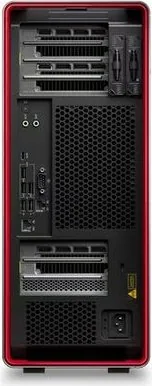
1x USB-C 3.2 (20Gb/s), 3x USB-A 3.1 (10Gb/s), 4x USB-A 2.0 (480Mb/s), 2x 3.5mm Jack, 1x RJ-45 1Gb LAN (Intel I219-LM), 1x RJ-45 10Gb LAN (Marvell AQtion AQC113CS), 1x AC-In C13 (Power Connector)
Front/Side Ports
2x USB-C 3.1 (10Gb/s), 2x USB-A 3.1 (10Gb/s), 1x 3.5mm Jack, 1x SD Card
Optical Drive
N/A
Camera
N/A
Operating System
Windows 11 Pro for Workstations
Dimensions
6.89x17.34x20.00in (WxHxD)
Weight
54.01lb
Volume
10.36gal (calculated)
Special Features
Security Lock (Kensington Security Slot), EPEAT Gold, incl. Mouse, incl. Keyboard
Color
black
Warranty
three Years (On-Site)
Note
Also suitable as a slot-in module for Lenovo ThinkCentre Tiny-in-One displays.
USB Naming Convention
Link
Product Description
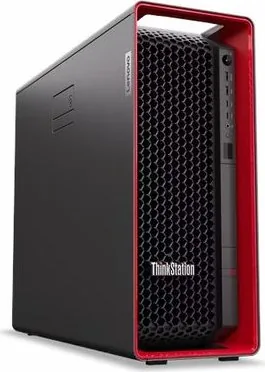
Lenovo ThinkStation P7 — Powerful Workstation for Demanding Tasks
The Lenovo ThinkStation P7 stands as a high-end desktop workstation engineered for professionals who need uncompromising performance, expandability, and reliability. Built around workstation-grade Intel Xeon and high-end Core processors, the system supports up to eight DDR5 ECC RDIMMs for up to 2 TB of memory, multiple PCIe slots for GPUs and accelerators, and flexible storage options including M.2, E1.S and 3.5-inch drives. With 1000 W or 1400 W efficient power supply choices, the P7 is designed to drive intensive compute, rendering, simulation, and data-analysis workloads while maintaining stable operation in professional environments.
Performance and expandability
The P7 targets professionals who run CAD, 3D rendering, scientific computing, and media production. It provides multiple PCIe x16/x8/x4 slots and support for advanced GPU configurations, NVLink bridges, and AVAGO MegaRAID controllers for RAID arrays (RAID 0/1/5/6/10 depending on the adapter). Storage is highly configurable with horizontal and vertical M.2 slots, internal bays, a flex bay with modular options, and optional E1.S drives for high-capacity, high-performance NVMe storage.
Security and manageability
Lenovo equips the ThinkStation P7 with comprehensive security features: UEFI BIOS with supervisor/power-on/hard-disk passwords, certificate-based BIOS management for password-less admin workflows, Intel BIOS Guard, Secure Wipe tools, Smart USB Protection to restrict USB write access, and Absolute Persistence support. Hardware tamper detection (cover presence switch) and physical lock options add another layer of protection for sensitive environments.
Reliability and serviceability
Serviceability is a key design goal: a broad CRU (Customer Replaceable Unit) list includes fans, drives, power supplies, flex modules, and more; detailed replacement procedures and clear internal layout make maintenance straightforward for trained technicians. Diagnostic features include a front-panel diagnostic LCD with QR-coded error decoding and UEFI/ThinkStation Diagnostics tools for troubleshooting.
Workflow and software support
The preinstalled Lenovo Vantage app centralizes system health, updates (UEFI BIOS, firmware, drivers), diagnostics, and warranty lookups. Connectivity options include multiple USB-A and USB-C ports (including USB-C 3.2 Gen2x2 / Thunderbolt variants on supported models), 10 Gb and 1 Gb Ethernet, Wi‑Fi and Bluetooth on select configurations, and various audio and legacy connectors.
Notes:
- Designed for professional use: heavy workloads, long runtimes, and complex GPUs.
- Flexible storage and RAID options allow balancing speed vs. redundancy.
- Many features vary by model; check exact configuration when purchasing.
Search for 67,706 Manuals online


Type-in Brand or Model