
Lenovo ThinkStation P360 Tiny Manual
PDF manual · 64 Pages
English


Quick check
Incorrect answer, please try again.
Chat with your Lenovo ThinkStation P360 Tiny manual using AI
Get instant AI answers from your Lenovo ThinkStation P360 Tiny manual
Ask anything about the Lenovo ThinkStation P360 Tiny. Answers come from this manual, with the pages they are based on.
Ask a Question
Do you recommend ThinkStation P360 Tiny?
Yes NoFrequently Asked Questions
It supports up to 64 GB using two DDR5 SODIMM slots for maximum capacity.
Is this answer helpful?
Yes, navigate to the Startup menu in UEFI BIOS to adjust boot priority.
Is this answer helpful?
Wireless LAN modules are available on selected models with optional antenna slots.
Is this answer helpful?
Move the jumper to the maintenance position after unplugging all power cables temporarily.
Is this answer helpful?
Yes, configure NVMe RAID via the BIOS Setup Utility for better data redundancy.
Is this answer helpful?
Start, Admin, Hard Disk, and System Management passwords are supported in BIOS.
Is this answer helpful?
Advantages and Disadvantages
Advantages

- Compact form factor saves significant desk space while delivering workstation power.
- Dual M.2 SSD support enables very fast storage speeds and high redundancy.
- Comprehensive security tools like BIOS Guard protect data and firmware integrity.
- Easy access to replaceable parts simplifies routine maintenance and upgrades.
- Supports DDR5 memory for high performance multitasking and large datasets.
Disadvantages

- Limited storage bays compared to larger full tower desktop computer cases.
- Battery replacement requires partial disassembly of the main protective case.
- Proprietary connectors may restrict certain third-party upgrade option purchases.
- Some wireless antenna options require careful installation to avoid interference.
- Noise levels may increase noticeably in full speed cooling modes used.
Product Specification
HDD
N/A
Flash
N/A
Rear Ports
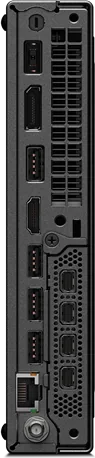
2x USB-A 3.1 (10Gb/s), 2x USB-A 3.0 (5Gb/s), 1x HDMI 2.1, 1x DisplayPort 1.4, 1x RJ-45 1Gb LAN (Intel I219-LM), 1x DC-In Lenovo Slim Tip (AC Power)
Optical Drive
N/A
Camera
N/A
Dimensions
1.46 x 7.05 x 7.17 in (WxHxD)
Weight
3.09 lb
Volume
1.27 qt (calculated)
Features
Security Lock (Kensington Security Slot), EPEAT Gold, includes mouse, includes keyboard
Color
Black
Warranty
Three years (Bring-In)
Note
Also suitable as Slot-In module for Lenovo ThinkCentre Tiny-in-One displays.
USB Designation
Link
Product Description
Lenovo ThinkStation P360 Tiny Overview
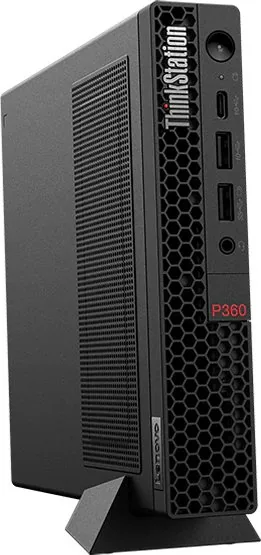
The Lenovo ThinkStation P360 Tiny Manual confirms this machine offers powerful compact performance. Many users seek small form factor PCs that do not compromise on workstation capabilities. This system integrates robust internal architecture within a slim chassis measuring under forty centimeters in height. Processing power comes from compatible Intel Core microprocessors designed for demanding applications. Multitasking efficiency is boosted by support for high-speed DDR5 memory modules up to sixty-four gigabytes total capacity. Data retention benefits from multiple M.2 Solid State Drive bays enabling fast boot times and retrieval speeds.
Reliability and Design
Engineers prioritized durability in the casing and component layout. Serviceability remains simple for technicians needing to swap out aging parts. Customer Replaceable Units allow quick access to common hardware failures like fans or batteries. Security protocols prevent unauthorized physical or digital access through advanced encryption methods. Features include Smart USB Protection to block data theft and BIOS Guard against malware injection. The Intelligent Cooling System adjusts fan speeds to maintain optimal thermal conditions silently.
Connectivity Features
External connection options accommodate various peripherals and displays efficiently. Multiple USB ports including Gen 2 and Type C facilitate rapid data exchange with accessories. Video output relies on DisplayPort and HDMI standards for versatile monitor arrangements. Network stability is ensured via integrated Gigabit Ethernet or optional wireless modules. Power delivery adapts to workload peaks using efficient switching supplies rated at appropriate wattages. Users can configure boot priorities to prioritize network drives or external media during recovery operations.
Maintenance Guidelines
Regular upkeep keeps the machine running smoothly over years of daily operation. Diagnostic tools help identify failing components before complete system failure occurs. Firmware updates patch vulnerabilities and improve hardware compatibility continuously. Reset procedures restore default settings if configuration errors arise unexpectedly. Support channels provide assistance through phone lines or online portals registered to valid warranties. Tracking serial numbers aids in verifying eligibility for extended service coverage programs globally.
Advanced Configuration
Configuring Redundant Array of Independent Disks improves data safety significantly against hardware failure events. Setting Secure Boot options ensures the operating system starts only from trusted sources. Language selections within the firmware menu aid multinational teams in standardizing workflows easily. Users can enable automatic power-on functions for remote wake up scenarios across networks. Recovery processes restore functionality after failed updates through dedicated jumpers.
Conclusion
Ultimately this device serves well in office environments where space savings matter most. Reference material like the Lenovo ThinkStation P360 Tiny Manual ensures correct setup procedures are followed. Compatibility lists verify peripheral integration before purchase decisions are finalized. Performance metrics meet enterprise requirements for stable compute loads without excessive energy draw. Investing in this unit promises long-term productivity gains through reliable hardware foundations maintained by effective cooling strategies.
Search for 67,706 Manuals online


Type-in Brand or Model