
Lenovo ThinkStation P350 Tower Manual
PDF manual · 90 Pages
English


Quick check
Incorrect answer, please try again.
Chat with your Lenovo ThinkStation P350 Tower manual using AI
Get instant AI answers from your Lenovo ThinkStation P350 Tower manual
Ask anything about the Lenovo ThinkStation P350 Tower. Answers come from this manual, with the pages they are based on.
Ask a Question
Do you recommend ThinkStation P350 Tower?
Yes NoFrequently Asked Questions
The P350 supports up to four DDR4 UDIMM modules with a maximum capacity of 128 GB. It accepts DDR4 ECC UDIMMs on supported processor platforms and non‑ECC UDIMMs on others; actual speed and compatibility depend on the installed processor and memory configuration.
Is this answer helpful?
Storage includes 2.5-inch and 3.5-inch drive bays plus up to two M.2 NVMe slots. Intel Rapid Storage Technology supports RAID 0 (striping) and RAID 1 (mirroring) for selected SATA drives; creating or deleting RAID volumes in UEFI will erase existing data on the selected drives.
Is this answer helpful?
You can update BIOS via Lenovo Vantage or download the flash package from Lenovo Support. For recovery, use a BIOS recovery disc or built-in recovery jumper procedure: move the Clear CMOS/Recovery jumper to maintenance, run the recovery media, then restore the jumper to its standard position and verify BIOS settings.
Is this answer helpful?
The P350 includes UEFI BIOS passwords (power-on, supervisor, disk), Smart USB Protection modes to limit USB storage access, Intel BIOS Guard for BIOS integrity, cover presence switch and E‑Lock for tamper protection, and optional Computrace agent for asset tracking and recovery.
Is this answer helpful?
Yes—when specific requirements are met: SATA 4 hot-plug support must be enabled in BIOS, the enclosure’s SATA cable must be connected to SATA4 on the board, and the OS must not reside on that drive. If requirements aren’t met, do not hot-swap while powered.
Is this answer helpful?
Lenovo Vantage offers updates, diagnostics, and device health monitoring. Additional diagnostic tools and support materials (drivers, manuals, troubleshooting) are available at Lenovo’s support website. CRU lists and step‑by‑step replacement instructions are provided for common serviceable parts.
Is this answer helpful?
UEFI BIOS offers ITS performance mode settings: Balance, Performance (default), and Full Speed. These modes change fan behavior to prioritize quieter operation, balanced cooling, or maximum cooling performance, respectively. Choose based on workload and noise tolerance.
Is this answer helpful?
Advantages and Disadvantages
Advantages

- Highly serviceable chassis with multiple CRUs for easy upgrades and repairs.
- Flexible storage: multiple 2.5/3.5 bays plus dual M.2 slots and RAID support.
- Robust security: UEFI passwords, Smart USB Protection, Intel BIOS Guard, and cover tamper detection.
- Good expansion: full-size PCIe x16 and additional PCIe slots for GPUs and accelerators.
- Lenovo Vantage and diagnostic tools centralize updates, health checks, and support.
Disadvantages

- Feature set varies by model—Wi‑Fi, optical drive, and some ports may be optional.
- Chassis size and weight can be limiting in space-constrained environments.
- Thermal tuning to full performance may increase acoustic noise levels.
- Secure-wipe and BIOS operations are technical and risk data loss if misused.
- ECC memory support depends on CPU choice; some Core CPU models do not support ECC.
Product Specification
Form factor
Tower
HDD
N/A
Flash
N/A
Rear ports
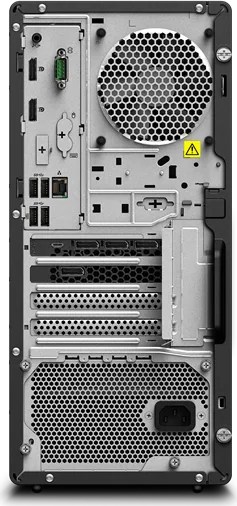
4x USB-A 3.0 (5Gb/s), 2x DisplayPort, 1x 0.14in jack, 1x RJ-45 1Gb LAN (Intel I219-LM), 1x serial, 1x AC-In C13 (power connection)
Camera
N/A
Dimensions
6.69x14.80x12.40in (WxHxD)
Weight
20.72lb
Volume
5.31 gal (calculated)
Color
black
Warranty
three years (Bring-In)
USB notation
Link
Product Description
Lenovo ThinkStation P350 Tower Manual — Overview and Practical Guide
The Lenovo ThinkStation P350 Tower embodies a professional-grade desktop built for reliability, expandability, and secure enterprise use. Designed to support a wide range of workflows from CAD and content creation to data analysis, this tower emphasizes serviceability and controlled performance. Its compact tower chassis houses flexible storage options, multiple PCIe slots, and support for both integrated and discrete graphics, making it a versatile workstation for demanding applications.
Key hardware and design highlights
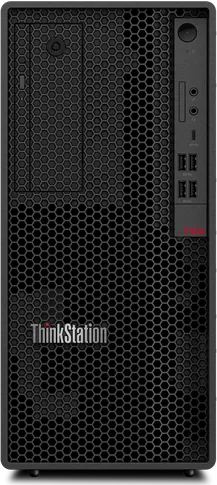
The P350 Tower offers a choice of 500 W or 750 W automatic voltage-sensing power supplies, multiple drive bays (2.5-inch, 3.5-inch, and M.2 slots), and up to 128 GB of DDR4 memory across four UDIMM slots. Its rear and front I/O include USB 3.2 Gen1/Gen2 ports, USB-C (3.2 Gen2) charging, DisplayPort outputs, Ethernet, and optional Wi‑Fi/Bluetooth on selected models. The internal layout is optimized for serviceability: a tool-less cover, clearly labelled connectors, smart cable clip options, and an accessible CRU (Customer Replaceable Unit) design support in-field upgrades and maintenance.
Performance and expandability
The workstation supports modern Intel processors and offers multiple PCIe expansion slots for GPUs and accelerators, plus M.2 Gen3/Gen4 support for fast NVMe storage. RAID configurations (RAID 0/1 via Intel RST) are supported to meet performance or redundancy needs. Thermal and acoustic behavior can be tuned through ITS performance modes—Balance, Performance, or Full Speed—to match workload and noise requirements.
Security and management features
A broad set of security capabilities are included: UEFI BIOS password controls (power-on, supervisor, disk), Smart USB Protection (Disabled / Read Only / No Access), Intel BIOS Guard, cover presence switch, E‑Lock, and support for Computrace agent on selected models. BIOS-level tools allow secure wipe of drives, BIOS updates and recovery methods, and configuration-change detection to guard against tampering.
Usability and support
Lenovo Vantage provides firmware, driver, and BIOS updates, health monitoring, and diagnostics. The system integrates with Lenovo diagnostic tools and offers clear guidance for CRU replacement—front/rear fans, M.2 drives, storage cages, power supplies, and more—facilitating quick repairs and upgrades. Documentation and support resources are accessible via Lenovo’s support site.
Notes
- Models vary: certain ports, drives, and features (Wi‑Fi, optical drive, specific connectors) are model-dependent.
- Always back up data before performing RAID, drive replacements, or secure wipes.
- Follow safety notices and ESD precautions when servicing internal components.
Search for 67,706 Manuals online


Type-in Brand or Model