
Lenovo ThinkPad OneLink+ Dock 40A4 Manual
PDF manual · 48 Pages
English


Quick check
Incorrect answer, please try again.
Chat with your Lenovo ThinkPad OneLink+ Dock 40A4 manual using AI
Get instant AI answers from your Lenovo ThinkPad OneLink+ Dock 40A4 manual
Ask anything about the Lenovo ThinkPad OneLink+ Dock 40A4. Answers come from this manual, with the pages they are based on.
Ask a Question
Do you recommend ThinkPad OneLink+ Dock 40A4?
Yes No
Lukas Schmidt
9 months ago
Will this dock work plug-and-play with a Lenovo IdeaPad V510-15IKB on Fedora, or do I need extra drivers/configuration?

Manual.ly
9 months ago
From user reports, it can work without extra setup on Fedora with the Lenovo IdeaPad V510-15IKB. In general, a dock should support your kernel and USB/Video output via standard system drivers. To be safe, verify the dock model is compatible with your ports (USB-C/Thunderbolt and display type) and that your Fedora version is reasonably up to date. If you do not get display or networking immediately, try unplugging/replugging the dock, restarting the display service, or rebooting once after connecting. If issues persist, contact support with your exact dock model, Fedora version, and laptop port type so we can confirm compatibility.
Frequently Asked Questions
The Lenovo OneLink+ Dock supports Microsoft Windows 7, Windows 8.1, and Windows 10. Users can install drivers via the Lenovo System Update tool or download them from the support website to ensure compatibility.
Is this answer helpful?
Yes, the dedicated USB 3.0 port with charging function works even if the notebook is shut down, in standby, or disconnected from the laptop power source, allowing convenient accessory charging.
Is this answer helpful?
You can use up to three external displays simultaneously. This configuration typically involves connecting two DisplayPort monitors and one VGA monitor to maximize workspace efficiency.
Is this answer helpful?
Drivers are usually pre-installed. However, using the Lenovo System Update application ensures you have the latest firmware and driver versions for the best performance and stability during operation.
Is this answer helpful?
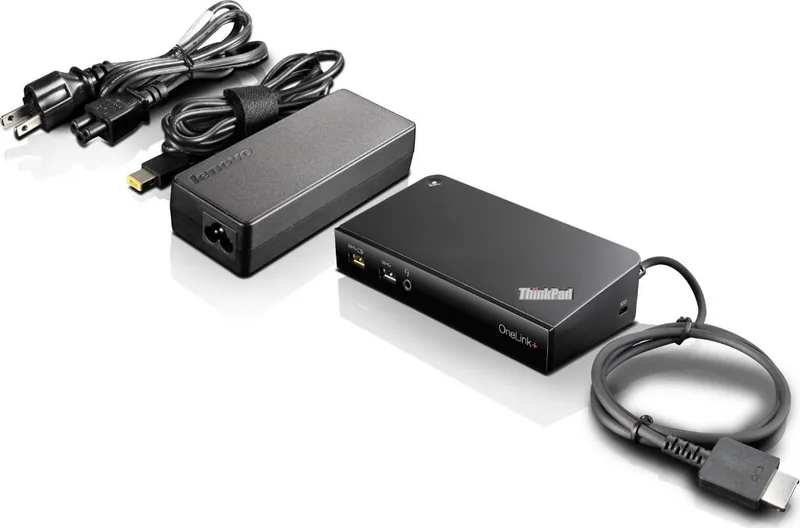
The package contains the ThinkPad OneLink+ Dock, a power supply unit, a power cord, and a guarantee poster. A security slot is built-in for locking the device to a surface.
Is this answer helpful?
Yes, the dock allows you to change the display orientation on the external screen including landscape, portrait, and rotated versions via standard system display settings to fit user needs.
Is this answer helpful?
Advantages and Disadvantages
Advantages

- USB charging port enables device power even when laptop is off or disconnected.
- Supports up to three external displays using DP and VGA for multitasking.
- Gigabit Ethernet ensures fast and stable network connections for productivity.
- Single OneLink+ simplifies setup and reduces cable clutter significantly.
- Compatible with Windows 7, 8.1, and 10 for broad system integration.
Disadvantages

- Requires a notebook with a specific OneLink+ port for direct connection.
- VGA output uses older technology compared to modern DisplayPort standards.
- Charging speed varies and may not fully power high-draw external devices.
- Some drivers require manual installation via System Update for stability.
- Security lock cable is not included in the standard package contents.
Product Specification
Compatibility
ThinkPad X1 Tablet, ThinkPad Yoga P40/14/260/460, X1 Yoga, X1 Carbon Gen 4
Ports
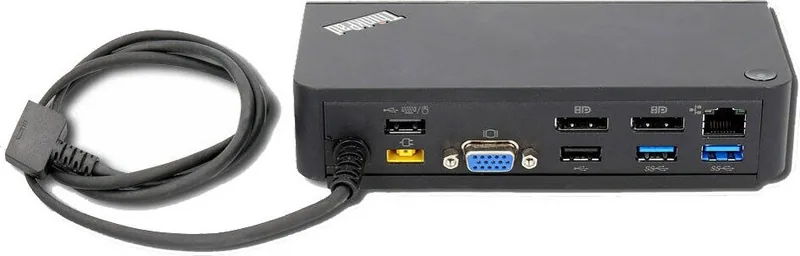
4x USB 3.0, 2x USB 2.0, 1x Gb LAN, 2x DisplayPort 1.2, VGA, 1x Jack
Power Supply
90W, External
Features
Security Lock (Kensington)
Product Description
Unlocking Full Potential with the Lenovo OneLink+ Dock (40A4)
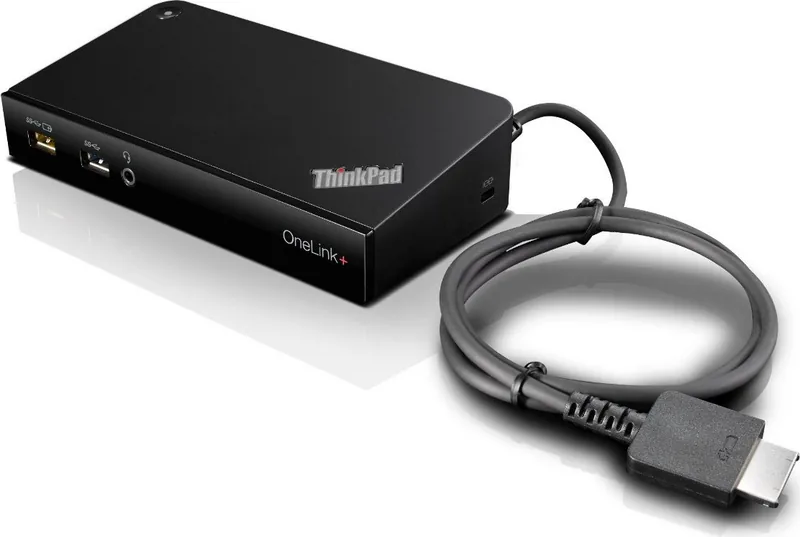
The Lenovo OneLink+ Dock (40A4) is designed to transform your mobile workstation into a powerful desktop environment with minimal effort. This compact expansion module simplifies connectivity, allowing you to connect your ThinkPad notebook to essential peripherals using a single OneLink+ cable. Whether you are managing complex data projects or participating in multi-screen video conferences, this dock provides the stability and speed required for professional tasks.
Comprehensive Connectivity Options
Equipped with a robust array of ports, the OneLink+ Dock ensures that you never run out of connections. It features four USB 3.0 ports for high-bandwidth data transfer, two USB 2.0 ports for legacy devices, and a dedicated USB 3.0 port with charging functionality. This charging feature is particularly useful, enabling you to power your devices like smartphones or tablets even when the notebook is in standby mode. For audio needs, a combined headset and microphone jack is available, streamlining your communication setup. The inclusion of a security slot allows users to lock the device to a desk for added physical security.
Advanced Video Support
Visual productivity is a key focus of this equipment. The dock supports Dual DP and VGA outputs, allowing you to connect multiple monitors simultaneously. You can choose between different video modes including Extended, Mirrored, and Single Screen configurations. The system supports up to three external displays at once, accommodating high resolutions up to 3840x2160 depending on the connection used. This flexibility ensures that your workflow adapts to your specific visual requirements.
Reliable Network Performance
Keeping your workflow uninterrupted is crucial. The integrated Gigabit Ethernet port provides a fast and stable network connection, supporting ThinkVantage Access Connections for seamless integration into corporate networks. Unlike Wi-Fi, this wired connection offers consistent speeds ideal for large file transfers and video streaming. This reliability is essential for modern work environments.
Installation and Support
Setting up the dock is straightforward on Windows 7, 8.1, and 10 operating systems. While drivers are often pre-installed, Lenovo recommends using the System Update utility to ensure you have the latest firmware for optimal performance. Package contents include the dock unit, power supply, power cord, and guarantee posters. If issues arise, the built-in troubleshooting section helps resolve common connectivity or audio problems quickly. This dock serves as a reliable bridge between your mobile device and your stationary office needs.
Search for 67,732 Manuals online


Type-in Brand or Model
Juliane Kowalski
7 months ago
Does this docking station work with Linux distributions such as Fedora on Lenovo laptops?
Manual.ly
7 months ago
Based on verified user experiences, this docking station is compatible with Fedora Linux on Lenovo IdeaPad models. It functions without additional driver installation or configuration steps. Users report it works seamlessly for standard peripheral connectivity.