
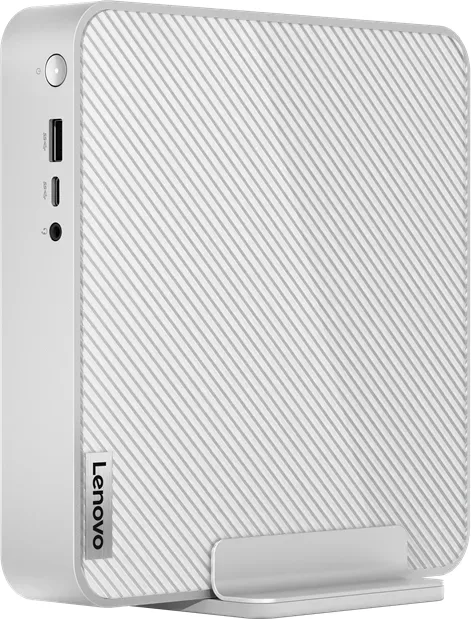
Lenovo IdeaCentre Mini 01IRH8 Manual
PDF manual · 36 Pages
English


Quick check
Incorrect answer, please try again.
Chat with your Lenovo IdeaCentre Mini 01IRH8 manual using AI
Get instant AI answers from your Lenovo IdeaCentre Mini 01IRH8 manual
Ask anything about the Lenovo IdeaCentre Mini 01IRH8. Answers come from this manual, with the pages they are based on.
Ask a Question
Do you recommend IdeaCentre Mini 01IRH8?
Yes NoFrequently Asked Questions
You can connect an external monitor using the HDMI 2.1, DisplayPort 1.4, or the USB-C/Thunderbolt 4 ports located on the back of the unit. For wireless setups, ensure both devices support Miracast and press Windows plus K keys.
Is this answer helpful?
Yes, the device supports Customer Replaceable Units. You can add up to two DDR4 SODIMMs for memory and install M.2 Solid-State Drives. Instructions are available in the user manual regarding removing the bottom cover and installing components safely.
Is this answer helpful?
The Always On USB-A 3.2 Gen 2 port allows you to charge compatible USB devices like smartphones or tablets even when the computer is turned off, in sleep mode, or hibernating, provided the main power cable is connected.
Is this answer helpful?
Use the pre-installed Lenovo Vantage application. It automatically scans for updates and allows you to download and install the latest UEFI BIOS, firmware, and driver versions directly from the Microsoft Store or via the search bar.
Is this answer helpful?
Immediately disconnect the power adapter and turn off the computer to prevent short circuits. Do not try to drain liquid by tilting the device. Wait until the unit is completely dry before attempting to power it on again.
Is this answer helpful?
Advantages and Disadvantages
Advantages

- Compact design saves significant desk space while offering full desktop performance
- Thunderbolt 4 and USB-C ports provide extremely fast data transfer speeds up to 40 Gbit/s
- Always On USB feature allows charging devices even when the PC is off
- Modular design enables easy upgrades of RAM and storage by the end-user
- Includes Lenovo Vantage for simplified system management and automatic updates
Disadvantages

- Limited internal expansion slots compared to larger tower PCs
- Requires specific tools and careful handling for accessing internal CRUs
- Some advanced features may vary depending on the specific regional model configuration
- No built-in Wi-Fi module in all configurations; Ethernet required for wired connection
- Fan noise may become noticeable under heavy sustained workloads
Product Specification
Form Factor
Mini-PC
HDD
N/A
Flash
N/A
SSD/HDD Slots
2x M.2 PCIe
Rear Ports
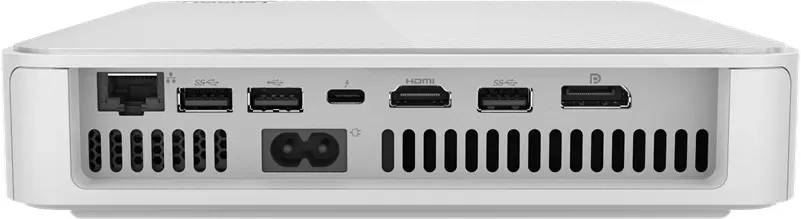
1x USB-A 3.1 (10Gb/s), 1x USB-A 2.0 (480Mb/s), 1x Thunderbolt 4 (40Gb/s), 1x HDMI 2.1, 1x DisplayPort 1.4, 1x RJ-45 2.5Gb LAN (Realtek RTL8125BGS), 1x DC-In Lenovo Slim Tip (Power)
Front/Side Ports
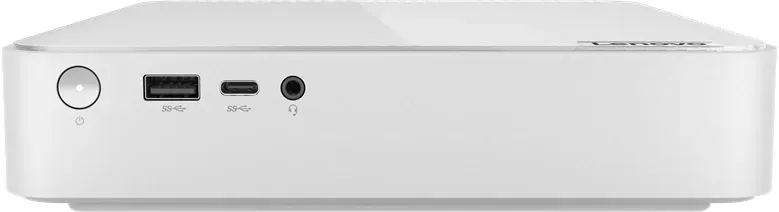
1x USB-C 3.1 (10Gb/s), 1x USB-A 3.1 (10Gb/s), 1x 3.5mm Jack (Line-In/Out)
Wireless
Wi-Fi 6 (WLAN 802.11a/b/g/n/ac/ax, 2x2), Bluetooth 5.1
Optical Drive
N/A
Camera
N/A
Power Supply
Internal 150W
Dimensions
7.53x1.51x7.68in (WxDxH)
Weight
3.97lbs
Volume
0.05cu ft (calculated)
Features
Security Lock (Kensington Security Slot)
Color
Gray (Cloud Grey)
USB Spelling
Link
Product Description
Discover the Power of the Lenovo IdeaCentre Mini 01IRH8
The Lenovo IdeaCentre Mini 01IRH8 redefines compact computing by delivering robust performance in a space-saving design. This mini PC is engineered for users who demand efficiency without compromising on power. Whether you are managing complex spreadsheets, streaming high-definition media, or handling multitasking workflows, this machine stands ready to serve as your central digital hub.
At the heart of the IdeaCentre Mini lies a versatile hardware configuration designed for adaptability. It features a powerful processor capable of handling demanding applications while maintaining energy efficiency. The system supports up to two DDR4 SODIMMs for memory expansion and includes dedicated slots for M.2 Solid-State Drives, ensuring rapid data access and smooth boot times. With a 150-watt power supply that adapts to voltages between 100 and 240 volts globally, this device is built for international versatility.
Connectivity is where this unit truly shines. The front panel offers an Always On USB-A port, allowing you to charge smartphones or tablets even when the computer is powered down. Additional ports include a USB-C 3.2 Gen 2 connector and a Thunderbolt 4 port, enabling ultra-fast data transfers up to 40 Gbit/s and support for external displays at resolutions reaching 4K. The rear panel further expands your options with HDMI 2.1, DisplayPort 1.4, and multiple USB-A connections, making it easy to attach monitors, keyboards, mice, and printers.
Managing your system is effortless with pre-installed Lenovo Vantage software. This centralized tool allows you to monitor hardware health, apply critical firmware and driver updates, and customize power settings to optimize battery life and performance. The operating environment is carefully calibrated to operate reliably within temperatures ranging from 10°C to 35°C during active use.
For those interested in maintenance, the IdeaCentre Mini 01IRH8 supports Customer Replaceable Units (CRUs). Components such as the memory modules, storage drives, and system fans can be accessed and replaced by the user following clear guidelines provided in the documentation. This modularity extends the lifespan of your device and allows for cost-effective upgrades as your needs evolve.
Key Notes
- The device supports Bluetooth connectivity for wireless peripherals like mice and headsets.
- Windows Update ensures your operating system remains secure with the latest patches.
- The compact form factor requires careful placement to ensure adequate ventilation.
Pros and Cons
Pros
- Compact design saves significant desk space while offering full desktop performance.
- Thunderbolt 4 and USB-C ports provide extremely fast data transfer speeds up to 40 Gbit/s.
- Always On USB feature allows charging devices even when the PC is off.
- Modular design enables easy upgrades of RAM and storage by the end-user.
- Includes Lenovo Vantage for simplified system management and automatic updates.
Cons
- Limited internal expansion slots compared to larger tower PCs.
- Requires specific tools and careful handling for accessing internal CRUs.
- Some advanced features may vary depending on the specific regional model configuration.
- No built-in Wi-Fi module in all configurations; Ethernet required for wired connection.
- Fan noise may become noticeable under heavy sustained workloads.
Search for 67,706 Manuals online


Type-in Brand or Model