


Lenco PA-200 Manual
PDF manual · 60 Pages
English



Quick check
Incorrect answer, please try again.
Chat with your Lenco PA-200 manual using AI
Get instant AI answers from your Lenco PA-200 manual
Ask anything about the Lenco PA-200. Answers come from this manual, with the pages they are based on.
Ask a Question
Do you recommend PA-200?
Yes NoFrequently Asked Questions
Turn on both speakers and set the input mode to Bluetooth. Press and hold the TWS key on both units for 2 seconds until the display shows the connection symbol. Once connected, search for Lenco PA-200 on your phone and select it to start playing music in stereo.
Is this answer helpful?
Yes, the device has dedicated jacks for both a wired microphone and a guitar. You can adjust the volume, echo, and other effects for these inputs using the MENU button and the Volume/Multi knob on the top panel or the remote control.
Is this answer helpful?
The Lenco PA-200 delivers a maximum output power of 100 Watts. It utilizes a 6.5-inch subwoofer, a 5-inch woofer, and a 1-inch tweeter to produce loud and clear sound suitable for parties and gatherings.
Is this answer helpful?
Yes, the PA-200 has a rechargeable internal battery. It charges automatically when connected to AC power. A red flashing light indicates charging, while a green light means it is fully charged or operating on battery power.
Is this answer helpful?
No, the device is not waterproof. It should not be used in wet or moist areas such as bathrooms or near swimming pools. Avoid exposure to rain, splashing, or condensation to prevent damage.
Is this answer helpful?
Press the LIGHT MODE button on the top panel or the LIGHT SHOW button on the remote control. This cycles through four different LED animation modes (LED1, LED2, LED3, LED4) or turns the lights off completely.
Is this answer helpful?
Yes, the speaker includes an FM radio tuner ranging from 87.5 to 108 MHz. You must attach the supplied antenna for best reception. Use the SOURCE button to switch to FM and the CH+/- keys to scan or tune stations.
Is this answer helpful?
Advantages and Disadvantages
Advantages

- Powerful 100W output with deep bass via X-Drive technology
- Full front light animation with multiple customizable modes
- Dedicated inputs for microphone and guitar with adjustable echo
- True Wireless Stereo (TWS) capability to pair two units
- Versatile connectivity including Bluetooth V5.0, USB, and FM radio
Disadvantages

- Not suitable for professional commercial or industrial use
- Battery life depends on AC charging and usage intensity
- No USB extension cables recommended due to potential interference
- Heavy weight of 5.9 kg makes portability slightly difficult
- Warranty voids if opened by non-official service centers
Product Specification
Power
50W RMS, 100W Peak
Frequency Range
38Hz-20kHz
Speakers
3 (1x 1" Tweeter, 1x 6.5" Woofer, 1x 5" Woofer)
Tuner
FM
Audio Connections
AUX In (3.5mm Jack), Mic In (6.35mm Jack), Instrument In (6.35mm Jack)
Other Connections
USB
Wireless
Bluetooth 5.0
Power Supply
Battery, Mains
Playback Duration
8h
Features
Remote Control, Light Effects
Dimensions
12x27.1x11.1in (WxDxH)
Weight
13.01lbs
Product Description
Discover the Lenco PA-200: The Ultimate Party Companion
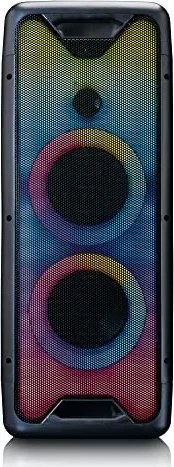
The Lenco PA-200 is a high-performance Bluetooth party speaker designed to bring energy and vibrant light shows to any gathering. Whether you are hosting a backyard barbecue, a house party, or a small event, this device delivers powerful audio with a full front light animation that syncs with your music. Its robust build ensures it can handle the demands of festive environments while providing crystal clear sound.
Equipped with a 100W output power, the PA-200 features a three-way speaker system including a 6.5-inch subwoofer, a 5-inch woofer, and a 1-inch tweeter. This configuration covers a wide frequency range from 38Hz to 20kHz, ensuring deep bass and crisp highs. The X-Drive technology further enhances the low-frequency response for an extra punch when needed. Users can easily switch between multiple input sources including USB playback, FM radio, line-in, and wireless Bluetooth V5.0 connections.
For those who love to sing or play instruments, the PA-200 includes dedicated inputs for both a wired microphone and a guitar. The built-in menu allows you to adjust echo, bass, treble, and individual volumes for these accessories independently. The unit also supports True Wireless Stereo (TWS) mode, allowing you to pair two PA-200 speakers together for a massive stereo soundstage without any cables connecting them.
The visual experience is just as important as the audio. The speaker boasts a dynamic LED display and a comprehensive light show with four distinct modes that illuminate the entire front panel. A remote control is included to manage volume, track selection, light modes, and equalizer settings from a distance. Safety is prioritized with warnings against moisture, heat, and unauthorized disassembly, ensuring long-term reliability when used according to the guidelines.
Important Notes
- Always ensure ventilation openings are not blocked by leaving at least 5 cm of space around the device.
- Do not use extension cords for USB drives as they may cause data interference.
- Keep the device away from water and do not use it in wet areas like bathrooms.
- Remove batteries from the remote if not used for extended periods to prevent leakage.
Search for 67,732 Manuals online


Type-in Brand or Model
clarissa92
6 months ago
My device turns off after about 30 minutes. The manufacturer claims no defect, but suggests setting smartphone volume to maximum and controlling volume via the remote instead. Is this actually a known issue or just user error?
Manual.ly
6 months ago
Thank you for contacting us. If your device powers down unexpectedly after 30 minutes, it is likely related to overheating protection or a firmware glitch rather than a hardware defect. We recommend ensuring all ventilation slots are clear and updating the device firmware to the latest version. Additionally, setting the source volume to maximum while using the device's own controls can help stabilize the signal path. If the issue persists after these steps, please contact our support team for a potential replacement.