
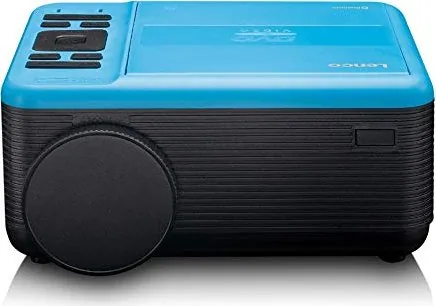
Lenco LPJ-500 Manual
PDF manual · 161 Pages
English



Quick check
Incorrect answer, please try again.
Chat with your Lenco LPJ-500 manual using AI
Get instant AI answers from your Lenco LPJ-500 manual
Ask anything about the Lenco LPJ-500. Answers come from this manual, with the pages they are based on.
LPJ-500 Maintenance Schedule
Use a soft dry cloth. For severe stains, use a damp cloth with dilute detergent. Do not use solvents or petrol-based fluids.
If the lamp switches off due to overheating, check that ventilation vents are not blocked and clean the air filter if necessary.
Use a vacuum cleaner to remove dust or spots from the projection lens if they appear on the screen.
Ask a Question
Do you recommend LPJ-500?
Yes NoFrequently Asked Questions
The Lenco LPJ-500 features a native display resolution of 800 by 480 pixels, which provides decent clarity for standard definition content and casual viewing.
Is this answer helpful?
Yes, you can use a Chromecast dongle plugged into the HDMI port or connect via MHL cable if your smartphone supports it to stream content wirelessly or directly.
Is this answer helpful?
No, the Lenco LPJ-500 does not contain a rechargeable battery. It must be connected to a power outlet via the included AC adapter to operate.
Is this answer helpful?
The manual does not specify region coding restrictions, but typically these units play most standard DVDs regardless of region unless explicitly stated otherwise by the manufacturer.
Is this answer helpful?
You can connect external speakers via Bluetooth for wireless audio or use the headphone jack for wired connections. Note that Bluetooth works only when not using VGA input.
Is this answer helpful?
The USB port supports flash drives up to 32GB and plays formats including MPEG1, MPEG2, MPEG4, MP3, and JPEG files for photos, music, and videos.
Is this answer helpful?
Yes, the projector supports ceiling mounting in both front and rear configurations, provided you purchase a compatible projector mount separately.
Is this answer helpful?
Advantages and Disadvantages
Advantages

- Built-in DVD player eliminates need for external disc drive
- Bluetooth 5.0 allows wireless audio streaming to speakers
- Four mounting configurations offer flexible installation options
- Lightweight design at 0.9 kg ensures high portability
- Multiple input ports including HDMI, VGA, AV, and USB
Disadvantages

- Native resolution of 800x480 may appear soft on large screens
- No built-in battery requires constant power connection
- VGA mode does not support audio transmission
- Remote control batteries are not included in the package
- Keystone correction has limits on extreme angles
Product Specification
Type
LCD
Light source
LED
Resolution (displayable)
Full HD (1920x1080)
Contrast
3,000:1
Projection distance
3.28-16.40 ft
Lens shift
motorized
Video connections
2x HDMI In, 1x VGA In
Audio connections
1x 3.5mm Audio Out
Other connections
1x USB 2.0, Card reader (microSD)
Wireless
Bluetooth 5.0
Features
built-in speaker (2x 2W)
Power consumption
48/W (Standard/Eco)
Dimensions
7.87x3.94x6.69 in (WxDxH)
Weight
2.71 lbs
Manufacturer warranty
2 years
Product Description
Discover the Lenco LPJ-500: Your Portable Home Theater Solution
The Lenco LPJ-500 is a versatile LCD projector designed to bring big-screen entertainment to any location. Whether you are hosting a movie night in the backyard, setting up a presentation in a small conference room, or simply enjoying media on your living room wall, this device offers flexibility and performance. It combines a built-in DVD player with modern connectivity options, making it an all-in-one entertainment hub.
This projector features LED technology that delivers bright images with a native resolution of 800x480 pixels. With a brightness output of 2800 lumens, it ensures clear visibility even in moderately lit environments. The device supports multiple input sources including HDMI, VGA, AV, and USB, allowing you to connect laptops, gaming consoles, smartphones, and external storage drives effortlessly. The inclusion of Bluetooth 5.0 enables wireless audio streaming to compatible speakers or soundbars, enhancing the immersive experience without messy cables.
Installation is straightforward with four mounting configurations available: front table, rear table, ceiling front, and ceiling rear. Users can easily adjust focus and correct trapezoidal distortion using the built-in keystone function. The unit also includes a built-in speaker system, though users may prefer to pair it with external audio for richer sound. Safety features include automatic overheating protection and clear ventilation guidelines to ensure long-term reliability. The lightweight design at just 0.9 kg makes it highly portable for travel or outdoor use.
Key Highlights
- Integrated DVD player for physical media playback
- Multiple connectivity ports for diverse devices
- Wireless Bluetooth audio support
- Flexible mounting options for various setups
- User-friendly remote control with extensive functions
Important Notes
Always ensure the lens cover is removed before powering on the device. Avoid placing the projector near heat sources or in humid areas like bathrooms. For optimal image quality, maintain the recommended distance between the projector and the screen based on the desired diagonal size.
Search for 67,732 Manuals online


Type-in Brand or Model