
Lenco BTC-055 Manual
PDF manual · 51 Pages
English



Quick check
Incorrect answer, please try again.
Chat with your Lenco BTC-055 manual using AI
Get instant AI answers from your Lenco BTC-055 manual
Ask anything about the Lenco BTC-055. Answers come from this manual, with the pages they are based on.
Ask a Question
Do you recommend BTC-055?
Yes NoFrequently Asked Questions
Press the mode button repeatedly until you hear a tone and the LED flashes blue quickly. Then enable Bluetooth on your phone, search for 'BTC-055', and select it. If asked for a code, enter 0000.
Is this answer helpful?
Yes, but only in moderate climates. Keep the device away from rain, moisture, and direct exposure to extreme heat or cold. Do not use it near swimming pools or in steamy kitchens.
Is this answer helpful?
The Lenco BTC-055 contains a 3.7V Li-ion battery with a capacity of 2500mAh, providing portable power for extended periods of use.
Is this answer helpful?
No, this product is intended for non-professional use only. Any damage or malfunction resulting from commercial or industrial use will void the warranty immediately.
Is this answer helpful?
You can use the master volume knob on the device, the volume buttons on the remote control, or the volume controls on your Bluetooth source device. Note that the master knob sets the maximum limit.
Is this answer helpful?
When the battery power becomes low, the device will emit an audible warning sound every minute to remind you to connect it to the power adapter for charging.
Is this answer helpful?
Advantages and Disadvantages
Advantages

- Integrated disco ball with color lights enhances party atmosphere
- Bluetooth 5.0 ensures stable wireless connectivity
- Rechargeable battery provides portable, cord-free usage
- Supports multiple media sources including USB and SD card
- Includes wired microphone for karaoke singing
Disadvantages

- Not suitable for professional or commercial environments
- Maximum volume is limited by the master knob on the device
- Battery requires four hours for a full charge cycle
- Cannot be sent directly to manufacturer for repairs
- Remote control uses a coin cell battery which poses a swallowing hazard for children
Product Specification
Power
8W RMS
Audio Connectors
AUX In (3.5mm jack), Mic In (6.35mm jack)
Other Connectors
USB-A, Card reader (microSD)
Wireless
Bluetooth 5.0
Power Supply
Battery (2500mAh), AC power
Playback Time
10h
Features
Light effects
Dimensions
7.3x10.2x7.3in (WxHxD)
Weight
3.53lbs
Product Description
Discover the Lenco BTC-055 Karaoke System
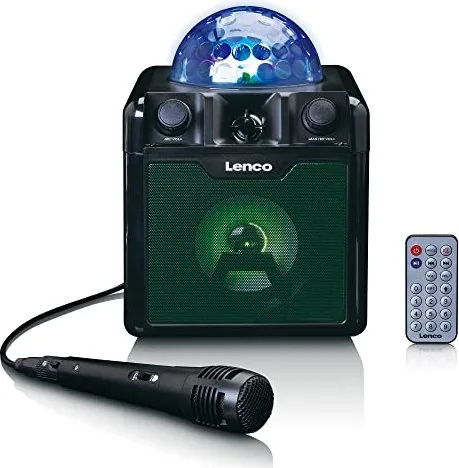
The Lenco BTC-055 is a versatile portable party speaker designed to bring music and fun to any gathering. This compact unit features an integrated disco ball with colorful lighting effects that sync with your tunes, creating an instant festive atmosphere. Whether you are hosting a backyard BBQ or a small house party, this device serves as the perfect centerpiece for entertainment.
Equipped with Bluetooth 5.0 technology, users can easily stream high-quality audio from smartphones, tablets, or laptops without the hassle of tangled wires. The system also supports multiple playback options, including USB drives and Micro SD cards, allowing you to access your favorite tracks directly. A wired microphone is included, enabling you to sing along with your favorite songs while adjusting the vocal volume independently.
Powering this lively device is a built-in rechargeable Li-ion battery, ensuring hours of wireless operation away from wall outlets. When the battery runs low, an audible warning reminds you to recharge it using the provided AC adapter. The unit also features a master volume control on the device itself, which acts as the primary limiter for all volume adjustments made via the remote or connected devices.
Designed for ease of use, the Lenco BTC-055 includes a remote control for convenient management of play, pause, track selection, and light settings. The durable construction allows for safe operation in moderate climates, though it should be kept away from moisture and extreme temperatures. This non-professional grade speaker is ideal for home entertainment, offering a blend of portability, sound quality, and visual flair.
Important Usage Notes
Always ensure the device is placed on a stable surface with adequate ventilation space. Avoid exposing the unit to water or placing heavy objects on the power adapter. For optimal performance and safety, use only the original charger and do not attempt to open the casing yourself.
Search for 67,732 Manuals online


Type-in Brand or Model