
Leicke Sharon DJ Roxx Big Woody EP18108 Manual
PDF manual · 8 Pages
English



Quick check
Incorrect answer, please try again.
Chat with your Leicke Sharon DJ Roxx Big Woody EP18108 manual using AI
Get instant AI answers from your Leicke Sharon DJ Roxx Big Woody EP18108 manual
Ask anything about the Leicke Sharon DJ Roxx Big Woody EP18108. Answers come from this manual, with the pages they are based on.
Ask a Question
Do you recommend Sharon DJ Roxx Big Woody EP18108?
Yes No
maria_k
10 months ago
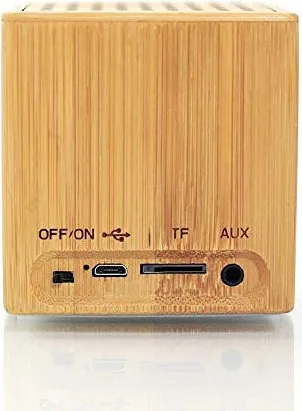
Is the speaker durable? I read that the USB/audio ports are small and flimsy, leading to a loose connection and the device breaking after some time. Does this happen often?

Manual.ly
10 months ago
Thanks for the concern. Some customers report that the ports and connectors can feel tight or become loose if the cable is bent, pulled, or used without strain relief. To help prevent damage: fully insert the plug, avoid twisting or yanking the cable, and do not move the speaker by the cable. If you experience a wobbly connection or the device breaks, please contact our support with your order details and a short description (and photos if possible). We will check the issue and, if it is a defect, arrange a replacement or warranty solution. For best reliability, use a suitable cable and keep the connection stable during use.
Frequently Asked Questions
It supports Bluetooth audio, MP3 playback from MicroSD/TF cards, FM-style radio use, and hands-free calling. It is built as a compact all-in-one speaker for casual listening and daily convenience.
Is this answer helpful?
Turn the speaker on, activate Bluetooth on your phone or tablet, and select the device shown as LEICKE EP18108. If a code is requested, use 0000. Pairing is saved for future use.
Is this answer helpful?
No. If a memory card is inserted, the speaker switches to MP3 mode automatically, and Bluetooth is not available until the card is removed.
Is this answer helpful?
Playback time is typically about 6 to 8 hours, depending on volume and the type of content played. The speaker should be charged with a 5V/1A USB power supply.
Is this answer helpful?
Connect the charging cable to the speaker while it is switched off; the cable acts as an antenna. Then switch to radio mode and scan stations using the Play/Pause button.
Is this answer helpful?
Yes. The built-in microphone supports hands-free calling, and the speaker can also work with Alexa through a paired smartphone when the app is running.
Is this answer helpful?
Advantages and Disadvantages
Advantages

- Compact 5W speaker with Bluetooth, radio, and MP3 support in one device.
- MicroSD/TF playback offers offline listening without needing a phone connection.
- Hands-free calling and microphone support add everyday convenience.
- Simple controls and a front volume knob make it easy to operate.
Disadvantages

- Bluetooth and memory card playback cannot be used at the same time.
- Sound output is limited compared with larger speakers.
- Radio mode needs the charging cable connected as an antenna.
- Battery life depends heavily on volume and audio type.
Product Specification
Display
no
Tuner
no
Connections
AUX In (3.5mm jack), Card reader (microSD)
Wireless
Bluetooth 4.0, NFC
Power supply
Battery, USB
Playback time
8h
Features
Hands-free function
Color
brown
Product Description
Leicke Sharon DJ Roxx Big Woody Brown Manual
The Leicke Sharon DJ Roxx Big Woody Brown Manual points to a compact speaker that tries to do a lot in a small footprint. It blends wireless audio, portable playback, and everyday convenience into a single brown-finished unit that feels suitable for both home use and on-the-go listening. With its simple controls and practical feature set, it is designed for users who want more than just basic Bluetooth sound.
At the center of the experience is a Bluetooth speaker with integrated battery, paired with support for MP3 playback and microSD/TF cards up to 32 GB. That means you can stream music from a phone when Bluetooth is active, or load tracks locally for times when you do not want to rely on a second device. The speaker also includes radio mode, making it a flexible choice for casual listening, background music, or keeping up with stations throughout the day.
The unit’s 5-watt output is modest, but well matched to its size and purpose. It is not built to overwhelm a room with heavy bass, yet it offers a balanced everyday sound profile for podcasts, playlists, and spoken content. The integrated microphone adds hands-free calling, while the Play/Pause and navigation buttons keep operation straightforward. A front volume knob and simple mode switching make it easy to learn quickly, even for first-time users.
Battery performance is another useful highlight. With a 1200 mAh battery, playback can last around 6 to 8 hours, depending on volume and content. Charging is done through USB 5V/1A, and the manual emphasizes safe charging habits to protect both the battery and the speaker’s lifespan. For radio use, the charging cable doubles as an antenna, which is a clever small detail that improves practicality.
There is also an extra smart-home angle: when paired with a smartphone and the app running, the speaker can work with Alexa voice commands through the built-in microphone. That makes the device feel more modern than a basic portable speaker, especially for users who want voice interaction without adding another accessory.
Notes
- Use Bluetooth mode only when no memory card is inserted.
- Charge the battery for at least two hours before first use.
- For radio reception, keep the charging cable connected as instructed.
- Avoid high-volume listening for long periods to protect hearing and the speaker.
Search for 67,732 Manuals online


Type-in Brand or Model
Helena Zeller
9 months ago
Does the speaker have reliable ports and cables? I heard the USB jack is small and can develop a loose connection quickly, and the device may break off at the port.
Manual.ly
9 months ago
We understand that a loose USB connection is frustrating. The ports are designed for normal use, but if the cable is repeatedly pulled, stressed, or inserted loosely, it can loosen over time. To help prevent this, plug the cable in firmly, avoid twisting or yanking, and keep the connector area supported so the strain does not sit on the jack. If you already have a wobbly connection or a damaged port, please contact our support with your order details and a short photo of the damaged area. If it is within the warranty period, we can arrange a repair or replacement.