
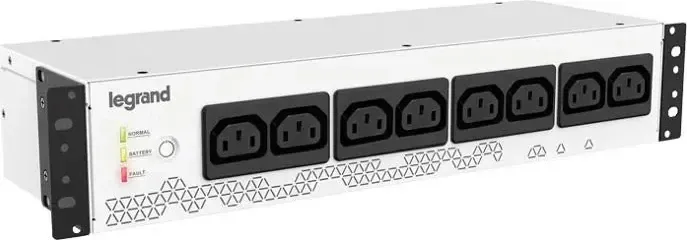
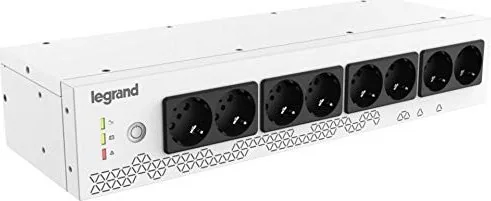
Legrand Keor PDU Manual
PDF manual · 88 Pages
English



Quick check
Incorrect answer, please try again.
Chat with your Legrand Keor PDU manual using AI
Get instant AI answers from your Legrand Keor PDU manual
Ask anything about the Legrand Keor PDU. Answers come from this manual, with the pages they are based on.
Keor PDU Maintenance Schedule
If the storage ambient temperature is above +25°C (+77°F), repeat the 8-hour charging procedure every two months.
If the UPS is not in use, recharge the battery every 2 to 3 months by connecting the power cable to a grounded mains socket.
During warehousing, charge the battery for 8 hours every 3 months by connecting the UPS to the mains supply socket.
Free maintenance reminders
Timed to your purchase date. Always free, unsubscribe anytime.
Ask a Question
Do you recommend Keor PDU?
Yes NoFrequently Asked Questions
The unit has a nominal power of 800 VA and an active power rating of 480 W. You must ensure the total connected load does not exceed these values to prevent damage or failure.
Is this answer helpful?
Under normal conditions with a typical workstation connected, the backup time is approximately 10 minutes. Actual duration may vary depending on the number and type of connected devices.
Is this answer helpful?
No, the internal batteries are sealed and not designed for user replacement. Attempting to open the unit will void the warranty and poses significant safety risks. Battery servicing must be done by qualified personnel.
Is this answer helpful?
It is not recommended to connect laser printers to the backup outputs. They draw a very high current during startup which can trip the UPS protection or damage the unit.
Is this answer helpful?
If the UPS is not in use, the battery should be charged for at least 8 hours every two to three months to maintain its health and capacity.
Is this answer helpful?
The Legrand Keor PDU features an automatic restart function. Once mains power is restored and the battery has sufficient charge, the unit will automatically resume powering the connected loads.
Is this answer helpful?
Advantages and Disadvantages
Advantages

- Provides 800 VA / 480 W capacity suitable for standard workstations
- Fast 10 ms transfer time minimizes disruption during power outages
- Includes USB port for charging mobile devices in standby mode
- Sealed VRLA battery eliminates the need for regular maintenance
- Built-in overload, overvoltage, and short-circuit protection
Disadvantages

- Output waveform is simulated sine wave, not pure sine wave
- Backup time is limited to approximately 10 minutes for typical loads
- Internal batteries are not user-replaceable
- Requires specific grounding and cannot be used with extension cords
- Cannot support high-startup current devices like laser printers on backup
Product Specification
Type
Rackmount
Classification
VFD (Off-Line)
Apparent Power
800VA
Real Power
480W
Voltage
180-270V
Input
1x C13
Interfaces
USB
Data Line Protection
N/A
Charging Time
4-6h
Weight
12.12 lbs
Dimensions (WxDxH)
17.32x3.46x5.91 in
Height Units
2U
Features
IP20, HID Support
Product Description
Legrand Keor PDU UPS/USV: Reliable Power Protection for Your Environment
Protecting your critical electronic equipment is essential in both residential and commercial settings. The Legrand Keor PDU UPS/USV offers a robust solution designed to safeguard your devices against power failures, surges, and other electrical anomalies. This uninterruptible power supply ensures that your computers, workstations, and sensitive data remain operational even when the main grid fails.
Designed with a line interactive topology, this unit provides simulated sine wave output during battery mode, making it compatible with a wide range of IT equipment. With a nominal power of 800 VA and an active power capacity of 480 W, it delivers sufficient backup time for typical workstations. The device features a fast transfer time of approximately 10 ms, ensuring minimal interruption to your workflow during power transitions.
Installation is straightforward but requires adherence to strict safety guidelines. The unit must be connected to a grounded mains socket with appropriate upstream protection rated at 10 A or 16 A. Users should ensure that the total load does not exceed the specified limits on the product label. The internal VRLA battery is sealed and maintenance-free, requiring only periodic recharging every two to three months if the unit remains unused. A USB charging port is also available for convenient device charging while the UPS is in standby mode.
Safety is paramount with the Legrand Keor PDU. The device includes multiple protections against overload, overvoltage, and short circuits. It also features visual and audible alarms to alert users to potential issues such as low battery levels or system faults. For optimal performance, the unit should be installed in a ventilated area with temperatures between 0°C and 40°C, avoiding direct sunlight and proximity to heat sources.
The Legrand Keor PDU UPS/USV combines efficiency, reliability, and ease of use. Its compact design fits easily into various environments, while its comprehensive management features allow for effective monitoring of power status. Whether you are securing a home office or a small business server room, this UPS provides peace of mind by keeping your essential systems running smoothly.
Important Notes
- Do not connect laser printers to the backup outputs due to high start-up currents.
- Never attempt to open or repair the unit yourself; unauthorized access voids the warranty.
- Ensure the power cord is accessible near the unit for emergency disconnection.
- Dispose of batteries according to local hazardous waste regulations.
Search for 67,706 Manuals online


Type-in Brand or Model