
Legrand BTicino Sfera 352500 Manual
PDF manual · 42 Pages
English



Quick check
Incorrect answer, please try again.
Chat with your Legrand BTicino Sfera 352500 manual using AI
Get instant AI answers from your Legrand BTicino Sfera 352500 manual
Ask anything about the Legrand BTicino Sfera 352500. Answers come from this manual, with the pages they are based on.
Ask a Question
Do you recommend BTicino Sfera 352500?
Yes NoFrequently Asked Questions
It works with BTicino two-wire digital systems.
Is this answer helpful?
Use the mini_USB connector and TiSferaDesign software.
Is this answer helpful?
Yes, Alphanumeric or Numeric BFA mode via settings menu.
Is this answer helpful?
The default password is 00000 for the installer menu.
Is this answer helpful?
Yes, reduces brightness by 20% after one minute of inactivity.
Is this answer helpful?
Yes, up to 20 numerical codes for door lock access.
Is this answer helpful?
Range is from minus 25 to plus 70 degrees Celsius.
Is this answer helpful?
Advantages and Disadvantages
Advantages

- Versatile configuration options support both keypad and software setup
- Graphic display allows easy viewing of resident names and caller status
- Eco mode reduces power consumption by dimming screen during inactivity
- Supports Alphanumeric and Numeric address book formats for flexibility
- Robust anti-vandal options available for high traffic entrances
Disadvantages

- Requires specific BTicino two-wire digital system for operation
- Default installer password requires immediate change for security
- Address book changes need software or empty book for format switch
- Door code entry needs specific keypad module installation
- Warranty voids if installed by unauthorized personnel
Product Specification
Type
Door station module
Standard
Open wire (2-wire)
Function
Information display, Doorbell
Topology
Bus
Dimensions
4.53 x 3.58 in
Features
Display (160x240), Outdoor, IP54
Product Description
Legrand bticino Display Module Overview
Managing security requires reliable systems for residential buildings. The Legrand bticino Display Module stands out as a comprehensive solution for modern intercom setups. Integrating this device into building infrastructure ensures seamless visitor interaction and controlled access. Users often consult the Legrand bticino Display Module, Door Station Module Manual when seeking configuration steps, though the system offers features accessible through direct interaction on the unit.
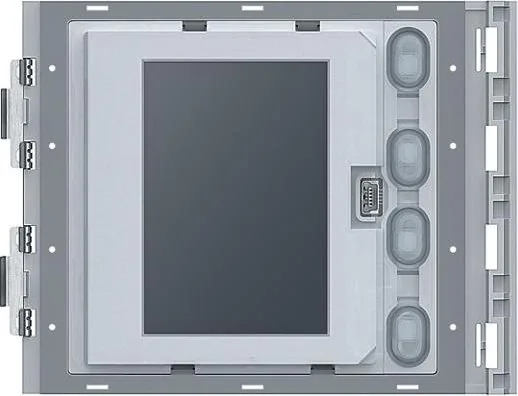
The unit features a graphic display that enhances readability for residents and visitors. A mini_USB connector is included on the front view, facilitating advanced software configurations and firmware updates. This connectivity allows installers to utilize the TiSferaDesign software for data management. Residents can be programmed via the keypad directly on the display module. The system supports two distinct modes for address books to suit different standards. Alphanumeric mode uses names, while Numeric BFA mode relies on Block, Floor, and Apartment digits.
Security settings are customizable through a settings menu accessed by the installer password. The default password is 00000, but it is highly recommended to change this to prevent unauthorized access. Power consumption is optimized with an Eco Mode feature. When the device remains inactive, the display brightness reduces after one minute. LCD settings allow precise adjustments for brightness and contrast based on installation position. Users can also enable or disable keypad sounds for operation.
Physical build quality is a major highlight. The Sfera series offers attractive finishes designed to blend with architecture. The New line comes in three colors, while the Robur line provides heavy duty anti-vandal protection. This ensures durability in high-traffic areas. Technical data specifies a power supply between 18 and 27 Vdc. The operating temperature range accommodates environments from minus 25 to plus 70 degrees Celsius. Protection index IP 54 ensures resistance against dust and water splashes.
Key Features
Configuring door codes allows access using numeric codes entered on the panel. This requires the separate keypad module. The address book can store contacts for calling. Residents can open the door lock with security codes. The system handles call status on the screen. It works well for communication. Adapts to needs. Ensures reliability.
Search for 67,732 Manuals online


Type-in Brand or Model