

Legrand 694690 Manual
PDF manual · 6 Pages
English



Quick check
Incorrect answer, please try again.
Chat with your Legrand 694690 manual using AI
Get instant AI answers from your Legrand 694690 manual
Ask anything about the Legrand 694690. Answers come from this manual, with the pages they are based on.
Ask a Question
Do you recommend 694690?
Yes NoFrequently Asked Questions
Install the Legrand Mobile Socket app, scan the QR code, connect to Wi-Fi, press the button for six seconds, and assign a name in the app.
Is this answer helpful?
The maximum power capacity reaches 3680 watts with a 16 amp rating using a 230 volt supply and fifty hertz frequency.
Is this answer helpful?
No, the device operates exclusively on a 2.4 GHz Wi-Fi network for connectivity and signal transmission.
Is this answer helpful?
Yes, you can create groups by dragging icons in the app to execute general off commands for all connected units remotely.
Is this answer helpful?
Alerts cover power cuts, internet disconnection, abnormal consumption, zero consumption faults, and overload protection warnings.
Is this answer helpful?
Setup is designed for convenience with guided steps in the app, though users must follow safety instructions strictly to avoid risks.
Is this answer helpful?
The system supports minimum compatibility with Android version four or higher and iOS version ten or higher on smartphones.
Is this answer helpful?
Advantages and Disadvantages
Advantages

- Remote control of all four outlets individually or as a group via mobile app
- Energy saving scenarios automatically switch off dependent devices when TV is off
- Overload protection triggers at ninety percent of maximum circuit power capacity
- Supports grouping multiple units for synchronized global commands
- Compatibility with Android four and above and iOS ten and above systems
Disadvantages

- Requires 2.4 GHz Wi-Fi network and may not support five GHz bands
- Setup process involves multiple steps including app download and QR scan
- Complex features may overwhelm users who only need basic power control
- Device relies on internet connection for remote functionality activation
- LED indicator may glow in dark rooms if not configured for dimming
Product Specification
Type
Actuator
Standard
WLAN (802.11b/g/n)
Function
Switchable socket (on/off), Power measurement function
Topology
Mesh/Star
Features
Controllable via App
Product Description
Revolutionize Your Home with Smart Power Control
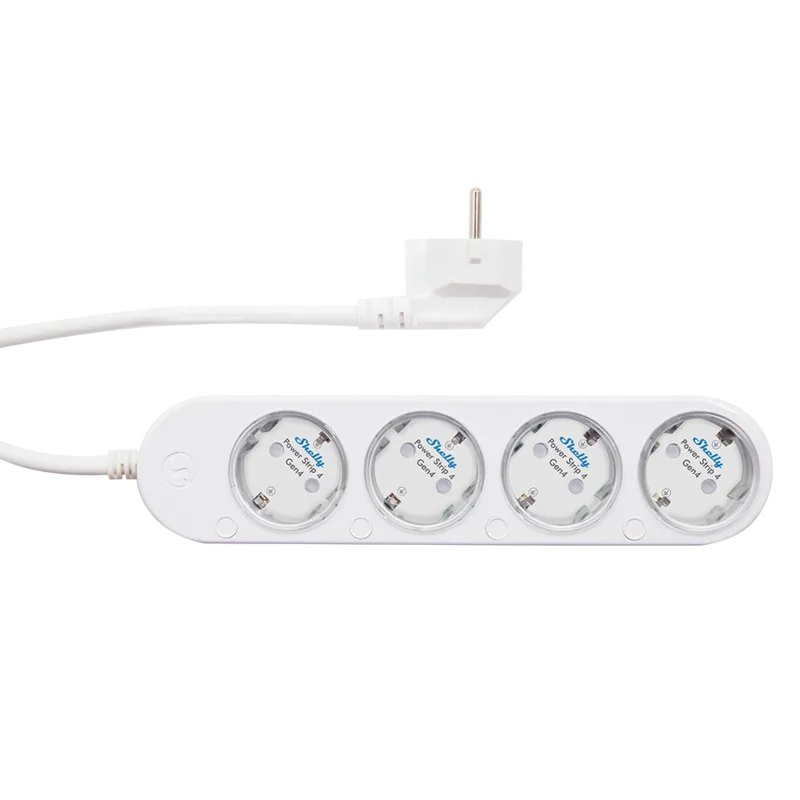
Welcome to the future of home energy management with the Legrand bticino WLAN Power Strip 4-Outlet. This device brings your electrical infrastructure into the digital age. Understanding the Legrand bticino WLAN Power Strip 4-Outlet Smart Power Strip Manual is the first step toward a seamless smart home experience. The interface connects seamlessly to your daily routine without complexity. You gain the ability to control outlets remotely using a smartphone. This remote capability ensures lights and appliances follow your commands instantly. It replaces traditional switching with modern connectivity solutions.
Setup is designed for user convenience. You must install the Legrand Mobile Socket application on your device first. Ensure your network supports 2.4 GHz frequencies for the signal to transmit effectively. The router settings require WPA or WPA2 encryption keys for secure pairing. Do not use older security standards if not supported. Scan the QR code located on the device to initiate the installation process. Press the button on the socket for six seconds until the light blinks slowly. The app will prompt you to enter your network password. Once paired, assign the outlet a clear name for easy identification. Skip the introduction video if you are ready to begin immediately.
Energy conservation is the core benefit of this system. You can build scenarios that trigger shutdowns automatically. A standby power cut scenario saves energy when a main device like a TV turns off. Dependent sockets for consoles or lamps switch off with the television. Monitoring alerts notify you of power cuts or internet failures immediately. You also receive warnings for abnormal consumption rates or total zero consumption which indicates faults. Overload protection activates if you reach ninety percent of the maximum power capacity. This prevents circuit damage during high draw events.
Grouping features allow multiple units to act as a single entity. Press and hold the icon of one unit to drag it onto another in the app. This creates a command group for total remote control. You can execute a global OFF state for all grouped devices. The unit supports Android version four or higher and iOS version ten or higher. It adheres to the German standard Type F plug configuration. The maximum power capacity reaches 3680 watts with a 16 amp rating. Radio frequency power stays under 100 mW to ensure safety compliance.
Safety is paramount when using electrical devices. Failure to follow installation rules risks electric shock or fire. Always refer to the safety section of the Legrand bticino WLAN Power Strip 4-Outlet Smart Power Strip Manual before operation. The LED indicator helps you confirm connection status during setup. When pairing finishes, the light turns off to confirm readiness. This smart tool ensures convenience, safety, and efficiency in your modern living space. It offers peace of mind while you manage your household resources effectively. The system integrates well with existing home networks. No hub is required for basic operation. Connection stability is maintained through standard protocols.
Search for 67,732 Manuals online


Type-in Brand or Model