Manual.ly Logo

Learning Resources Botley LER 2936 Manual

0.0 · 0 Ratings

PDF manual · 9 Pages

English

M: QW-35-FL
page

/ 9

Loading...
706398f76d2902a8e0b803c9b6ca3dfc52d7 page 2
STOP
POWER
Inserting Batteries
Botley requires (3) three AAA batteries. The Remote
Programmer requires (2) two AAA batteries. Please follow the
directions for battery installation on page 6 of this guide.
Note: When the batteries are low on power, Botley will beep
repeatedly and functionality will be limited. Please insert new
batteries.
Getting Started
In CODE mode, each arrow button you press represents a
step in your code. When you transmit your code to Botley,
he will execute all the steps in order. The lights on the top of
Botley will light up at the beginning of each step. Botley will
stop and make a sound when he completes the code.
STOP Botley from moving at any time by pressing the center
button on top of him.
CLEAR deletes all previously programmed steps. Note that
the Remote Programmer retains code even if Botley is turned
o . Press CLEAR to start a new program.
Botley will power down if left idle for 5 minutes. Press the
center button on top of Botley to wake him up.
Start with a simple program. Try this:
1. Slide the POWER switch on the bottom of Botley
to CODE.
2. Place Botley on the fl oor (he works best on hard
surfaces).
3. Press the FORWARD arrow on the Remote Programmer.
4. Point the Remote Programmer at Botley and press the
TRANSMIT button.
5. Botley will light up, make a sound to indicate the
program has been transmitted, and move forward
one step.
Note: If you hear a negative sound after pressing the transmit
button:
• Press TRANSMIT again. (Do not re-enter your program—
it will remain in the Remote Programmer memory until
you clear it.)
• Check that the POWER button on the bottom of Botley
is in the CODE position.
• Check the lighting of your surroundings. Bright light can
a ect the way the Remote Programmer works.
• Point the Remote Programmer directly at Botley.
• Bring the Remote Programmer closer to Botley.
Now, try a longer program. Try this:
1. Press CLEAR to delete the old program.
2. Enter the following sequence: FORWARD, FORWARD,
RIGHT, RIGHT, FORWARD.
3. Press TRANSMIT and Botley will execute the program.
Tips:
1. STOP Botley at any time by pressing the center button
on top of him.
2. You can transmit a program from up to 10’ away
depending on the lighting (Botley works best in ordinary
room lighting).
3. You can add steps onto a program. Once Botley
completes a program, you can add more steps by
entering them into the Remote Programmer. When you
press TRANSMIT, Botley will restart the program
from the beginning, adding on the additional steps at
the end.
4. Botley can perform sequences of up to 80 steps! If you
enter a programmed sequence that exceeds 80 steps,
you’ll hear a sound indicating the step limit has been
reached.
Loops
Professional programmers and coders try to work as
e ciently as possible. One way to do this is by using LOOPS
to repeat a sequence of steps. Performing a task in the
fewest steps possible is a great way to make your code more
e cient. Every time you press the LOOP button, Botley will
repeat that sequence.
Try this (in CODE mode):
1. Press CLEAR to delete the old program.
2. Press LOOP, RIGHT, RIGHT, RIGHT, RIGHT, LOOP again
(to repeat the steps).
3. Press TRANSMIT.
Botley will perform two 360s, turning completely around twice.
Introducing Botley
™
, the Coding Robot
Coding is the language we use to communicate with computers.
When you program Botley using the included Remote Programmer,
you are engaging in a basic form of “coding.” Beginning with the
very basics of sequence programming is a great way to get started in
the world of coding. So why is learning this so important? Because it
helps teach and encourage:
1. Basic coding concepts
2. Advanced coding concepts like
If/Then logic
3. Critical thinking
4. Spatial concepts
5. Collaboration and teamwork
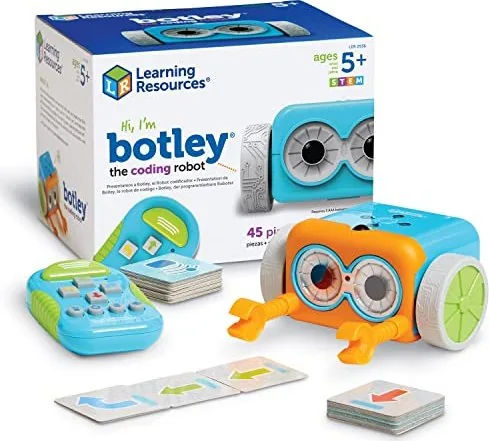
Set includes:
• 1 Botley robot
• 1 Remote Programmer
• Detachable robot arms
• 40 Coding cards
FORWARD
Botley moves forward 1
step (approximately 8",
depending on the surface).
CLEAR
Press to clear
all previously
programmed steps.
REVERSE
Botley moves
backward 1 step.
TURN RIGHT
Botley will rotate to
the right 90 degrees.
TURN LEFT
Botley will rotate to
the left 90 degrees.
LOOP
Press to repeat a step
or sequence of steps.
TRANSMIT
Press to send your
code from the
Remote Programmer
to Botley.
OBJECT DETECTION
Press to enable object
detection.
SOUND
Press to toggle
between 3 sound
settings: High, Low,
and O .
Basic Operation
Power— Slide this switch
to toggle between OFF,
CODE, and LINE-
following modes.
Using the Remote Programmer
You can program Botley using the Remote Programmer.
Press these buttons to enter commands.
2 3

Chat with your Learning Resources Botley LER 2936 manual using AI

Get instant AI answers from your Learning Resources Botley LER 2936 manual

Ask anything about the Learning Resources Botley LER 2936. Answers come from this manual, with the pages they are based on.

Botley LER 2936 Maintenance Schedule

As needed
Replace low batteries

Insert new batteries when Botley beeps repeatedly indicating low power. Remove weak or dead batteries immediately.

Before storage
Remove batteries for long-term storage

Remove batteries from the product if it will be stored for an extended period of time to prevent leakage.

As needed
Clean unit surface

Wipe the surface of the unit with a dry cloth to clean it.

M: qwen/qwen3.8-flash

Ask a Question

0/1000

Do you recommend Botley LER 2936?

Yes No

Frequently Asked Questions

A

Botley can store and execute a maximum of 80 steps in a single program sequence. If you attempt to enter more than 80 steps, the robot will emit a sound indicating the limit has been reached.

Is this answer helpful?

A

Botley requires three AAA batteries, while the Remote Programmer needs two AAA batteries. Always ensure fresh batteries are used and installed correctly by an adult to avoid leakage.

Is this answer helpful?

A

No, the object detection sensor only recognizes items that are at least 2 inches tall and 1.5 inches wide. Smaller objects will not trigger the sensor effectively.

Is this answer helpful?

A

Botley works best on smooth, flat surfaces like wood or tile. It may struggle on thick carpets or uneven terrain where wheels cannot move freely.

Is this answer helpful?

A

If object detection is active and Botley sees an obstacle directly in front, it will stop and honk until the object is moved. It will not drive over it automatically unless programmed to go around.

Is this answer helpful?

A

Switch the power to Line mode and place Botley on a solid black line between 4mm and 10mm wide. Press the center button to start; he will turn around when he reaches the end.

Is this answer helpful?

M: QW-35-FL

Advantages and Disadvantages

Advantages

  • Screen-free coding experience promotes healthy habits
  • Includes detachable arms for interactive object manipulation
  • Supports complex logic with loops and If/Then object detection
  • Color-coded coding cards aid visual learning and sequencing
  • Durable design suitable for various hard floor surfaces
VS

Disadvantages

  • Object detection fails when detachable arms are attached
  • Performance is inconsistent under very bright sunlight
  • Requires multiple AAA batteries for both units
  • Line following requires precise hand-drawn lines of specific width
  • Maximum sequence limit of 80 steps may restrict long programs
M: QW-35-FL

Product Specification

Age recommendation

5 years and up

Type

Learning robot

M: QW-35-FL

Product Description

Introducing Botley: The Coding Robot That Teaches Future Innovators

Botley, the programmable robot from Learning Resources, is a fantastic tool designed to introduce children aged 5 and up to the world of coding without the need for a screen. This engaging educational toy allows young learners to master basic programming concepts through hands-on play. By using the included Remote Programmer, children can command Botley to move forward, turn, and even navigate around obstacles, fostering critical thinking and spatial awareness.

The set includes a 77-piece activity kit featuring the Botley robot, a remote programmer, detachable arms for moving objects, and 40 color-coded coding cards. These cards help users visualize their code sequences before transmitting them to the robot. Botley operates in different modes, including Code mode for step-by-step programming and Line-following mode where he tracks a black path drawn on paper. His object detection sensor adds complexity by allowing If/Then logic, teaching kids how robots interact with their environment.

Programming is intuitive and fun. Users can create sequences of up to 80 steps or use loops to repeat actions efficiently. Whether guiding Botley through a maze or making him perform secret tricks like dancing or spinning, the possibilities are endless. The detachable arms enable physical tasks, adding a layer of problem-solving as children program Botley to push items from one location to another. With features that encourage collaboration and teamwork, Botley makes learning to code an accessible and enjoyable experience for everyone.

M: QW-35-FL

© Copyright 2026 Manual.ly