

LC-Power LC-25U3-Hydra Manual
PDF manual · 1 Pages
English


Quick check
Incorrect answer, please try again.
Chat with your LC-Power LC-25U3-Hydra manual using AI
Get instant AI answers from your LC-Power LC-25U3-Hydra manual
Ask anything about the LC-Power LC-25U3-Hydra. Answers come from this manual, with the pages they are based on.
Ask a Question
Do you recommend LC-25U3-Hydra?
Yes No
anna_h
6 months ago
Is the assembly process really as quick as the reviews suggest, and is the build quality durable despite the low price?

Manual.ly
6 months ago
Thank you for your inquiry. The product is designed for easy setup, typically taking only minutes. While priced competitively, we ensure materials are robust for regular use. Customer feedback confirms it fulfills its purpose well without issues.

tking68
4 months ago
How easy is the assembly process and does it meet expectations for the price?
Manual.ly
4 months ago
Our product offers excellent value with a straightforward assembly process. Most customers report that it goes together quickly and easily, fulfilling its intended purpose effectively at a competitive price point.
coconner15
6 months ago
Is this item durable enough for daily use given the affordable cost?
Laura Weber
6 months ago
Is the assembly process difficult, and is the price reasonable for the product quality?
Manual.ly
6 months ago
Customers report that assembly is quick and easy. The product fulfills its purpose effectively. Reviews highlight the great price point and recommend the item. It is considered good value for money given the quality and functionality delivered.
Sonia Clarke
4 months ago
Is the product easy to assemble, and is it good value for the price?
Manual.ly
4 months ago
Yes. Reviews consistently describe the assembly as quick and straightforward, and customers consider the product good value for money. It is reported to fulfill its intended purpose reliably.
Frequently Asked Questions
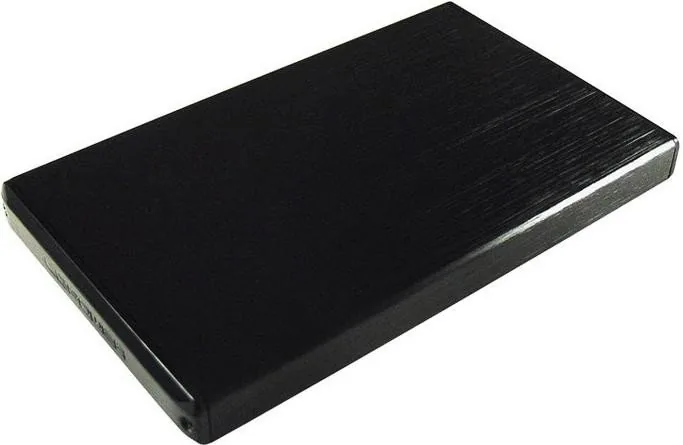
The enclosure is designed for one 2.5-inch SATA hard drive or SSD up to 3 TB. It supports SATA I, SATA II, and SATA III interfaces. The storage drive must be purchased separately.
Is this answer helpful?
Yes. The USB 3.0 Micro-B connection is backward compatible with USB 2.0 and USB 1.1. Transfer speed will be limited by the older USB standard used by the host computer.
Is this answer helpful?
Remove the two side screws and slide out the PCB interface. Carefully connect the 2.5-inch SATA drive, slide the interface and drive back into the housing, then secure it again with the screws.
Is this answer helpful?
Supported systems include Windows XP, Vista, 7, 8, and 10, Mac OS 9.1 or later, and Linux 2.4 or later. Plug-and-play support helps simplify connection on compatible systems.
Is this answer helpful?
The nominal USB 3.0 SuperSpeed rate is up to 5 Gb/s. Real-world results vary according to the installed HDD or SSD, the computer port, cable quality, and the size and type of transferred files.
Is this answer helpful?
Keep it dry and away from direct sunlight, high temperatures, flames, and corrosive materials. Handle the internal drive and connectors carefully during installation. Children should use the enclosure with adult supervision.
Is this answer helpful?
Advantages and Disadvantages
Advantages

- Supports 2.5-inch SATA I, II, and III HDDs or SSDs up to 3 TB.
- USB 3.0 offers transfer rates up to 5 Gb/s in suitable conditions.
- Backward compatible with USB 2.0 and USB 1.1 ports.
- Plug-and-play operation supports Windows, Mac OS, and Linux systems.
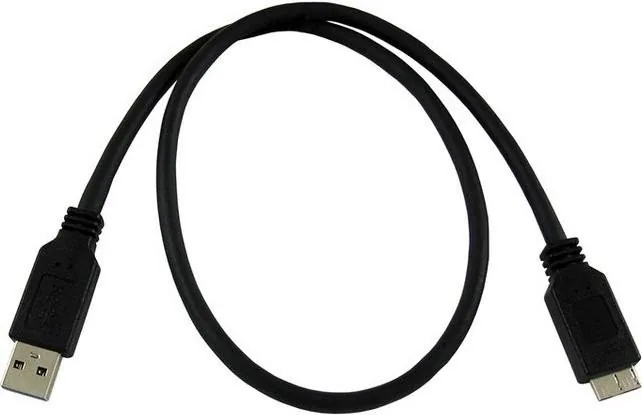
- Includes a USB 3.0 cable for connecting the enclosure to a computer.
Disadvantages

- A compatible 2.5-inch SATA drive is required and is not included.
- Installation requires removing and replacing two screws.
- Actual transfer speed depends on the drive and the computer's USB connection.
- Some SATA drives may not be supported, depending on their specific design.
- Improper use or damage can affect the two-year warranty coverage.
Product Specification
Form factor
2.5"
Internal connection
1x SATA 6 Gb/s (up to 0.37 in height)
External connection
1x USB 3.0 Micro-B (5 Gb/s)
RAID level
N/A
Fan
N/A
Dimensions
5.2 x 3.07 x 0.47 in
Weight
5.54 oz
Color
black
Special features
Aluminum enclosure
USB notation
Link
Product Description
LC-Power LC-25U3-Hydra, USB 3.0 Micro-B Manual
The LC-Power LC-25U3-Hydra is a compact external enclosure designed to turn a 2.5-inch SATA hard drive or SSD into portable storage. It provides a practical way to reuse an existing drive, create a backup solution, or carry important data between compatible computers. With its USB 3.0 Micro-B connection, the enclosure combines broad compatibility with fast transfer potential for everyday storage tasks.
Built for 2.5-inch SATA drives
This enclosure supports one 2.5-inch SATA HDD or SSD with a capacity of up to 3 TB. Its chipset is compatible with SATA I, SATA II, and SATA III drives, giving users flexibility when selecting storage hardware. A drive is not included, so the LC-25U3-Hydra can be matched with the capacity and performance level that best suits a particular setup.
Installation is straightforward. The enclosure is opened by removing two side screws, after which the drive connects directly to the internal PCB interface. Once connected, the drive and interface slide back into the housing and are secured with the screws. This simple construction makes the product suitable for upgrading, repurposing, or transporting 2.5-inch storage.
USB 3.0 speed and broad system support
USB 3.0 enables SuperSpeed transfer rates of up to 5 Gb/s under suitable conditions. The enclosure is also backward compatible with USB 2.0 and USB 1.1 ports, where it can operate at up to 480 Mb/s and 12 Mb/s respectively. Actual performance depends on the installed drive, host port, cable condition, and file types, but an SSD paired with USB 3.0 can offer notably responsive access to files.
Plug-and-play support helps keep setup uncomplicated on supported systems. The LC-Power LC-25U3-Hydra works with Windows XP, Vista, 7, 8, and 10, as well as Mac OS 9.1 and later and Linux 2.4 or later. This makes it a versatile accessory for mixed home or office environments where data may need to move between different platforms.
Everyday storage with sensible care
The enclosure includes a USB 3.0 cable, allowing users to get started once a compatible drive is installed. It is well suited to file archives, media libraries, project transfers, and secondary backups. For reliable operation, keep the enclosure in a dry location and away from direct sunlight, fire, high temperatures, and corrosive materials.
Notes
- Use a compatible 2.5-inch SATA HDD or SSD only.
- Handle the drive carefully during installation to protect its connectors.
- Back up important data independently, especially before moving or replacing drives.
- The product includes a two-year warranty from the purchase date; damage caused by improper use may affect coverage.
Search for 67,706 Manuals online


Type-in Brand or Model
Stacey Ratke
9 months ago
Is it really good value for the money, and how easy is it to assemble?
Manual.ly
9 months ago
Based on customer feedback, it offers a top price-performance ratio and is straightforward to set up. Reviews mention that assembly is quick and easy, with users stating that it can be put together without complications. If you follow the included instructions step by step, you should be able to complete the assembly fast and with minimal effort. For best results, make sure all parts are present before you start and keep the parts organized as you work.