Manual.ly Logo

LC-Power Cylindron Manual

5.0 · 1 Ratings

PDF manual · 1 Pages

English

M: OA-GPT-54-NAN
page

/ 1

Loading...
8236da34650e3b62dd7ecc75bcfdb734162a page 1
1 Preface
Lieferumfang
Lautsprecherspezikation
Bluetooth-/NFC-Verbindung herstellen
LED-Anzeige
Blaue LED blinkt
Blaue LED leuchtet
dauerhaft
Rote LED blinkt
Rote LED leuchtet dauerhaft
Status
Lautsprecher wartet auf Verbindung
Lautsprecher ist per Bluetooth® oder
per 3,5 mm-Klinkenkabel verbunden
Akku fast leer; Lautsprecher muss
aufgeladen werden
Lautsprecher wird aufgeladen; LED geht
aus, wenn Lautsprecher aufgeladen ist
LED-Anzeigen
9 Statement
10 Contact us
Vielen Dank, dass Sie sich für einen Bluetooth®-Lautsprecher mit
NFC-Funktion von LC-Power entschieden haben.
Bitte lesen Sie diese Anleitung vor der Benutzung sorgfältig durch.
Spezifikationen können sich ohne vorherige Mitteilung ändern.
1x Bluetooth®-Lautsprecher
1x Micro-USB-Ladekabel
1x 3,5 mm-Klinkenkabel
1x Benutzerhandbuch
An/Aus-Schalter: Der Bluetooth®-Modus wird automatisch aktiviert.
Play/Pause-Taste: Um zu Pausieren drücken Sie kurz die Taste.
Durch ein weiteres Drücken wird die Wiedergabe fortgesetzt.
Vorwärtstaste: Um auf das nächste Lied zu springen, drücken Sie kurz
die Taste. Durch ein längeres Drücken wird die Lautstärke erhöht.
Rückwärtstaste: Um auf das vorherige Lied zurück zu springen, drücken
Sie kurz die Taste. Durch ein längeres Drücken der Taste verringern Sie die
Lautstärke.
Mikrofon
Bluetooth®-Deaktivierungs- & Rufannahmetaste:
Drücken Sie die Taste ca. 3 Sekunden, um den Bluetooth®-Modus
zu deaktivieren.
Bei eingehendem Anruf:
Drücken Sie die Taste ca. 1 Sekunde, um einen Anruf anzunehmen.
Drücken Sie die Taste ca. 3 Sekunden, um einen Anruf abzulehnen.
Hinweis: Wenn Sie den Lautsprecher mit dem 3,5 mm-Klinkenkabel
betreiben, funktioniert die Anrufannahme nicht!
Drücken Sie die Taste ca. 3 Sekunden und es wird in den
Bluetooth®-Kopplungsmodus gewechselt.
Micro-USB-Anschluss: Verbinden Sie das Micro-USB-Ladekabel mit
dem Lautsprecher und einem freien USB-Port an Ihrem Computer,
um den Lautsprecher aufzuladen.
Line-In/AUX-Eingang: Verbinden Sie mit dem 3,5 mm-Klinkenstecker-
kabel Ihren Bluetooth®-Lautsprecher mit nicht Bluetooth®-fähigen Geräten.
Auflade-LED-Anzeige: Leuchtet die LED dauerhaft rot, so lädt der
Lautsprecher auf. Nach vollständigem Aufladen erlischt die LED.
Schalten Sie den Lautsprecher mit dem An/Aus-Schalter ein.
Der Bluetooth®-Modus wird automatisch aktiviert. Die blaue LED blinkt.
Schalten Sie jetzt die Bluetooth®-Funktion Ihres Bluetooth®-Gerätes ein
und suchen Sie nach dem Lautsprecher mit der Bezeichnung "LC-SP-3B".
Koppeln Sie, nach einer erfolgreichen Suche, Ihr Bluetooth®-Gerät mit
dem Lautsprecher "LC-SP-3B".
Sollte Ihr Bluetooth®-Gerät ein Passwort verlangen, geben Sie bitte
den folgenden Code ein: "0000" (4x Null).
Die blaue LED leuchtet nun dauerhaft. Ihr Bluetooth®-Gerät ist
jetzt mit dem Lautsprecher gekoppelt.
Hinweis: Sollte Ihr Bluetooth®-Gerät über eine NFC-Funktion verfügen, so
müssen Sie Ihr Bluetooth®-Gerät mit dem Lautsprecher nur einmal koppeln.
Danach erkennt Ihr Bluetooth®-Gerät den Lautsprecher jedesmal
automatisch als Bluetooth®-Lautsprecher an, sobald Sie die
Bluetooth®-Funktion Ihres Bluetooth®-Gerätes aktiviert haben.
Hinweise und Service
Vermeiden Sie direkte Sonneneinstrahlung sowie hohe Temperaturen.
Halten Sie den Lautsprecher von Feuer und anderen Hitzequellen fern.
Verwahren Sie den Lautsprecher in einer trockenen Umgebung. Halten Sie
ihn von Korrosivität verursachenden Materialien fern.
Wir empfehlen die Handhabung durch Kinder nur unter elterlicher Aufsicht
sowie unter Berücksichtigung des Benutzerhandbuches.
Dieses Produkt hat zwei Jahre Garantie ab Kaufdatum.
Bei Serviceleistungen wenden Sie sich bitte an Ihren Händler.
Sollte der Lautsprecher aufgrund eines Anwendungsfehlers beschädigt
werden, erlischt die zweijährige Garantiezeit sofort.
Besuchen Sie uns unter www.lc-power.com oder kontaktieren Sie uns unter
folgender E-Mail-Adresse: [email protected].
Silent Power Electronics GmbH
Mühlenstraße 123, 41352 Korschenbroich, Deutschland
TM
Technische Daten
Ausgangsleistung: 5W RMS
Kanal: 1.0-Kanal
Verstärker: digitaler Verstärker
Frequenzgang: 90 Hz - 18 kHz
Bluetooth®-Version: Bluetooth® 4.0
Bluetooth®-Chipsatz: CSR
Übertragungsbereich: 10 m
Akku-Typ: 500mAh-Lithium-Polymer-Akku
Dauerbetrieb: ca. 6 Stunden
Abmessung: ca. 7 x 6,5 x 6,5 cm (HxBxT)
Gewicht Lautsprecher: ca. 260 g
Ausgangsleistung: DC 5V
Arbeitsstrom: max. ≤350mA
Arbeitsspannung: 3,3V - 4,2V
Schwellenpegel: 80db
Einsatztemperatur: -10° C bis +50°C
Included in delivery
Notes and service
Avoid direct sunlight and a high temperature environment, keep the speaker
far away from fire and related heat sources.
Keep the speaker in dry places, keep it away from corrosiveness
causing materials.
We recommend that parents should guide their children using the item,
strictly following the notes in this manual.
The product has a two year warranty period from the date of purchase,
service issues will be handled by your dealer.
If the speaker is damaged due to improper operation, the warranty period
expires immediately.
Check www.lc-power.com or contact us by e-mail at:
Silent Power Electronics GmbH
Mühlenstraße 123, 41352 Korschenbroich, Germany
TM
Hinweis: Um die folgenden Tasten (2 bis 4) nutzen zu können, muss
der Bluetooth®-Modus aktiviert sein! Die Tasten 2 bis 4 haben
keine Funktion, wenn Sie den Lautsprecher mit dem
3,5 mm-Klinkenkabel benutzen!
Note: To use the below mentioned buttons (2 to 4), the
Bluetooth® mode must be activated! The buttons 2 to 4 have
no function if you use the speaker with the 3,5 mm audio jack!
Bluetooth/NFC connection
Turn on the speaker with the power on/off switch.
The Bluetooth® mode is automatically activated. The LED blinks blue.
Turn on the Bluetooth® feature of your Bluetooth® device and search for
the speaker with the description "LC-SP-3B".
The Bluetooth® device must be paired with the speaker "LC-SP-3B".
If you need to input a password into your Bluetooth® device,
please use the following code: "0000" (4x zero).
The blue LED flashes permanently now. Your Bluetooth® device is
paired with the speaker.
Note: If your Bluetooth® device has a NFC feature, you must pair your
device and the speaker only once.
After this your Bluetooth® device will recognize the speaker automatically,
as soon as you activate the Bluetooth® feature of your Bluetooth® device.
Technical specications
Output power: 5W RMS
Channel: 1.0 channel
Amplifier: digital amplifier
Frequency range: 90 Hz - 18 kHz
Bluetooth® version: Bluetooth® 4.0
Bluetooth® chipset: CSR
Transmittance range: 10 m
Battery type: 500mAh Lithium Polymer battery
Non-stop operation: ca. 6 hours
Dimensions: ca. 7 x 6,5 x 6,5 cm (hxwxd)
Weight speaker: ca. 260 g
DC output: DC 5V
Working current: max. ≤350mA
Working voltage: 3,3V - 4,2V
Sensitivity: 80db
Working temperature: -10° C to +50°C
5
6
1
8
3
2
4
7
9
TM
1
2
3
4
5
6
7
8
9
1
2
3
Speaker specication
5
6
1
8
3
2
4
7
9
Power on/off switch: The Bluetooth® mode is automatically activated.
Play/Pause button: To pause the playback push this button shortly.
Push the button again to continue the playback.
Forward button: To skip to the next track, push the button shortly.
The volume will increase by pushing the button for a longer time.
Backward button: To skip to the previous track, push the button shortly.
The volume will turn down by pushing the button for a longer time.
Microphone
Bluetooth® deactivate & talk button:
Push the button for 3 seconds to deactivate the Bluetooth® mode.
During incoming call:
Push the button for 1 second to answer the call.
Push the button for 3 seconds to reject the call.
Note: If you use the speaker with the 3,5 mm audio jack, the hands-free
mobile phone call feature does not work!
Push the button for 3 seconds to switch to the Bluetooth® pairing
mode.
1
2
3
4
5
6
LED indicator
Blue LED blinks
Blue LED ashes
permanently
Red LED blinks
Red LED ashes
permanently
Status
Waiting for connection
Connected to Bluetooth® device or
to 3,5 mm audio jack device
Battery is low; speaker needs to be
charged
Speaker is in charging mode; LED turns
o when charging is nished
LED indicator
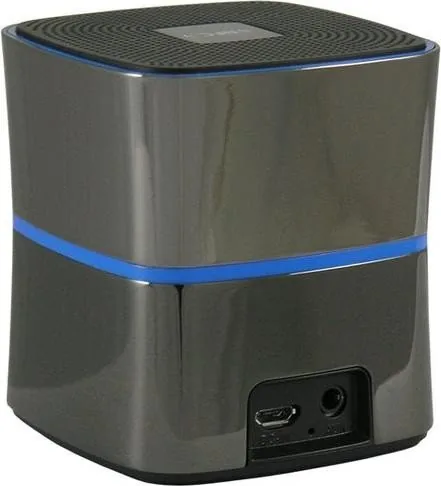
Micro USB port: To charge the speaker, connect it with a free USB port
of your computer with the help of the micro USB charging cable.
Line-In/AUX connection jack: Connect the speaker to devices
without Bluetooth® feature with the help of the 3,5 mm audio jack
LED charging indicator: The LED illuminates red during charging mode.
The LED turns off when charging is finished.
7
8
9
1
2
3
TM
Thank you for purchasing this Bluetooth® speaker with NFC feature
from LC-Power.
Please read the manual before usage.
Specifications may be subject to change without prior notice.
1x Bluetooth® speaker
1x Micro USB charging cable
1x 3,5 mm audio jack
1x user manual
Benutzerhandbuch
LC-SP-3B - Cylindron
User manual
LC-SP-3B - Cylindron

Chat with your LC-Power Cylindron manual using AI

Get instant AI answers from your LC-Power Cylindron manual

Ask anything about the LC-Power Cylindron. Answers come from this manual, with the pages they are based on.

Ask a Question

0/1000

Do you recommend Cylindron?

Yes No
0
User Pic

Sofia Richter

10 months ago

Will this small 5W speaker work right away with a PC, and what cables does it include for connection and charging?

0
User Pic

Manual.ly

10 months ago

Yes. Reviewers report it is recognized immediately when switched on. You can connect it to a PC or other audio device using the included 3.5 mm (aux) jack cables. A USB cable is also included so you can charge the speaker and use it without complicated setup. If your audio device has a headphone/line-out port, it should work with the included jack connectors right away.

M: OA-GPT-5-NAN
M: OA-GPT-5-NAN

Frequently Asked Questions

A

It is a compact Bluetooth speaker with NFC support, a built-in microphone, and an AUX input. It is designed for easy everyday listening rather than high-power home audio.

Is this answer helpful?

A

Turn the speaker on, enable Bluetooth on your phone, and search for "LC-SP-3B." If a code is requested, enter 0000. Once connected, the blue LED stays on.

Is this answer helpful?

A

Yes. If your device supports NFC, you usually need to pair only once. After that, the phone can recognize the speaker automatically when Bluetooth is turned on again.

Is this answer helpful?

A

Yes. Use the 3.5 mm AUX connection to plug in devices without Bluetooth support, such as older music players, PCs, or other audio sources.

Is this answer helpful?

A

The 500mAh battery provides about 6 hours of continuous use, depending on volume and playback conditions. Charging is handled through the Micro-USB port.

Is this answer helpful?

A

The track and call functions are tied to Bluetooth operation. When the speaker is connected through AUX, only basic audio playback is available, so those buttons are disabled.

Is this answer helpful?

M: OA-GPT-54-NAN

Advantages and Disadvantages

Advantages

  • Compact and lightweight design makes it easy to carry and place anywhere.
  • Bluetooth and AUX support give it flexible use with modern and older devices.
  • NFC pairing can speed up reconnection after the first setup.
  • Useful on-speaker controls and call support add everyday convenience.
VS

Disadvantages

  • 5W mono output is fine for personal use, but not ideal for larger rooms.
  • Call handling and some buttons do not work when using the AUX input.
  • Battery life is about 6 hours, so frequent charging may be needed for heavy use.
M: OA-GPT-54-NAN

Product Specification

Power

5W RMS

Display

no

Tuner

no

Frequency Range

90Hz-18kHz

Connections

AUX In (3.5mm Jack), USB Micro-B

Wireless

Bluetooth 4.0, NFC

Power Supply

Li-Polymer Battery (500mAh)

Playback Time

6h

Special Features

Hands-free Function

Dimensions

2.56x2.76x2.56in (WxHxD)

Weight

0.57lb

M: OA-GPT-54-NAN

Product Description

LC-Power Cylindron: Compact Sound for Daily Listening

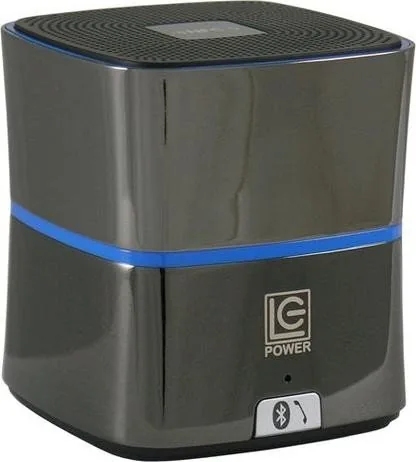
The LC-Power Cylindron is a small Bluetooth speaker designed for people who want simple wireless playback without extra fuss. With 5W RMS output and a 1.0-channel setup, it focuses on practical everyday use rather than oversized sound. Its cube-like shape, light weight, and built-in battery make it easy to carry from a desk to a kitchen, patio, or travel bag.

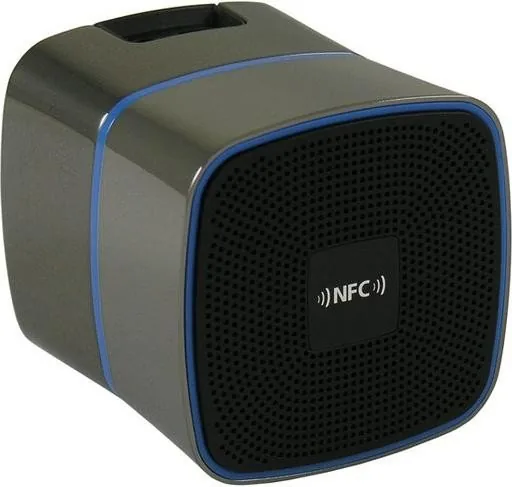
Following the LC-Power Cylindron Manual, setup is refreshingly easy. Switch the speaker on, and Bluetooth mode starts automatically. The blue LED shows that the unit is waiting to connect, then stays on once pairing is complete. On supported devices, NFC adds an even smoother experience: after the first connection, the speaker can reconnect almost instantly when Bluetooth is enabled again. That makes it a friendly choice for users who prefer fast, no-hassle pairing.

The controls are straightforward and practical. You get play/pause, track skip, volume adjustment through long presses, and a combined Bluetooth disable and call button. A built-in microphone allows hands-free calling when connected over Bluetooth, which adds convenience for quick conversations. LED indicators also help you understand what the speaker is doing at a glance: blue for connection status and red for charging or low battery.

Connectivity is another strong point. Besides Bluetooth 4.0, the Cylindron includes a 3.5 mm AUX input, so it can work with laptops, older music players, and other non-Bluetooth devices. That flexibility helps the speaker fit into more setups, especially when wireless use is not possible. Keep in mind, though, that some controls and call functions only work in Bluetooth mode, not when AUX is in use.

In terms of power, the 500mAh lithium-polymer battery offers about six hours of continuous playback, which is enough for casual listening, podcasts, or background music. The compact body measures roughly 7 x 6.5 x 6.5 cm and weighs around 260 g, making it easy to move around the house. Overall, the LC-Power Cylindron is a neat little speaker that balances portability, useful controls, and simple connectivity.

Notes

  • Best suited for personal listening and small spaces.
  • Charge via Micro-USB and watch the red LED for charging status.
  • Keep it dry, away from heat, and use the pairing code 0000 if needed.
M: OA-GPT-54-NAN

© Copyright 2026 Manual.ly
