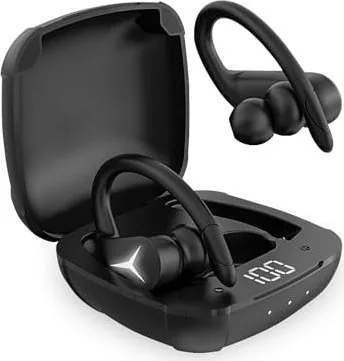
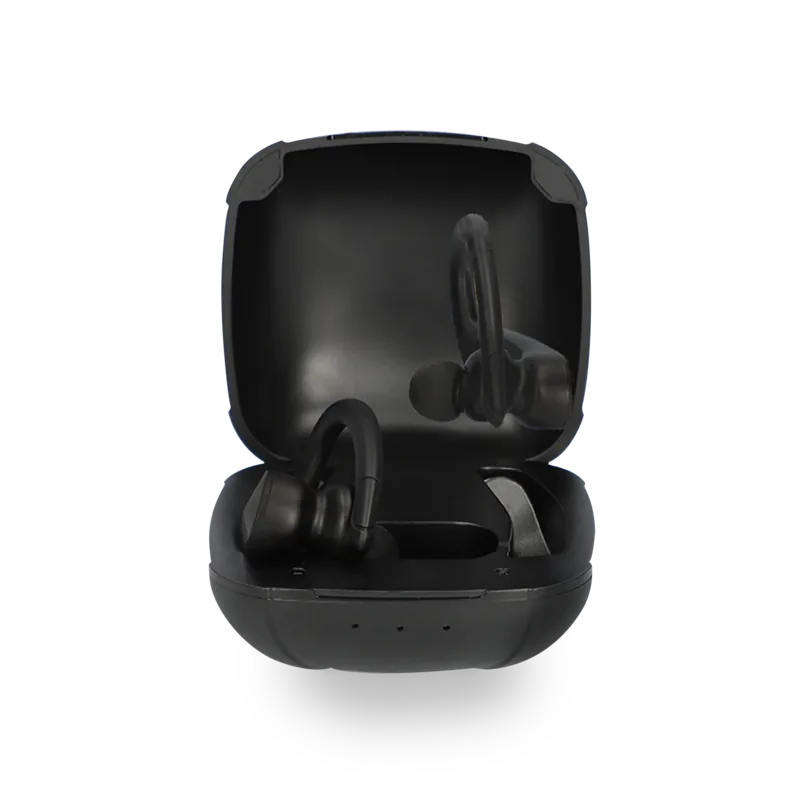
Manual.ly Logo

Ksix Sport Buds 2 Manual

0.0 · 0 Ratings

PDF manual · 48 Pages

English

M: QW-35-FL
page

/ 48

Loading...
d07fd13430bbd7f9a698397c49efffc01df3 page 1
USER GUIDE
Charging
• Remove the protective film from the earbuds when using them for the first
time.
• Fully charge both earbuds and the charging case before the first time using
them.
• Please, use the provided USB-C cable.
• Make sure the earbuds and the USB port are completely dry before charging.
SPORTBUDS2
True Wireless Earphones
User manual
Box contents
Earbuds(Left&Right)
Charging Case
User Manual
Type-C Charge Cable
S/M/L Eartips
Technical information
Bluetooth Version: 5.1+EDR
Functions: answer/reject calls, volume control, next/previous track and voice
assistant by single-click, double-click, triple-click, long-press, and other
operations. Compatible with IOS system devices, Android system devices and
Windows system devices.
Speaker Impedance: 16Ω±15%
Sensitive: 99dB±2
Frequency: 20Hz – 20,000Hz
Chipset: AD6973D4
Bluetooth profiles: A2DP V1.3/AVRCP V1.5/HFP V1.7/HSP V1.2
Operation distance: 10 meters
Battery: Earbuds: Polymer battery 581013Charge Case: Polymer Battery
663035
Earbuds capacity: 50mAh each earbud
Charging Case capacity: 700mAh
Earbuds’ battery size: L*W*H: 5.8*10*13mm
Charging Case’s battery size: L*W*H:6.6*30*35mm
Charging Interface: Type-C
Playtime: 4-6 hours
Charging case charges: 4 times
Earbuds Size (L*W*H): 53.2x37.9x29.0mm
Earbuds Weight (Single Unit): 8.5g
Charge Case Size(L*W*H): 70.0*68.0*44.0mm
Charge Case Weight: 58.5g
Input: 5V 700mA
Output: 5V 120mA
Earbuds Full Charged: 1.5hours
Case Fully Charged: 1.5-2hours
Power on
Mode 1
Take both earbuds out of the charging case and they will automatically turn on
(with white LED lights flashing) and start pairing.
Mode 2
When the earbuds are o and not in the charging case. Simultaneously click and
hold the Touch Area of both earbuds for 3 seconds to power on and enter
pairing mode (with white LED lights flashing).
Power o
Mode 1
Put the earbuds back in the charging case to turn them o.
Mode 2
If the earbuds are not in the charging case, pause the music first, click and hold
the Touch Area of both earbuds for 4 seconds to turn them o.
Pairing
Mode 1
Take both earbuds out of the charging case. They will automatically enter the
pairing mode in which the LED lights flash white, and then select "BXAUBT05”.
Mode 2
If the earbuds are not in the charging case, click and hold the button of both
earbuds for 6 seconds. they will automatically enter the pairing mode. Then
select "BXAUBT05” on your phone.
Note: The earbud will reconnect to the paired device by default. If you want to
pair to a second smartphone, please disconnect the name on the paired
smartphone.
Touch Control
Volume Up/Down
Volume+: click and hold the left Touch Area to turn up the volume.
Volume-: click and hold the right Touch Area to turn down the volume.
Next / Previous Track
Next Track: double click the right Touch Area.
Previous Track: double click the left Touch Area.
Play / Pause
Click the Touch Area of either earbud once.
Answer / hang up
Click the Touch Area of either earbud once.
Reject a call
Double click the Touch Area of either earbud when there is an incoming call.
Activate Siri
Triple click the Touch Area of either earbud.
Maintenance recommendations
• Regularly clean the product with a dry cloth. The product must be disconnected or switched o
when you clean it.
• Keep the connectors and/ or ports free from dust, lint, etc. to prevent improper connections.
• Avoid breaking the device. Do not put objects over it or bend it too strong.
• If the product includes a cable do not bend it too strong and do not pull from it to unplug the
product.
• Do not wet the product. Keep it always in a dry place, away from humidity.
• When not using the product, store it in a place free from dust, dirt, lint, liquids, etc.
• If water or other liquids enter the product interior, unplug it immediately from any attached
power source or device it is connected to.
• Avoid dropping or hitting the product. It might be damaged.
• Do not use the product for anything other than its intended use.
• Please recycle the product in accordance with local environmental laws and regulations.
Safety information
Please read the following instructions before using the device for the first time:
• When you use device keep it away from heat sources (fire) and from humidity sources (water and
other liquids).
• If the product is wet or damaged do not us it.
• Do not use the product with wet hands.
• Do not leave the product in contact with flammable materials.
• Do not expose the product to high temperatures (for example: inside a car during hot weather)
• Do not throw the product into fire.
• Keep the product away from children.
• Disconnect or switch o the product if you are not going to use for a long period of time.
• Do not use the device if you perceive any visible defects.
• Do not attempt to open or puncture the product. You might damage it.
• Do not use the product with incompatible devices.
• Do not dismount or modify the product. These actions will invalidate the Warranty.
BXAUBT05
Legal Note
Hereby, Atlantis Internacional S.L. declares that this product is in compliance with the essential
requirements and other relevant provisions of Directive 2014/53/EC.
The features and functions described in this manual are based on tests made by Atlantis
Internacional S.L. It is the user’s responsibility to examine and verify the product after its purchase.
Atlantis Internacional S.L. is not responsible and will never be liable for any personal loss or injury,
economical loss, material loss or any damage due to misuse, abuse or improper installation of the
product.
For electronical devices with Bluetooth: Atlantis Internacional S.L. is not responsible and will never
be liable for any function, communication and connection failure between the product and
Bluetooth enabled devices.
Electronic and electrical devices disposal
This symbol indicates that electrical and electronic equipment is to be collected separately.
• This product is designated for separate collection at an appropriate collection point. Do not
dispose of as household waste.
• The final price of this product includes the cost necessary for the correct environmental
management of the generated waste.
• If the equipment uses batteries, they must be removed from the equipment and disposed in an
appropriate collection center. If the batteries cannot be removed, do not attempt to do it yourself
since it must be done by a qualified professional.
• Separate collection and recycling helps conserve natural resources and prevent negative
consequences for human health and the environment that might result from incorrect disposal.
• For more information, contact the retailer or the local authorities in charge of waste
management.

Chat with your Ksix Sport Buds 2 manual using AI

Get instant AI answers from your Ksix Sport Buds 2 manual

Ask anything about the Ksix Sport Buds 2. Answers come from this manual, with the pages they are based on.

Sport Buds 2 Maintenance Schedule

Regularly
Clean the product with a dry cloth

Ensure the product is disconnected or switched off before cleaning. Do not wet the product.

Regularly
Keep connectors and ports free from dust

Remove dust, lint, and other debris from connectors and ports to prevent improper connections.

M: qwen/qwen3.8-flash

Ask a Question

0/1000

Do you recommend Sport Buds 2?

Yes No

Frequently Asked Questions

A

Remove both earbuds from the case to activate automatic pairing mode with flashing white LED lights. Select BXAUBT05 on your phone. If not in the case, hold touch areas for 6 seconds and then select the same name.

Is this answer helpful?

A

Each earbud offers 4 to 6 hours of playtime on a single charge. The charging case provides an additional 4 full charges for extended usage sessions.

Is this answer helpful?

A

Yes, they are compatible with IOS system devices, Android system devices, and Windows system devices via Bluetooth 5.1+EDR technology.

Is this answer helpful?

A

Earbuds require approximately 1.5 hours to fully charge. The charging case takes between 1.5 to 2 hours to fully charge using the included Type-C cable.

Is this answer helpful?

A

Click and hold the left touch area to increase volume, and click and hold the right touch area to decrease volume accordingly.

Is this answer helpful?

A

The manual advises keeping the product dry and avoiding water to prevent damage. It is recommended to keep it in a dry place away from humidity during and after use.

Is this answer helpful?

A

The package contains Left and Right Earbuds, a Charging Case, a User Manual, a Type-C Charge Cable, and S, M, and L Eartips for a custom fit.

Is this answer helpful?

M: QW-35-FL

Advantages and Disadvantages

Advantages

  • Bluetooth 5.1+EDR ensures stable connection up to 10 meters distance for modern devices.
  • Provides 4 to 6 hours playtime with additional 4 charges from the charging case.
  • Features intuitive touch controls for music, calls, and Siri activation easily.
  • Lightweight design with 8.5g weight per earbud for comfortable long-term wear.
  • Supports Type-C charging for fast and convenient power replenishment sessions.
VS

Disadvantages

  • Requires careful drying before charging to prevent potential device damage issues.
  • Water exposure must be avoided as the product is not explicitly waterproof rated.
  • Charging time is approximately 1.5 hours for earbuds which may be moderate.
  • Manual instructions required for pairing process if automatic connection fails.
  • Unit weight is light which might impact durability against heavy drops.
M: QW-35-FL

Product Specification

Type

Earphones (In-Ear)

Form Factor

True Wireless, Ear Hook

Principle

Closed

Microphone

Integrated

Wireless

Bluetooth 5.1

Control

Touch Control

Battery Life

4h, 20h (with charging case)

Battery

USB-C Charging Port, Charging Case (700mAh), 1.5h Charging Time

Frequency Range

20Hz-20kHz

Impedance

16 Ohm

Sensitivity

99dB

Driver

6mm

Device Features

Water Resistant (IPX5)

Software Features

Voice Assistant (Apple Siri)

Color

Black

Weight

0.30 oz (per earphone), 2.08 oz (Charging Case)

M: QW-35-FL

Product Description

Discover the Ksix Sport Buds 2 Experience

Are you searching for reliable audio equipment for your active lifestyle? The Ksix Sport Buds 2 offer an exceptional wireless solution designed for sports and daily use. These True Wireless Earphones deliver high-quality sound with advanced Bluetooth technology. When you explore the Ksix Sport Buds 2 Manual, you unlock the full potential of your device. This guide helps users maximize comfort and performance in their daily activities without hassle.

Audio Quality and Connectivity

Engineered with modern audio components, these earphones support Bluetooth version 5.1+EDR. This ensures a stable connection within a 10-meter operation distance from your device. The headset functions seamlessly with IOS system devices, Android system devices, and Windows system devices. You enjoy clear calls and music playback without constant interruptions caused by connection drops. The speaker impedance is 16 ohms, providing depth in your audio experience. Frequency response spans from 20Hz to 20,000Hz for full sound coverage. The chipset AD6973D4 ensures reliable performance during operation.

Battery Life and Charging

Power is crucial for active users on the go. Each earbud contains a polymer battery with a capacity of 50mAh, offering 4 to 6 hours of playtime per charge. The charging case holds an additional 700mAh capacity, providing up to 4 extra charges for extended listening sessions. Both units support Type-C charging interfaces for modern convenience. It takes approximately 1.5 hours to fully charge the earbuds, and the case requires 1.5 to 2 hours. Always ensure the earbuds and USB port are dry before connecting power to prevent damage.

Intuitive Touch Controls and Fit

Control is simplified through the responsive touch area. Single-click play or pause, double-click next track or reject a call. You can activate Siri with a triple click on either side. Volume adjustment involves holding the left or right area respectively. Powering on happens automatically when removing from the case, or by holding both touch areas for three seconds. The single unit weighs only 8.5g, ensuring lightweight comfort during long sessions. The box contains S, M, and L eartips for a custom fit to prevent falling during activity.

Maintenance and Safety Protocols

Proper care ensures longevity for your investment. Keep the product dry and clean with a dry cloth periodically. Avoid extreme heat or water exposure as it is water sensitive. Store the device in a dust-free place when not in use. Do not dismount or modify the product as these actions will invalidate the warranty. The manual lists specific safety information to follow before initial use. Keep the product away from children and flammable materials. Additionally ensure connectors remain free from dust to prevent improper connections.

What Comes in the Box

The shipping package is designed for immediate use. It contains the Earbuds, a Charging Case, the User Manual, a Type-C Charge Cable, and S, M, and L Eartips. Everything needed for setup is included.

Conclusion and Manual Reference

Experience premium sound and convenience with these wireless earbuds today. The design balances functionality and portability perfectly. Always consult the Ksix Sport Buds 2 Manual for specific troubleshooting steps to resolve any pairing or playback issues effectively. Enjoy your music anywhere with this versatile audio companion.

M: QW-35-FL

© Copyright 2026 Manual.ly