

Ksix Spark Manual
PDF manual · 30 Pages
English



Quick check
Incorrect answer, please try again.
Chat with your Ksix Spark manual using AI
Get instant AI answers from your Ksix Spark manual
Ask anything about the Ksix Spark. Answers come from this manual, with the pages they are based on.
Ask a Question
Do you recommend Spark?
Yes NoFrequently Asked Questions
Take the earbuds out of the charging case. They will flash blue lights. Turn on Bluetooth on your phone, search for 'SPARK', and click it. A voice prompt confirms connection. After first pairing, they connect automatically when removed from the case.
Is this answer helpful?
The earbuds have a 45 mAh capacity and the case holds 450 mAh. You receive extended listening sessions. The case charges via a Type-C cable. Indicator lights show charging status.
Is this answer helpful?
Delete the phone connection. Tap either earbud 5 times. Red and blue lights will flash alternately. Once off, the reset is complete. Reconnect to the phone afterwards.
Is this answer helpful?
Yes, tapping the left earbud once lowers volume and the right raises it. Some phones support direct volume adjustment, while others require phone-side settings. iPhones support both.
Is this answer helpful?
There is a 3-year warranty covering material or manufacturing defects. It does not cover consumable parts or wear and tear. Consult local distributor for specific terms.
Is this answer helpful?
Use the included USB to USB-C cable to charge the case directly. The earbuds charge automatically when placed inside the box. Red light indicates charging mode.
Is this answer helpful?
No, keep the product dry. Avoid moisture, humidity, and submerging. Clean with a dry cloth only. Exposure to liquids invalidates warranty protection immediately.
Is this answer helpful?
Advantages and Disadvantages
Advantages

- Bluetooth 5.2 provides reliable wireless connectivity up to 10 meters.
- Touch controls allow easy management of music, calls, and volume without touching phone.
- Includes three pairs of silicone eartips ensuring a comfortable fit for different ear sizes.
- Fast recharge capability via USB Type-C cable ensures minimal downtime.
- Comes with a comprehensive 3-year warranty protecting against manufacturing defects.
Disadvantages

- The product lacks explicit waterproof ratings so moisture damage is possible if wet.
- Limited to 10-meter operation range may be restrictive for larger open environments.
- Touch panels can sometimes register accidental input when handling the earbuds.
- Volume adjustment depends on phone compatibility and may not work on all Android devices.
- Resetting requires manual tapping which might be unintuitive for new users initially.
Product Specification
Type
Earbuds (In-Ear)
Form Factor
True Wireless, Hookless
Design
Closed-Back
Microphone
Built-in
Connectivity
Bluetooth 5.2
Controls
Touch Control
Battery Life
7 h, 27 h (with Charging Case)
Battery
USB-C Charging Port, Charging Case (450 mAh), 1.5 h Charging Time
Impedance
32 Ω
Sensitivity
90 dB
Software Features
Voice Assistant (Amazon Alexa, Apple Siri, Google Assistant)
Product Description
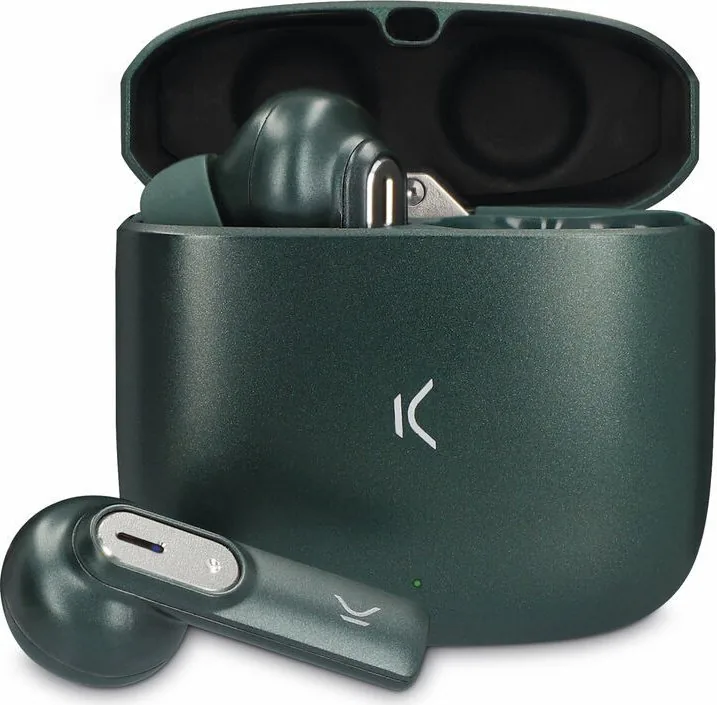
Experience Freedom with Ksix Spark Wireless Headphones
When you want high-quality audio without the hassle of cables, the Ksix Spark Wireless Headphones stand out as a top choice for modern listeners everywhere. Designed with portability and performance in mind, these innovative earbuds deliver crisp sound across a broad frequency range from 20Hz to 20KHz. Whether you are commuting, working out at the gym, or relaxing at home, the reliable Bluetooth 5.2 connectivity ensures a rock-solid connection up to 10 meters away from your mobile device.
One of the most appealing aspects of using the Ksix Spark is the intuitive interface designed for seamless interaction. The touch-sensitive operating area allows you to control playback, adjust volume, and manage incoming calls with simple taps and strategic holds. You do not need to constantly reach into your pocket to manage your music stream during active moments. The included Ksix Spark Manual details every single gesture so you can master the controls quickly. For instance, a quick double tap plays or pauses tracks, while holding buttons lets you skip songs or activate your voice assistant instantly.
Battery life is crucial for daily commuters and heavy users, and this device does not disappoint in this regard. With a 45 mAh capacity in each individual earbud and a robust 450 mAh charging case, you get extended listening sessions. The case utilizes a standard Type-C cable for convenient recharging whenever power runs low. The smart indicator lights provide clear feedback on charging status and connection states, ensuring you never run out of power unexpectedly during a long conference call or commute.
Comfort is paramount for headphone designs, and this pack includes six eartip sizes to ensure a perfect seal for various ear shapes. Safety guidelines recommend keeping the product completely dry and avoiding exposure to extreme heat to maintain longevity. Proper maintenance involves regular cleaning with a soft dry cloth and storing the unit in a secure place when not in use. This attention to detail helps preserve the device integrity over time for many years.
Overall, the Ksix Spark offers a balanced mix of functionality and design. It caters to users who value total ease of use and reliable wireless performance above all else. By referring to the official documentation initially, owners can maximize their experience significantly. It is more than just headphones; it is a dedicated companion for your daily audio needs. Remember to update your usage knowledge regularly by consulting the official manuals for the best possible results every day. The 3-year warranty covers manufacturing defects to ensure satisfaction.
Search for 67,706 Manuals online


Type-in Brand or Model