Manual.ly Logo

Ksix Rainbow Manual

0.0 · 0 Ratings

PDF manual · 24 Pages

English

M: qwen/qwen3.5-flash-20260224
page

/ 24

Loading...
f30bd971cf567c63012e08aed33e44d58d4a page 1
RAINBOW
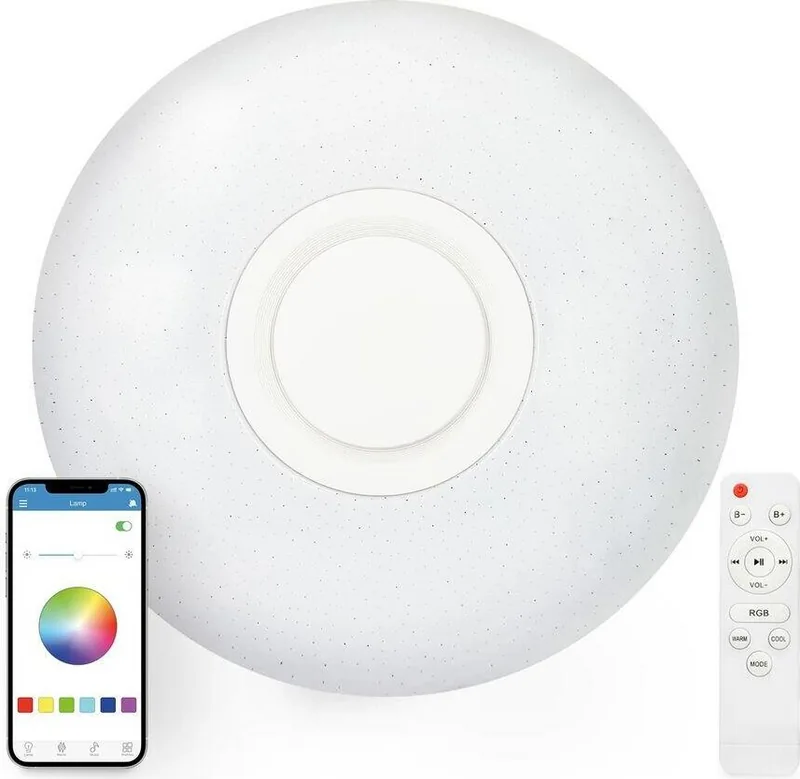
Bluetooth Speaker Lamp
User manual
BXPLAFLED40
Technical information
Light output: 30W
RGB output: 5W
Speaker output: 5W
Dimensions: 40 x 7 cm (diameter)
Bluetooth version: 4.0
Color temperature: 3000K-6800K
Brightness: 2200 lumens
Lamp bulbs beam angle: 165°
Light beam angle: 180°
Working voltage: AC200~265V
Working temperature: -20~50°C
RA: ≥80
Lifetime: 30000h
Light source type: LED lamp, 108pcs
Irradiation area: 10-20m2
In the box
1 x LED ceiling lamp
1 x remote control
4 x screws
4 x plastic wall plugs
1 user manual
Illustration
How to use the remote control
Turn on/o the lamp
Press the ON/OFF button to turn on the lamp. Press the ON/OFF button to turn o
the lamp.
Music control
Volume: Please, press the Volume adjustment (+) button to volume up, and Volume
adjustment (-) to volume down.
Song control: To pause or play a song, please, press the Play/Pause button. To
reproduce the previous or next track, press the Previous song or Next song buttons
respectively.
Light control
Colorful light modes: Press the RGB button to choose a color mode. There are
dierent kinds of color modes you can choose using the remote control:
• Flicking monochromatic light modes (red, green or blue)
• Flicking multicolored light modes
• Fading multicolored light modes
• Light modes changing to the music beat
• Static monochromatic light modes (red, green or blue)
• Rainbow light mode
Long press to make the lights change to the music.
Brightness adjustment: Press the Color temperature (Warm) button to increase
color temperature. Press Color temperature (Cool) to decrease color temperature.
White/Warm/Neutral/Night light modes: Press the Mode button to choose a light
mode.
• Press once to activate the white light mode.
• Press twice to activate the warm light mode.
• Press three times to activate the neutral light mode.
• Press four times to activate the night light mode.
How to use the i-Link app
Search “i-Link” on App Store or Play Store. It can also be downloaded by scanning
the following QR code:
Note: Please, open the GPS location information when installing and allow all
permissions.
Pairing (speaker)
1. Turn on the ceiling light your device Bluetooth.
2. Search i-Link on your device Bluetooth connection interface. Once it appears
on screen, select it to start pairing.
3. Once the connection is successful, the speaker will play a sound.
4. Please, open your device music player and play a song to check if the
connection was successful.
Pairing (lamp)
1. Follow the steps set for the speaker pairing.
2. Open the i-Link app and click the menu button placed in the upper left corner.
3. Tap the first option (“BT Connect”)
4. The app will automatically detect the lamp and start pairing. If this does not
happen, please search manually by selecting the search button on the bottom and
start pairing.
Notes
• If connection is not possible, please check that the lamp has been properly
installed and that the above steps have been followed.
• The app may not work properly due to software compatibility issues. If this
happens, please restart the phone or reinstall the app.
• The lamp can be connected to one device only at the same time. To connect it to
another phone, please, disconnect the previous device first.
• The speaker can play both the device internal storage and other apps music.
• The music timer is to play music from your device internal storage or other apps.
To turn o the music, please use your mobile phone.
App functions
Timer set: Set timers for lights, music, alarms and sound adjustment.
Color light control: Choose one of the preset color modes or choose it manually by
sliding the dot over the multicolored circle. Adjust color brightness with the upper
bar.
White/Warm/Neutral/Night light control: Choose one of the preset color modes
or choose it manually by sliding the dot over the multicolored circle. Adjust color
brightness and temperature with the upper bars.
Music control: It shows the music stored in your mobile memory.
RGB color scenes: Choose your favorite color eect from a wide range of dierent
color scenes.
Warnings
• Please, strictly follow this user manual to install and use the product to avoid
accidents.
• Do not disrupt the bulb or modify any component.
• Turn o the power and the main electrical panel before installing or doing
maintenance task to avoid damage from electric shock.
• Do not install the lamp on unstable or unsafe ceilings.
• Do not cover the lamp with blankets or similar objects.
• Do not handle the bulb or any other lamp component for installation, repairing or
checking unless you are a qualified electrician. Wire connecting must follow IEE
electric standard or any other valid national standard.
• Do not install the lamp above hot or wet surfaces.
Maintenance recommendations
• Regularly clean the product with a dry cloth. The product must be disconnected or
switched o when you clean it.
• Keep the connectors and/ or ports free from dust, lint, etc. to prevent improper
connections.
• Avoid breaking the device. Do not put objects over it or bend it too strong.
• If the product includes a cable do not bend it too strong and do not pull from it to unplug
the product.
• Do not wet the product. Keep it always in a dry place, away from humidity.
• When not using the product, store it in a place free from dust, dirt, lint, liquids, etc.
z• If water or other liquids enter the product interior, unplug it immediately from any
attached power source or device it is connected to.
• Avoid dropping or hitting the product. It might be damaged.
• Do not use the product for anything other than its intended use.
• Please recycle the product in accordance with local environmental laws and regulations.
Safety information
Please read the following instructions before using the device for the first time:
• When you use device keep it away from heat sources (fire) and from humidity sources
(water and other liquids).
• If the product is wet or damaged do not us it.
• Do not use the product with wet hands.
• Do not leave the product in contact with flammable materials.
• Do not expose the product to high temperatures (for example: inside a car during hot
weather)
• Do not throw the product into fire.
• Keep the product away from children.
• Disconnect or switch o the product if you are not going to use for a long period of time.
• Do not use the device if you perceive any visible defects.
• Do not attempt to open or puncture the product. You might damage it.
• Do not use the product with incompatible devices.
• Do not dismount or modify the product. These actions will invalidate the Warranty.
4
6
8
9
10 11
5
7
1 - ON/OFF
2 - Brightness adjustment (-)
3 - Brightness adjustment (+)
4 - Volume adjustment (+)
5 - Previous track
6 - Next track
7 - Play/Pause
8 - Volume adjustment (-)
9 - RGB
10 - Color temperature (Warm)
11 - Color temperature (Cool)
12 - Mode
* 2 x AAA batteries needed
Legal Note
Hereby, Atlantis Internacional S.L. declares that this product is in compliance with the
essential requirements and other relevant provisions of Directive 2014/53/EC.
The features and functions described in this manual are based on tests made by Atlantis
Internacional S.L. It is the user’s responsibility to examine and verify the product after its
purchase. Atlantis Internacional S.L. is not responsible and will never be liable for any
personal loss or injury, economical loss, material loss or any damage due to misuse, abuse
or improper installation of the product.
For electronical devices with Bluetooth: Atlantis Internacional S.L. is not responsible and
will never be liable for any function, communication and connection failure between the
product and Bluetooth enabled devices.
Electronic and electrical devices disposal
This symbol indicates that electrical and electronic equipment is to be collected separately.
• This product is designated for separate collection at an appropriate collection point. Do
not dispose of as household waste.
• The final price of this product includes the cost necessary for the correct environmental
management of the generated waste.
• If the equipment uses batteries, they must be removed from the equipment and disposed
in an appropriate collection center. If the batteries cannot be removed, do not attempt to
do it yourself since it must be done by a qualified professional.
• Separate collection and recycling helps conserve natural resources and prevent negative
consequences for human health and the environment that might result from incorrect
disposal.
• For more information, contact the retailer or the local authorities in charge of waste
management.

Chat with your Ksix Rainbow manual using AI

Get instant AI answers from your Ksix Rainbow manual

Ask anything about the Ksix Rainbow. Answers come from this manual, with the pages they are based on.

Rainbow Maintenance Schedule

Regularly
Clean the product with a dry cloth

Ensure the product is disconnected or switched off before cleaning. Do not use wet cloths.

Regularly
Keep connectors and ports free from dust

Remove dust, lint, and dirt from connectors and ports to prevent improper connections.

M: qwen/qwen3.8-flash

Ask a Question

0/1000

Do you recommend Rainbow?

Yes No

Frequently Asked Questions

A

Yes, use the i-Link app on Android and iOS devices. It allows for custom timers, specific color selection, and music streaming directly to the built-in speaker system.

Is this answer helpful?

A

The LED source is rated for over 30000 hours of continuous operation before replacement is needed. This ensures long-term reliability for your home.

Is this answer helpful?

A

Yes, the built-in 5W speaker connects via Bluetooth to play audio from your device library. You can control volume and tracks remotely.

Is this answer helpful?

A

Yes, wiring must follow local electrical standards. A qualified electrician should perform the task to avoid damage and ensure safety compliance.

Is this answer helpful?

A

The unit measures 40 centimeters in diameter and 7 centimeters in height for a low profile fit within standard ceiling openings.

Is this answer helpful?

A

Yes, you can choose from various RGB effects or warm white tones using the remote. The app also offers customizable color scenes.

Is this answer helpful?

A

It has an IP42 rating meaning it resists splashes but should not be submerged in water. Keep it away from direct moisture sources.

Is this answer helpful?

M: qwen/qwen3.5-flash-20260224

Advantages and Disadvantages

Advantages

  • Integrated speaker and light saves space and wiring
  • Long LED lifespan reduces replacement costs significantly
  • Remote and app control offers flexible management options
  • High brightness suitable for large living areas effectively
  • Adjustable color temperature fits various daily moods
VS

Disadvantages

  • Bluetooth 4.0 is older standard compared to 5.0 devices
  • Connection limited to one device simultaneously only
  • Installation requires qualified electrician for safety compliance
  • Water resistance is low so avoid wet environments
  • Browsers may need permissions for the App Store download
M: qwen/qwen3.5-flash-20260224

Product Specification

Type

Ceiling light, Wall light

Energy Efficiency Class (Built-in Light Source)

F (A to G)

Built-in LEDs

Yes

Socket

No

Light Source

LED (built-in light source), 3,240 W (108 x 30 W), warm white-daylight white (3,000-6,800 K), RGBW, dimmable, 2,200 lm

Total Power

30 W

Total Luminous Flux

2,200 lm

Material

Plastic

Color

White

Design

Round

Features

Dimmable (only via app or remote control), White color temperature control, RGB color control, Color changing, Timer, Programmable lighting settings, Remote control, Integrated speaker

Smart Home

App control optional (Bluetooth 4.0)

Dimensions

15.75 x 2.76 in (Dia x H)

Note

For full functionality, a gateway from the manufacturer may be required. This may also change via a firmware update. Please note the manufacturer-specific instructions!

M: qwen/qwen3.5-flash-20260224

Product Description

Welcome to the Future of Home Lighting

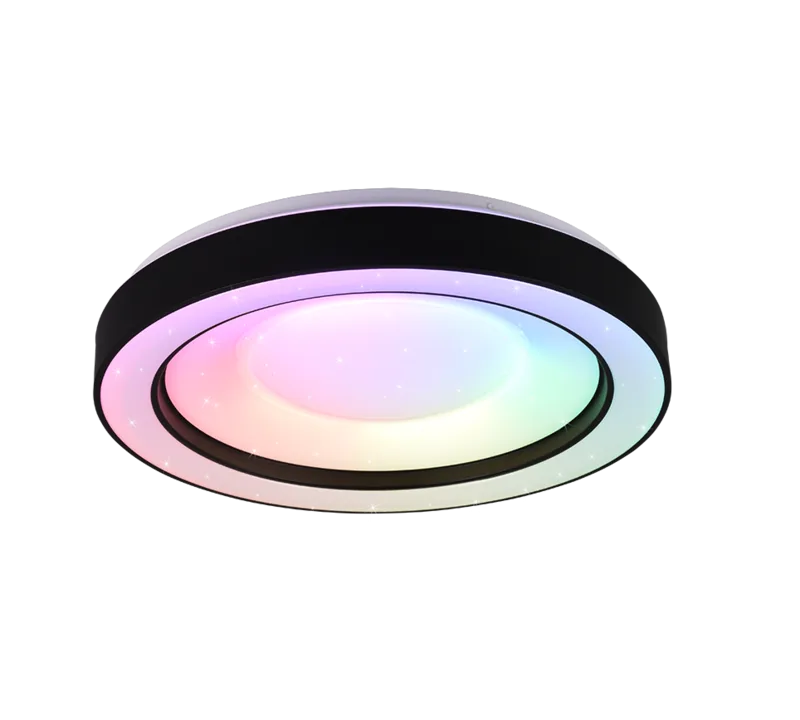
Transform your living space with the Ksix Rainbow RGBW Ceiling Light 40cm. This innovative device combines premium lighting with integrated audio capabilities. Designed for modern homes, it fits perfectly into standard ceiling openings with a sleek 40cm diameter finish. Users can enjoy bright illumination alongside a compact speaker built directly into the fixture housing. The light source utilizes advanced LED technology, ensuring energy efficiency throughout its long operational life without requiring frequent bulb replacements.

Controlling Your Environment

Adjusting the atmosphere is simple and intuitive. You have two primary methods to manage settings. The included remote control offers direct access to power, brightness, and color temperature adjustments. You can select between white, warm, neutral, or night light modes with simple button presses. For smarter automation and deeper customization, download the i-Link app to your smartphone. It allows for custom timers, specific color selection, and music streaming directly to the built-in speaker system. You can change brightness and temperature easily. Refer to the Ksix Rainbow RGBW Ceiling Light 40cm Manual for detailed connectivity steps.

Technical Specifications

The unit delivers 2200 lumens of brightness, covering an area of 10 to 20 square meters efficiently without dark spots. Supported range is 3000K to 6800K to match any time of day. Bluetooth 4.0 ensures stable connection with mobile devices for control or audio. The speaker provides 5W output while the LED system consumes 30W. It features 108 LED bulbs with a lifetime exceeding 30000 hours. The Color Rendering Index is 80 or higher for better color quality.

Safety and Maintenance

Proper installation is crucial for long life. Disconnect power at the panel before mounting. Use provided screws for secure attachment to stable ceilings. Keep away from water and heat sources. Clean with a dry cloth while switched off. Do not disassemble the unit yourself. It is for indoor dry use only. Contact a qualified technician if issues arise regarding wiring.

Final Notes

Enjoy the benefits of this smart home device. It serves as a light source and entertainment piece. Ensure Bluetooth is enabled for features. Dispose of batteries responsibly. This product enhances comfort and style in your home with versatile control options and modern design aesthetics.

M: qwen/qwen3.5-flash-20260224

© Copyright 2026 Manual.ly