
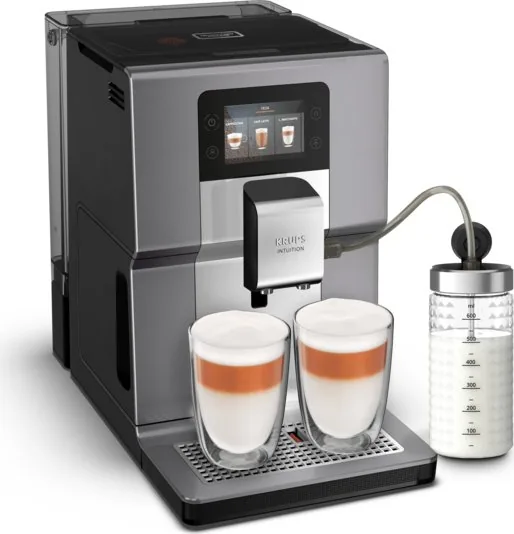
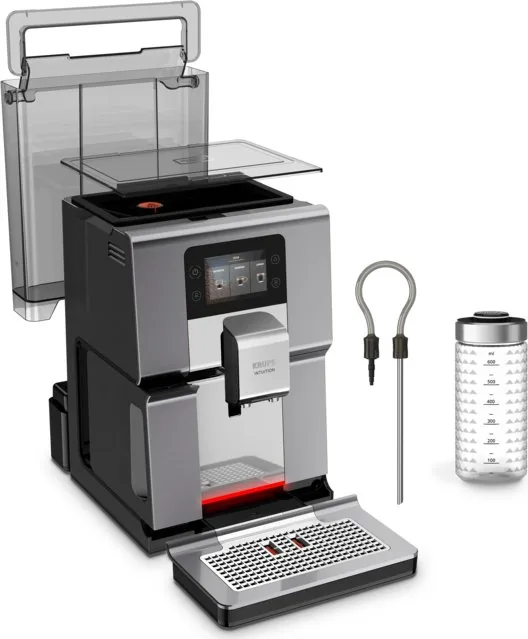
Krups EA875E Intuition Preference+ Manual
PDF manual · 295 Pages
English



Quick check
Incorrect answer, please try again.
Chat with your Krups EA875E Intuition Preference+ manual using AI
Get instant AI answers from your Krups EA875E Intuition Preference+ manual
Ask anything about the Krups EA875E Intuition Preference+. Answers come from this manual, with the pages they are based on.
EA875E Intuition Preference+ Maintenance Schedule
Change the filter cartridge two months after installation or when the machine notifies you. Turn the grey ring to indicate date + 2 months.
Start the machine's rinsing cycle. Manually clean the milk tube and nozzle with hot water and soap immediately after use.
Empty when the machine notifies you or when floats are raised. Ensure machine is on to record emptying. Do not put in dishwasher.
Remove and clean the removable One Touch Cappuccino block using the cleaning needle for optimum foam quality.
Run the 13-minute automatic cleaning program using a KRUPS cleaning tablet to degrease the coffee circuit.
Run the 20-minute descaling program using a KRUPS descaler sachet to remove limescale deposits affecting taste.
Free maintenance reminders
Timed to your purchase date. Always free, unsubscribe anytime.
Ask a Question
Do you recommend EA875E Intuition Preference+?
Yes No
Elinore Moore
6 months ago
I am disappointed that the milk frother stops working or produces warm milk instead of foam even after cleaning. Is there a fix?
Frequently Asked Questions
You can adjust the coffee strength by changing the amount of ground coffee. Select your drink and choose between one, two, or three beans using the control panel. One bean produces a softer taste while three creates a full-bodied flavor.
Is this answer helpful?
Setting the water hardness prevents limescale buildup inside the machine. You must configure this based on your local water supply to ensure optimal performance and longevity of the appliance.
Is this answer helpful?
Yes, the machine supports preparing two cups of a recipe simultaneously. Simply select the desired beverage and press the double-cup button to brew both servings at the same time.
Is this answer helpful?
You should rinse the milk system after every milky drink. Additionally, perform a deep manual cleaning of the milk tube and nozzle immediately after each use to maintain hygiene and foam quality.
Is this answer helpful?
Slow flow usually indicates the grind is too fine. Turn the grinding fineness adjustment button to the right for a coarser grind. You can also perform a rinse cycle or check the filter cartridge.
Is this answer helpful?
If beans run out, an alert will appear. Fill the container and press OK to resume the recipe without wasting the coffee already processed. The machine will continue from where it stopped.
Is this answer helpful?
Advantages and Disadvantages
Advantages

- Intuitive touchscreen interface with smartphone-like navigation
- Intuitive Light Indicator provides clear status updates and alerts
- One Touch Cappuccino block ensures consistent milk foam quality
- Customizable user profiles store up to seven favorite recipes each
- Automated maintenance programs simplify cleaning and descaling
Disadvantages

- Milk tube requires manual cleaning after every use to prevent clogging
- Oil-coffee beans can damage the grinder and should be avoided
- Descaling frequency depends heavily on usage of milky drinks
- Machine may run grinder empty briefly if beans are not fed correctly
- Initial setup requires configuring water hardness manually
Product Specification
Power
1450W
Color
gray, silver, black
Pump Pressure
217.56 psi
Coffee System
Whole Beans
Milk System
Separate Milk Container
Grinder
Adjustable Conical Grinder (5 Settings)
Coffee Temperature
Adjustable (3 Settings)
Hot Water Temperature
Adjustable
Water Tank Capacity
0.79 gal
Bean Hopper Capacity
8.82 oz
Display
Touchscreen
Features
Touch-Control Operation, Dual Height-Adjustable Spout, 2-Cup Function (with Milk), Memory Function, Auto Shut-Off, Steam Nozzle with Quick Steam Function, Hot Water Function, Removable Water Tank, Integrated Water Filter, Automatic Cleaning Program, Automatic Milk Frother Line Cleaning Program, Auto Rinse
Dimensions
9.45x14.37x15.75 in (WxDxH)
Weight
18.08 lbs
Product Description
Krups EA 875E Intuition Preference+ - Your Gateway to Café-Quality Coffee
Welcome to the world of effortless brewing with the Krups EA 875E Intuition Preference+. This automatic espresso machine is designed to bring the authentic taste of a professional café straight into your home kitchen. With its sleek design and advanced technology, it transforms the daily coffee ritual into a moment of pure enjoyment.
The heart of this machine lies in its user-friendly interface. Featuring a large touchscreen display similar to a smartphone, navigating through settings and selecting your favorite drinks is intuitive and fast. The standout feature is the Intuitive Light Indicator, which guides you every step of the way. It alerts you when maintenance is needed or when containers require attention, ensuring your machine always performs at its peak. You can even assign specific colors to different user profiles for instant visual recognition.
Brewing capabilities are extensive. Whether you crave a strong Ristretto, a classic Espresso, or a creamy Cappuccino, this machine handles it all with precision. The built-in conical burr grinder allows you to adjust the fineness of the grind to suit various bean types, enhancing the aroma and crema quality. The One Touch Cappuccino block simplifies milk-based drinks, frothing milk perfectly for lattes and macchiatos. You can prepare two cups simultaneously, saving time during busy mornings.
Maintenance is hassle-free thanks to automated programs. The machine prompts you for cleaning cycles, descaling, and rinsing the milk system. The Claris Aqua Filter System helps optimize water quality, protecting the internal components and preserving the true flavor of your coffee. With customizable profiles allowing up to seven recipes each, everyone in the household can enjoy their perfect cup at the touch of a button.
Key Notes on Performance
- The machine automatically detects low levels of beans, water, or grounds.
- Temperature settings allow customization for both coffee and tea.
- Energy-saving features include auto-stop and auto-start timers.
Search for 67,706 Manuals online


Type-in Brand or Model
Katie Wilkinson
4 months ago
Why does my Krups Intuition machine keep freezing or showing error messages like 'Maintenance in progress' after only a few months of use?
Manual.ly
4 months ago
We apologize for the inconvenience you are experiencing. The issues you described, such as the machine freezing during cleaning cycles or displaying error codes requiring multiple power cycles, are known software-related problems that have affected some units of this model. If your machine is under warranty, please contact our customer service immediately to arrange for a repair or replacement. We recommend ensuring the unit is plugged directly into a wall outlet without an extension cord and keeping the firmware updated if possible.