
Korona Sonja Manual
PDF manual · 12 Pages
English



Quick check
Incorrect answer, please try again.
Chat with your Korona Sonja manual using AI
Get instant AI answers from your Korona Sonja manual
Ask anything about the Korona Sonja. Answers come from this manual, with the pages they are based on.
Ask a Question
Do you recommend Sonja?
Yes NoFrequently Asked Questions
Use the button on the upper edge of the scale to select the desired language. The voice feature is designed to switch quickly so the device can match the user’s preferred language.
Is this answer helpful?
Yes. Turn the volume control on the top edge of the scale toward minus to make it quieter or switch it off, and toward plus to make it louder.
Is this answer helpful?
Place the scale on a firm, flat, and stable floor. Soft, uneven, or slippery surfaces can affect the reading and reduce accuracy.
Is this answer helpful?
Tap the scale briefly and firmly with your foot to activate the vibration sensor. Then step on and stand still until the measurement is complete.
Is this answer helpful?
Err or ---- indicates an error condition, while Lo means the batteries are weak. In that case, replace the batteries and try again.
Is this answer helpful?
No. It is intended for private household use only. It is not designed or approved for medical or commercial weighing purposes.
Is this answer helpful?
Advantages and Disadvantages
Advantages

- Speaking function with selectable language and adjustable volume.
- Quick foot-tap activation makes daily use simple and fast.
- Automatic shut-off helps save battery power.
- Clean glass design gives the scale a modern home-friendly look.
Disadvantages

- Accuracy depends on a firm, level floor surface.
- Designed for private use only, not medical or commercial use.
- User must stand still during weighing for best results.
- Requires battery replacement and proper disposal over time.
Product Specification
Operating Mode
Battery operated (3x AAA battery)
Material
Glass
Color
white
Weight Capacity
396.83 lb
Graduation
3.53 oz
Units of Measurement
kg, lb, st
Display
yes
Special Features
Voice output, Automatic switch-on (Step-on), Automatic switch-off
Standing Surface
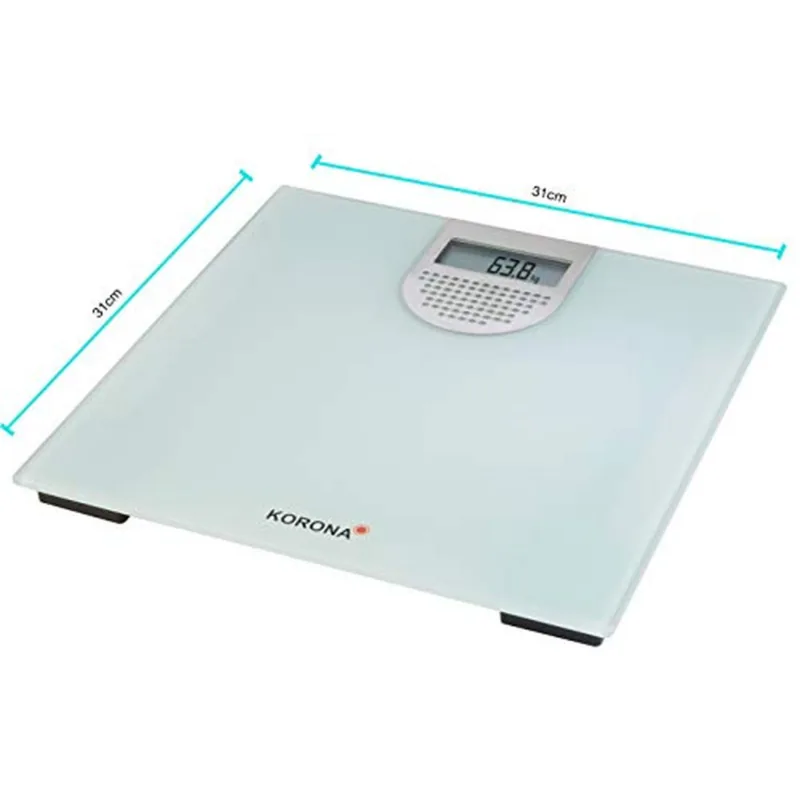
12.20x12.20 in (WxD)
Product Description
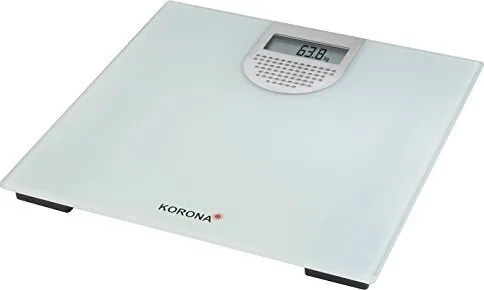
Korona Sonja Digital Personal Scale
The Korona Sonja Digital Personal Scale is made for everyday weighing with a focus on ease, clarity, and comfort. Its most distinctive feature is the speaking function, which announces the result aloud and can be adapted to different languages and volume levels. That makes the scale especially practical for users who want a more accessible routine and a device that feels intuitive right away. With its glass platform and clean digital design, it fits neatly into a modern bathroom while keeping the experience simple.
What sets this model apart is its thoughtful convenience. A quick tap with the foot activates the vibration sensor, so there is no need to search for hidden buttons or wait through a complicated startup process. Step on, stand still, and the scale does the rest. It also includes automatic shut-off to save power, plus clear error and low-battery signals that help make upkeep straightforward. Powered by 3 AAA batteries, it is easy to set up and use at home.
For best results, the scale should be placed on a firm, level floor. That detail is important, because a stable surface helps the measurement stay accurate. The glass surface should be handled with care and cleaned gently, which matches the product’s sleek, minimal style. The scale is designed for private use only, so it is best suited to household routines rather than medical or commercial settings.
Another useful touch is the adjustable voice volume. You can lower it, raise it, or switch it off completely, which is handy in shared homes or quiet mornings. Combined with the spoken guidance and easy language selection, the Korona Sonja Digital Personal Scale offers a balance of style and function without adding complexity. If you are looking up the Korona Sonja Digital Personal Scale Manual, the key takeaway is simple: set it up correctly, use it on a stable surface, and enjoy a more user-friendly weighing experience.
Notes
- Use only on a hard, even floor for reliable readings.
- Stand still during measurement to avoid inaccurate results.
- Replace batteries when the low-battery signal appears.
- Repairs should be handled by authorized service only.
Search for 67,706 Manuals online


Type-in Brand or Model
Lea Sommer
10 months ago
My voice scale sounds great, but after weighing it says it is 'ready for operation'. Is this normal, and can I turn it off?
Manual.ly
10 months ago
Yes, this message is normal on some models. After the measurement, the scale provides a short voice prompt indicating the device is ready for the next weigh-in. If you find it annoying, check the app or settings for voice guidance/voice output and disable it (wording can vary by language). Also confirm the correct language is selected, since mismatched language settings may make the prompt feel more irritating. If the message becomes excessive or persists unusually, try updating the app firmware and rebooting the scale.