
Korona Mona 73160 Manual
PDF manual · 12 Pages
English



Quick check
Incorrect answer, please try again.
Chat with your Korona Mona 73160 manual using AI
Get instant AI answers from your Korona Mona 73160 manual
Ask anything about the Korona Mona 73160. Answers come from this manual, with the pages they are based on.
Ask a Question
Do you recommend Mona 73160?
Yes NoVideo Manual
Digital Thermometer দিয়ে জ্বর কিভাবে দেখে। Thermometer দিয়ে জ্বর দেখার নিয়ম। Educational video
Frequently Asked Questions
The scale uses an integrated energy storage that is activated by pressing the power button (with foot or hand). Repeated pressing charges the internal storage so the display can show zero and begin weighing.
Is this answer helpful?
The scale measures up to 200 kg (440 lb). The minimum weight required to activate measurements is 8 kg, so very light objects or infants below this weight will not register.
Is this answer helpful?
Yes. A unit-selection button on the back of the scale lets you toggle between kilograms (kg) and pounds (lb) for display convenience.
Is this answer helpful?
No. The Korona Mona is intended for private home use only and is not calibrated as a medical or commercial instrument. Technical measurement tolerances are possible and it should not replace professional medical devices.
Is this answer helpful?
Clean with a damp cloth and mild dish soap if needed; do not use abrasive cleaners. Never immerse in water or rinse under running water. Do not store the scale upright and protect it from impacts, moisture, dust, chemicals, and extreme temperatures.
Is this answer helpful?
An overload indication appears if the maximum weight (200 kg) is exceeded. A low-power indication may cause the scale to shut off automatically; pressing the power button until zero appears reactivates the internal energy storage.
Is this answer helpful?
The product has a 5-year guarantee against material and manufacturing defects with valid proof of purchase. Warranty excludes wear parts and damage from misuse. Dispose of the appliance at appropriate electronic-waste collection points; do not discard with household waste.
Is this answer helpful?
Advantages and Disadvantages
Advantages

- Battery-free operation via integrated energy storage activated by pressing the power button
- High maximum load of 200 kg (440 lb) suitable for most users
- Slim glass design that’s easy to clean with a damp cloth and mild detergent
- Switchable units (kg/lb) via a rear button for flexible use
- 5-year warranty against material and manufacturing defects (with proof of purchase)
Disadvantages

- Not intended for medical or commercial use; may have technical measurement tolerances
- Minimum detectable weight of 8 kg excludes very small children or items
- Must be placed on firm, non-carpeted surface; sensitive to uneven flooring
- Glass surface can be slippery when wet—risk of slips if used with wet feet
- Repairs restricted to authorized service; misuse may void warranty
Product Specification
Operating Mode
without Battery
Material
Glass
Color
white
Load Capacity
440.92 lb
Graduation
3.53 oz
Measurement Units
lb, kg
Display
yes
Special Features
Automatic Shut-off
Platform
12.20x11.42in (WxD)
Product Description
Korona Mona digital scale Manual
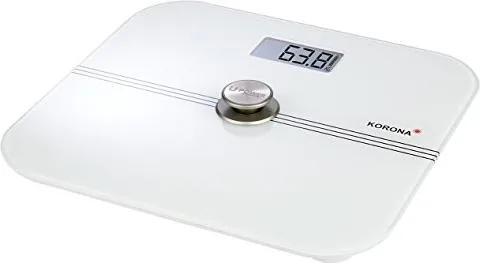
The Korona Mona digital scale is a sleek glass personal scale designed for reliable home weight monitoring. With a 200 kg (440 lb) maximum capacity, a frameless glass top, and a battery-free energy system activated by pressing the power button, it delivers simple, low-maintenance operation. The Korona Mona is intended for private use and not calibrated for medical or commercial applications, making it a convenient wellness accessory for everyday weight tracking.
Key features and use
The scale powers up without traditional batteries: its integrated energy storage is charged by pressing the power button with foot or hand. The display stabilizes quickly after you stand, giving a clear readout. The unit supports kilograms and pounds; a rear button switches units. Minimum detectable weight is 8 kg, and it auto-switches off after about one minute of inactivity.
Setup and care
Place the scale on a firm, level, non-carpeted surface to ensure accurate results and avoid tipping. Do not stand on the outer edge. Keep the surface dry and avoid stepping on it with wet feet to prevent slipping. Clean with a damp cloth and mild dish soap if needed; never immerse in water or use abrasive cleaners. Avoid exposure to impacts, moisture, chemicals, extreme temperature changes, and strong electromagnetic fields.
Safety and limitations
This device is for personal home use only. It is not intended as a medical instrument and may have technical measurement tolerances. Children should not use the appliance unsupervised. Repairs must be performed by authorized service personnel. Overloading beyond 200 kg triggers an overload indication on the display.
Warranty and disposal
Korona offers a 5-year guarantee against material and manufacturing defects, subject to proper use and proof of purchase. Wear parts and damage from misuse are excluded. At end of life, dispose of the appliance according to electronic-waste regulations—do not discard with household waste.
Notes
- Minimum weight to operate: 8 kg.
- Auto-off after ~1 minute of inactivity.
- Switch units (kg/lb) via rear button.
- Avoid storing upright; keep out of reach of children due to packaging hazard.
Search for 67,706 Manuals online


Type-in Brand or Model
Sofia König
8 months ago
How does the digital scale work without batteries, and will the battery-free charging be durable long-term?
Manual.ly
8 months ago
It is designed to weigh without inserting batteries. When you step on or press the foot button, the scale powers on automatically and shows your weight without needing external power or lighting. Because there are no battery replacements, there are no ongoing costs. The internal power storage is intended for long-term use, but exact lifespan depends on usage and storage conditions. For best durability, keep the unit dry, avoid dropping it, and do not store it in high humidity or extreme temperatures. If the display stops powering on reliably, contact support for troubleshooting or a warranty check.