
Korona 81502 Manual
PDF manual · 94 Pages
English



Quick check
Incorrect answer, please try again.
Chat with your Korona 81502 manual using AI
Get instant AI answers from your Korona 81502 manual
Ask anything about the Korona 81502. Answers come from this manual, with the pages they are based on.
Ask a Question
Do you recommend 81502?
Yes NoFrequently Asked Questions
It has three airflow speed settings: low, medium, and high. The fan starts in Normal mode at low speed when it is first switched on.
Is this answer helpful?
Yes. The Swing button activates or deactivates oscillation, allowing the fan to move airflow across a wider area instead of keeping it directed in one position.
Is this answer helpful?
Natural mode uses a preset changing airflow pattern to simulate a natural breeze. Sleep mode gradually slows the fan and then keeps it running at the low setting for gentler nighttime ventilation.
Is this answer helpful?
The automatic shutoff timer can be set in one-hour steps from 1 to 12 hours. Press the timer button repeatedly to select the desired operating time.
Is this answer helpful?
Yes. The included remote can control the primary settings. It uses one 3V CR2025 button cell battery, installed with the positive side facing upward.
Is this answer helpful?
Turn it off and unplug it before cleaning. Wipe the exterior with a soft, slightly damp cloth, then ensure all parts are dry. Never immerse it, spray it with liquids, or use abrasive or aggressive cleaners.
Is this answer helpful?
Advantages and Disadvantages
Advantages

- Three speed levels and Normal, Natural, and Sleep modes support different comfort preferences.
- Oscillation helps spread airflow across a broader section of the room.
- Remote control and LED temperature display add everyday convenience.
- Timer supports automatic shutoff from 1 to 12 hours.
- Slim tower design and two-piece base suit compact indoor spaces.
Disadvantages

- Designed for household indoor use only, not commercial or outdoor environments.
- Remote control requires a CR2025 button cell battery.
- The fan must be assembled and secured to the base before operation.
- Reported sound power level of 53.9 dB(A) may be noticeable in very quiet rooms.
Product Specification
Operating mode
Mains powered (40 W)
Color
white, black
Speed settings
3
Oscillation range
horizontal oscillation (can be turned off)
Special features
remote control, automatic shutoff after 12 h
Noise level
60 dB(A)
Dimensions
39.37 in (H)
Product Description
Korona 81502 Tower Fan - Read, Download & Print Free
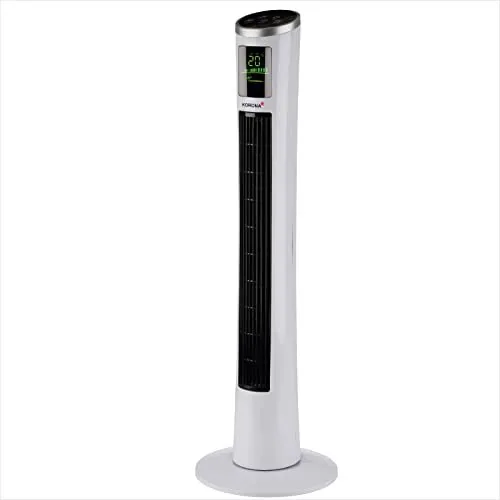
The Korona 81502 Tower Fan is a practical household cooling solution designed for comfortable everyday use in bedrooms, living rooms, home offices, and other indoor spaces. Its slim tower shape takes up little floor space while delivering a focused stream of air through the vertical outlet. With a stable two-piece base and a straightforward control layout, it is made for users who want adjustable airflow without complicated setup.
Flexible airflow for changing comfort needs
This fan provides three speed levels: low, medium, and high. Low speed is useful for gentle circulation, while higher settings offer more noticeable airflow when the room feels warm. The unit starts in normal mode at low speed and shows the current room temperature on its LED display, helping users check conditions at a glance.
In addition to standard operation, the Korona 81502 includes Natural and Sleep modes. Natural mode varies the airflow pattern to create a less uniform breeze. Sleep mode gradually reduces the fan speed and remains on a low setting, making it a useful option for nighttime use when steady, softer ventilation is preferred.
Convenient controls and timer settings
The fan can be operated using the control panel or the included remote control. This provides convenient access to the main settings from across the room. Oscillation can be switched on to distribute air over a wider area, rather than directing it toward one fixed point. A timer offers automatic shutoff in one-hour increments from 1 to 12 hours, which can help avoid leaving the fan running longer than needed.
The remote uses a 3V CR2025 button cell battery. Before initial use, its protective strip should be removed. For longer periods without use, removing the battery is recommended.
Performance and care
The Korona 81502 is rated for 220-240 V, 50-60 Hz operation and has a stated power rating of 40 W. Its reported maximum airflow is 4.98 m3/min, maximum air speed is 4.7 m/s, and sound power level is 53.9 dB(A). These figures position it as a compact fan for personal and room-level cooling rather than a replacement for air conditioning.
For best results, place the assembled fan upright on a dry, level, stable surface with clearance from walls, curtains, clothing, and other objects. Clean it only after unplugging it, using a soft, slightly damp cloth. Do not spray it, immerse it in liquid, or use harsh cleaning agents.
Notes
- Intended for household indoor use only.
- Includes a fan, remote control, and base components.
- A two-year guarantee covers material and manufacturing defects, subject to the stated terms.
Search for 67,706 Manuals online


Type-in Brand or Model