
Manual.ly Logo

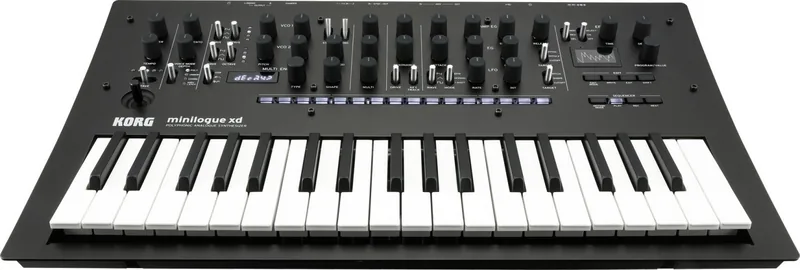
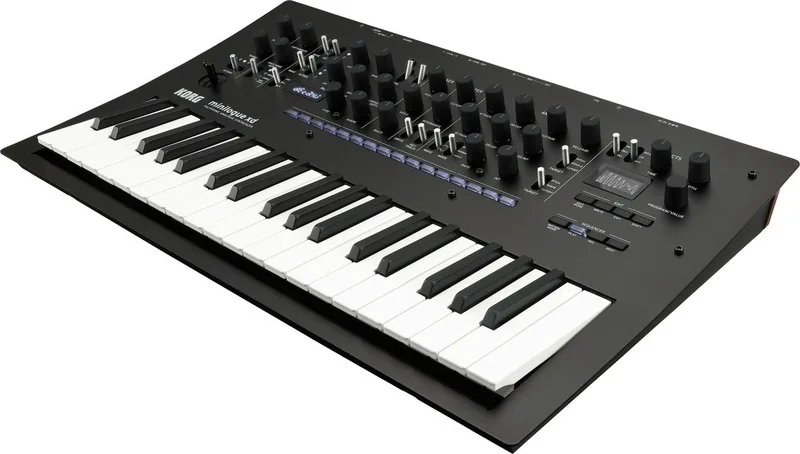
Korg minilogue xd Manual

0.0 · 0 Ratings

PDF manual · 8 Pages

English

M: OA-GPT-54-NAN
page

/ 8

Loading...
2ae45409ecf3c27669412f93966368bfd714 page 4
87
Saving a Program
1.
In Play mode, press the WRITE button.
The minilogue xd will enter the Write standby mode, and the
WRITE button will blink.
2.
Turn the PROGRAM/VALUE knob to select the Program num-
ber where your new sound will be saved.
Tip: To cancel, press the EXIT button.
3.
Press the WRITE button once more.
The Program will be saved in internal memory, and the message
“Complete” will appear in the display.
Never turn off the power while Programs are being saved.
Doing so may destroy the internal data.
Restoring the Factory settings
You can restore the minilogue xd’s preset Programs and global set-
tings to their original factory-set state at any time.
1.
Begin with the minilogue xd turned Off.
2.
While holding down the WRITE button and the EXIT button,
turn the minilogue xd On.
“FACTORY RESET” will be indicated in the display.
3.
Use the PROGRAM/VALUE knob to choose the settings you
wish to reset (PRESET, GLOBAL, ALL).
If you select “ALL” and execute, all user progras will be
erased.
4.
Press the WRITE button.
The display will indicate the message “Are you sure?”.
5.
Turn the PROGRAM/VALUE knob to select “Yes”, and press the
WRITE button.
The factory-set default data will be reloaded, and the minilogue
xd will be restored to its factory default state.
Never turn off the minilogue xd while data is being loaded.
Doing so might damage the internal data.
Analog Circuitry and Tuning
Tuning Operation
As with all analog instruments, the minilogue xd’s circuitry can
drift over time during performance due to changes in environment
and temperature. The minilogue xd provides an auto-tuning func-
tion that automatically tunes the instrument’s analog circuits on
demand, to correct for any analog drift.
As you continue to play the minilogue xd for a while right after
you’ve turned it on, the pitch and tone may gradually drift. If the
pitch drift becomes noticeable, use the steps below to tune the
minilogue xd.
1.
Hold down the SHIFT button and press the EXIT button.
Tuning will begin, and the display will indicate “Tuning...”.
The tuning will take about 15 seconds.
NOTE: During tuning, you will temporarily be unable to play the
minilogue xd.
1, 3
2
Editing a Program
The basic parameters that make up a program are assigned to the
knobs and switches on the front panel. Listen to how the sound
changes when you operate the controls.
1.
Turn the PROGRAM/VALUE knob to select a program in Play
mode.
2.
Use the knobs and switches on the front panel.
VCO 1/VCO 2/MULTI ENGINE section: You can select dif-
ferent VCO waveforms for the VCO 1/VCO 2, and change the
waveforms using the SHAPE knob. You can also set the pitch
and octave here. You can apply oscillator sync, a ring modulator
and cross modulation to VCO 2. For the MULTI ENGINE, you
can select either a noise generator, VPM oscillator or user oscil-
lator. You can load a custom oscillator program into the user
oscillator using librarian software.
VOICE MODE section
: Switches between Voice modes. In
Voice mode, you can combine the voices of the minilogue xd’s
four-voice analog synthesizer, and play the instrument in differ-
ent ways. Turn the VOICE MODE DEPTH knob to get different
effects for each Voice mode.
MIXER section
: Adjusts the volume balance between the VCO 1,
VCO 2 and the MULTI ENGINE.
FILTER section: This section includes a low-pass filter for
removing or emphasizing specific frequency regions of the oscil-
lator’s sound, making the sound brighter or darker or giving it
more character.
AMP EG/EG/LFO section
: The AMP EG controls the volume
over time. With the EG, you can select PITCH, PITCH 2 or
CUTOFF to change the pitch or apply time-based changes to the
sound. The LFO makes cyclical changes to the PITCH, SHAPE
and CUTOFF of the sound.
EFFECTS section: The MOD effect is used to apply modulation-
type effects like chorus, phaser and flanger to the sound, and
REVERB and DELAY are used for spatial effects.
Tip: We recommend that you save the programs you have edited
on the minilogue xd. Any edits that you make will be lost if
you turn off the power or recall a different program.
Recording Sequence data
Step Recording
1.
Select a program and press the REC button.
“STEP REC” and “STEP 1” will be indicated in the display.
If the sequence has already been recorded, the note names will
be indicated in the display.
2.
The notes you play on the keyboard (
xd-m
or by using but-
tons 1–16 when Keyboard mode is ON) will be recorded. Press
the REST button to record a rest. After recording an event, the
display will automatically move to the next step.
Press the REST button while holding down a key to record a tie.
The note recorded will be tied to the next step.
3.
When the set number of steps have finished recording, step
recording will automatically end (the REC button will go dark).
Press the REC button during recording to stop recording mid-
way.
Tip: We recommend that you save your sequences to internal
memory after step recording ends. If you select another
program before saving your edited program, the sequence
data in the newly selected program will be recalled, and the
sequence data you were editing will be lost.
Playing Programs & Sequences
Playing a Program
The minilogue xd features 500 program memories. When the
unit is shipped from the factory, preset programs are assigned to
program numbers 1–200. Programs 201–500 contain init programs
(programs that have been initialized).
1.
Check that the minilogue xd is in Play mode.
In Play mode, verify that the EDIT MODE button on the front
panel are unlit. If the EDIT MODE button is lit, press the EXIT
button.
2.
Turn the PROGRAM/VALUE knob to select a Program.
3.
Play the keyboard to hear the sound.
Use the OCTAVE switch (MASTER controls) to change the tonal
range of the keyboard. The joystick mainly controls the pitch
when moved from left to right, and changes parameters such
as the cutoff frequency and vibrato depth when moved up and
down. You can also change which parameters are controlled by
the joystick by changing the assignment in the menu.
xd-m
Flip the KEYBOARD switch up to turn Keyboard mode on.
In this mode, buttons 1–16 can be used instead of the keyboard to
play the instrument. Buttons 1–16 will light to indicate the black
and white keys. Buttons 1–16 can be used for both step and real-
time recording.
Flip the KEYBOARD switch off (down) when you do not want to
use buttons 1–16 instead of the keyboard.
Playing the Sequencer
The polyphonic sequencer in the minilogue xd can record up to 16
steps. In addition to note data, the sequencer can play back motion
sequences (record the sound changes using the knobs or switches).
1.
Press the PLAY button.
The sequence data recorded for each program will play.
2.
Press the PLAY button to stop playing.
2
Make sure EDIT MODE button is unlit.
1
1, 2
En Turning the power on/o
Connecting the AC adapter
1.
Connect the DC plug of the included AC adapter to the DC 9V
jack located on the rear panel of the minilogue xd.
Be sure to use only the included AC adapter. Using any other
AC adapter may cause malfunctions.
xd
Hook the AC adapter cord onto the cord hook.
Do not use excessive force when pulling the cord off the
hook. Doing so may damage the plug.
2.
Connect the plug of the AC adapter to an AC outlet.
Be sure to use an AC outlet of the correct voltage for your AC
adapter.
Turning the minilogue xd On
Make sure that both the minilogue xd and any external output
devices such as powered monitor speakers are turned off, and turn
the volume of all devices all the way down.
1.
Hold down the Power switch on the rear panel of the minilogue
xd; once the “minilogue xd” logo appears in the display, take
your finger off the Power switch.
The word “Tuning...” will appear on the display, and the instru-
ment will enter Tuning mode for the analog synthesizer circuit,
for around 15 seconds. After this, the minilogue xd will enter to
Play mode.
2.
Turn on any external output devices such as powered monitor
speakers. Adjust the volume of your external output equipment,
and adjust the minilogue xd’s volume using the MASTER knob.
Turning the minilogue xd O
1.
Lower the volume of your powered monitors or external output
system, and turn them off.
2.
Hold down the Power switch on the rear panel of the minilogue
xd; to turn off the power after the display goes blank, take your
finger off the power switch.
NOTE: Once you have turned the minilogue xd off, wait about 10
seconds before turning the minilogue xd on again.
Auto Power O Feature
The minilogue xd features an Auto Power Off feature that can
automatically turn the minilogue xd off after 4 hours have elapsed
with no operation of the knobs, switches, buttons, or keyboard
of the minilogue xd. By default, the factory setting for the Auto
Power Off is enabled.
The Auto Power Off can be disabled using the steps below.
1.
Press the EDIT MODE button.
2.
Turn the PROGRAM/VALUE knob, and select “GLOBAL EDIT.”
The minilogue xd will enter GLOBAL Edit mode.
3.
Press button 8 three times.
“Auto Power Off” will be indicated on the display.
4.
Turn the PROGRAM/VALUE knob, and select “Off”.
5.
Press the EXIT button.
Tip: Settings in GLOBAL EDIT are saved automatically.
81110 12913141516
3
1
2, 4
5

Chat with your Korg minilogue xd manual using AI

Get instant AI answers from your Korg minilogue xd manual

Ask anything about the Korg minilogue xd. Answers come from this manual, with the pages they are based on.

Ask a Question

0/1000

Do you recommend minilogue xd?

Yes No

Frequently Asked Questions

A

It uses an analog signal path with four voices, each built from two VCOs and a MULTI ENGINE. The MULTI ENGINE can provide a noise generator, a VPM oscillator, or a user oscillator. The instrument also includes a low-pass filter (VCF), EGs for time-based control, an LFO, and a VCA.

Is this answer helpful?

A

Per voice, you can choose between a noise generator, a VPM oscillator, or a user oscillator. You can load custom oscillator programs into the user oscillator using the librarian software. This makes the synth suitable for both classic analog tones and more complex, engineered textures.

Is this answer helpful?

A

The minilogue xd can record up to 16 steps in the sequencer. It stores note data, and it can also play motion sequences by recording changes made to knobs and switches during performance. Each program contains its own sequence data.

Is this answer helpful?

A

Yes. It provides CV IN 1 and CV IN 2 to control parameters using CV signals in the -5 V to +5 V range. Use monaural mini-cables (or stereo mini-cables where applicable) to connect external CV sources.

Is this answer helpful?

A

No. The minilogue xd supports damper control with supported Korg pedals or pedal switches, but it does not support the half-damper function. If you need half-damper behavior, this model will not provide it.

Is this answer helpful?

A

To save, press WRITE in Play mode, select the destination program number with PROGRAM/VALUE, then press WRITE again until the display confirms completion. To restore factory data, power off, then power on while holding WRITE and EXIT, choose PRESET, GLOBAL, or ALL with PROGRAM/VALUE, confirm, and avoid turning the unit off while data loads.

Is this answer helpful?

A

Analog circuits can drift with temperature and environment. The synth includes an auto-tuning function that corrects drift when needed, and it also offers a manual tuning procedure that takes about 15 seconds during which you cannot play. There is also an Auto Power Off feature that can turn the unit off after 4 hours without operation.

Is this answer helpful?

M: OA-GPT-54-NAN

Advantages and Disadvantages

Advantages

  • Four-voice analog design with VCO waveforms and a MULTI ENGINE per voice for expanded sound creation.
  • High-quality MOD effects plus reverb and delay for fast, musical tone shaping.
  • 16-step polyphonic sequencer, including motion sequencing from knob and switch movement.
  • Real-time oscilloscope visual feedback to monitor parameter changes while tweaking patches.
  • SYNC IN/OUT and CV IN 1/2 enable tight synchronization and modular-style control.
VS

Disadvantages

  • Maximum polyphony is limited to four voices.
  • Half-damper function is not supported.
  • Parameter edits can be lost unless programs are saved.
  • Analog circuits can drift with temperature and environment, requiring tuning attention.
  • Setup requires careful connection and use of the correct DC 9V adapter.
M: OA-GPT-54-NAN

Product Specification

Sound Generation

analog

Polyphony

4-voice

Sound Presets

200

Speakers

no

Display

OLED

Audio Connections

Line In (6.35mm jack), Stereo Line Out (6.35mm jack), 1x Headphones (6.35mm jack)

Other Connections

USB-B (USB to Host), MIDI In/Out, CV In, Sustain Pedal

Special Features

Sequencer

Dimensions

19.69x3.35x11.81in (WxHxD)

Weight

6.17 lbs

M: GO-GEM-FL-25

Product Description

Korg minilogue xd Manual - A four-voice analog synth for vivid sound design

What makes it special

The Korg minilogue xd is a compact, four-voice polyphonic analog synthesizer that draws inspiration from Korgs prologue lineage, delivering a thick analog core with modern performance tools. It is built around two VCOs per voice plus a MULTI ENGINE that can add a noise generator, a VPM oscillator, or a user oscillator via downloadable oscillator programs. The result is a flexible platform for everything from warm basses to animated leads and textured soundscapes.

FX are a major part of the workflow. The instrument includes digital MOD effects (including chorus, ensemble, phaser, flanger, and a user option), along with reverb and delay, so you can shape depth and motion without leaving the synth. A real-time oscilloscope visually helps you track how parameter changes affect the sound as you dial in patches.

Sequencing and control that feels immediate

Creative ideas move fast thanks to a powerful 16-step polyphonic sequencer. You can record note events, and you can also capture motion sequences by recording knob and switch movements, making it easy to evolve a pattern over time. With 500 programs available (factory preset slots plus user memories), you can recall sounds instantly, then refine and save what you like.

The rear panel is designed for session expansion. SYNC IN and SYNC OUT sync the step timing to compatible Korg gear, while CV IN 1 and CV IN 2 let modular systems and external controllers influence synth parameters using a -5 V to +5 V range. If you choose the xd-m variant, you can work in Keyboard mode using buttons 1-16 for playing and sequencing.

Notes for setup and long-term reliability

Analog synths can drift with environment and temperature. The minilogue xd includes an auto-tuning routine, and you can also trigger manual tuning when needed. When editing programs, you should save to keep changes, and you can restore factory settings if you want to start clean. Power use includes an Auto Power Off feature after 4 hours of no operation.

Pros and cons

  • Pros:
    • Four-voice analog signal path with rich VCO character
    • MULTI ENGINE options (noise, VPM, and user oscillator)
    • 500 programs with fast recall and instant saving
    • Polyphonic 16-step sequencer plus motion recording
    • SYNC and CV inputs for flexible studio integration
  • Cons:
    • Maximum polyphony is limited to four voices
    • Half-damper is not supported
    • Edits must be saved to avoid losing changes
    • Like many analog devices, tuning can drift over time

Key takeaways

  • MULTI ENGINE expands synthesis beyond basic VCO waveforms, including VPM and user oscillators.
  • Polyphonic 16-step sequencing supports both notes and motion recorded from real-time knob movement.
  • MOD, reverb, and delay help you stay creative without external effects gear.
  • SYNC and -5 V to +5 V CV inputs make it easy to integrate with modular and groove setups.
  • Auto-tuning helps reduce analog drift during sessions.
M: OA-GPT-54-NAN

© Copyright 2026 Manual.ly