Manual.ly Logo

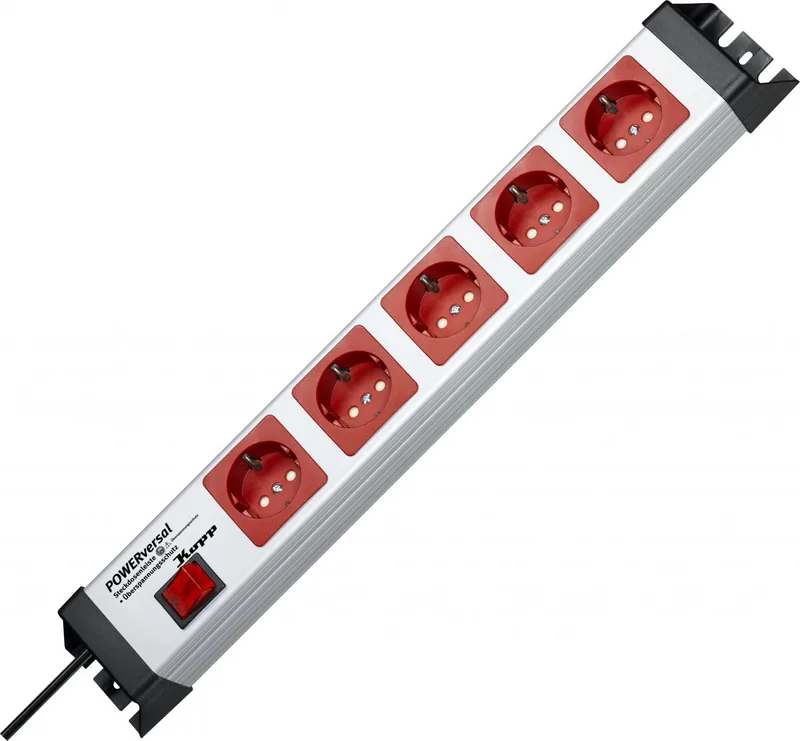
Kopp POWERversal Manual

0.0 · 0 Ratings

PDF manual · 2 Pages

English

M: OA-GPT-5-NAN
page

/ 2

Loading...
e29f48636341196c1fe3a3d80ab74fe27a19 page 1
058 623 010
Heinrich Kopp GmbH • Alzenauer Str. 68 • 63796 Kahl/Main • www.kopp.eu
2281.2001.2
POWERversal 4-fach mit FI/LS Funktion
Bedienungsanleitung
• Die Steckdosenleiste an Netzspannung anschließen.
• Einschalten der Steckdosenleiste durch Hochdrücken des grünen Knebels auf Position I
• Nach einem Fehlerfall steht der grüne Knebel in Mittelstellung
• Fehlerfall beseitigen und zum erneuten Einschalten zuerst grünen Knebel auf Position 0,
anschließend auf Position I drücken
• Schwarze Prüftaste zur Überprüfung der einwandfreien FI Funktion regelmäßig betätigen
POWERversal 4-vould met FI/LS functie
Gebruiksaanwijzing:
• De snoercentrale op de netspanning aansluiten.
• De snoercentrale inschakelen door de groene knop omhoog te drukken in positie I (rode
kleurverandering in het kijkvenster)
• Na een storing staat de groene knop in de middelste positie
• Nadat de storing is verholpen, eerst de groene knop in positie 0 en dan in positie I drukken, om
opnieuw in te schakelen
• De zwarte controletoets, ter controle van een perfecte lekstroom functie, regelmatig indrukken
POWERversal 4-fold with RCB function
Operating instructions:
• Connect the outlet strip to the supply voltage.
• Switch on the outlet strip by pressing the green knob up to position I (color changes to red in the
viewing window)
• After an error, the green knob is in the center position
• Eliminate error and fi rst press the green knob to position 0 and then to position I to switch on
• Press the black test button regularly to test for proper FI function
Technische Daten /
Technische gegevens /
Technical data:
16A 250V ~ / max. 3.600 W
(LxBxH) = ca. 482,6mm x 71mm x 83mm (19“)
RCB (FI/LS) Funktion /
RCB (FI/LS) functie /
RCD (FI/LS) function
:
B 16A /
∆
In 30mA
2polig schaltend/2-polige uitschakeling/2pole switch off
2280.2001.9
POWERversal 5-fach mit IR Fernabschaltung
Bedienungsanleitung
• Alle zu schalteten Verbraucher (mögliche Geräteanzahl 1-5) werden in die Steckdosenleiste
gesteckt und müssen im Standby-Modus stehen, d. h. üblicherweise ist die An/Aus Taste
des Endgerätes (z. B. Fernseher) eingedrückt.
• Auf Tastendruck prüft nun die Elektronik automatisch die Summe der Standby-Leistungen
der angeschlossenen Geräte (Anlernvorgang). Diese muss im Bereich von 5 – 100Watt liegen.
• Wird dieser Leistungsbereich eingehalten geht eine grüne Leuchtdiode dauernd an.
• Die Steckdosenleiste ist jetzt funktionsbereit.
• Sobald ein IR-Signal von einer beliebigen IR-Fernbedienung
mit einer Dauer von 0,5sec. erkannt wird, schaltet die Empfängereinheit die an der Steck-
dosenleiste angeschlossenen Last (z. B. Fernseher) zu, (der IR Sensor reagiert nur auf das
IR-Signal und nicht auf eine eventuell vorhandene Kodierung).
• Nun muss innerhalb von 30sec. die angeschlossene Last, (z. B. Fernseher) in den Betriebs-
modus geschaltet werden. Erkennt die Elektronik innerhalb dieser 30sec. keine Stromer-
höhung wird die angeschlossene Last (z. B. Fernseher) wieder abgeschaltet.
• Wenn die Summe der Standby-Leistungen der angeschlossenen Geräte geändert wird, muss
der Anlernvorgang erneut durchgeführt werden.
• Blinkt die grüne Leuchtdiode nach dem Anlernvorgang, liegt die Standby-Leistung der ange-
schlossenen Geräte außerhalb des erkennbaren Bereichs (5W-100W) der Elektronik.
Standby-Leistung erhöhen bzw. reduzieren.
Aktivierung:
Einschalten der Steckdosenleiste mit einer beliebigen, vorhandenen IR Fernbedienung.
Technische Daten IR Fernabschaltung:
µ 16A 230V ~ / 2polige Abschaltung / (LxBxH) = ca. 482,6mm x 71mm x 58,3mm (19“).
max. Schaltstrom: 20A / 20ms (1.000 W Glühlampenlast)
max. 3.600 W / Verlustleistung Pv < 1W (Standby)
POWERversal 5-vould met IR uitschakeling
Gebruiksaanwijzing:
• Alle te schakelen verbruikers (mogelijk aantal toestellen 1-5) worden in de snoercentrale
gestoken en moeten in de standby modus staat, m.a.w. normaliter is de Aan/Uit toets van het
eindtoestel (bijvoorbeeld televisie) ingedrukt.
• Door de toets in te drukken controleert de elektronica nu automatisch het standby vermogen
van de aangesloten toestellen (programmeren). Dit moet tussen 5 – 100Watt liggen.
• Worden deze vermogenswaarden aangehouden dan licht een groene lichtdiode continu op.
• De snoercentrale is nu bedrijfsklaar.
• Zodra een IR-signaal van een willekeurige IR-afstandsbediening met een duur van 0,5sec. herkend
wordt, schakelt de ontvangereenheid de op de snoercentrale aangesloten last (bijvoorbeeld
televisie) in, (de IR sensor reageert alleen op het IR-signaal en niet op een eventueel bestaande
codering). De TV staat nu weer in de standby stand
• Nu moet binnen 30sec.de aangesloten last (bijvoorbeeld televisie) naar de bedrijfsmodus
geschakeld worden. Herkent de elektronica binnen deze 30sec. geen stroomverhoging dan
wordt de aangesloten last (bijvoorbeeld televisie) weer uitgeschakeld.
• Wanneer de som van de standby vermogens van de aangesloten toestellen veranderd
wordt, moet de leerstap opnieuw uitgevoerd worden.
• Knippert de groene lichtdiode na de leerstap dan ligt het standby vermogen van de
aangesloten toestellen buiten het herkenbare bereik (5W-100W) van de elektronica.
Het standby vermogen verhogen resp. verlagen.
Technische gegevens IR uitschakeling:
µ 16A 230V ~ /2-polige uitschakeling / (LxBxH) = ca. 482,6mm x 71mm x 58,3mm (19“).
max. Schaltstrom: 20A / 20ms (1.000 W Glühlampenlast)
max. 3.600 W / Verlies Pv < 1W (Standby)
POWERversal 5-fold with IR Remote shut-Off function
Operating instructions:
• All consumers to be switched (possible number of devices 1-5) are plugged into the outlet
strip and must be in standby mode. This means that the on/off button of the terminal
device (e.g. television) is normally pressed in.
• With the press of a button, the electronics now automatically check the sum of the standby
outputs of the connected devices (programming procedure). This must be in a range of
5 – 100 Watt.
• If this output range is met, a green LED lights up continuously.
• The outlet strip is now ready to work.
• As soon as an IR-signal from any IR-remote control is detected for a duration of 0.5 sec., the
receiver unit switches on the load attached to the outlet strip (e.g. television). The IR sensor
only reacts to the IR-signal and not to any existing encoding.
• Now, the connected load must be switched to operating mode within 30 sec.
(e.g. television). If the electronics do not detect a current increase within these 30 sec. the
connected load (e.g. television) is switched off again.
• If the sum of the standby outputs of the connected devices is changed, the programming
procedure must be performed again.
• If the green LED blinks after the programming procedure, the standby output of the
connected devices is outside of the detectable range (5W-100W) of the electronics.
Increase or reduce the standby output.
Activation:
Switch ON/OFF the multi socket outlet with any available IR remote control anit.
Technical data IR Remote standby shut-off:
µ 16A 230V ~ / 2-pole switch / (LxBxH) = ca. 482,6mm x 71mm x 58,3mm.
Max. switched current: 20A / 20ms (1,000 W light bulb load)
max. 3.600 W / Power loss Pv < 1W (standby)
2279.2001.5
POWERversal 1+4-fach mit Abschaltautomatik (CountDown Funktion)
Bedienungsanleitung
• Die Steckdosenleiste an Netzspannung anschließen.
• Gewünschte Abschaltzeit mit dem Drehpoti vorwählen
• Taste < 1 Sekunde drücken = Start des Zeitablaufes (CountDown Funktion) oder Neustart des
Zeitablaufes während des Betriebes
• Taste > 2 Sekunden drücken = Abschaltfunktion (CoundDown Funktion) wird AUS geschaltet
die übrigen Steckdosen bleiben EIN geschaltet
• LED (rot) leuchtet = Schutzkontaktsteckdosenleiste roter Topf ist EIN geschaltet
• LED (rot) blinkt, Summer ertönt Intervallartig = Vorwarnung, angeschlossenes Gerät wird
nach 2 Minuten AUS geschaltet
• LED (rot) leuchtet, Summer ertönt im Dauerton = Vorwarnung, angeschlossenes Gerät
wird nach 20 Sekunden AUS geschaltet
Technische Daten:
Funktion Abschaltautomatik:
Vorwahl über Drehpotentiometer / Zeiteinstellung 3 min … 30 min (stufenlos)
Zeiteinstellung 1, 2, 4 Stunden (feste Vorwahl) / Schaltstellungsanzeige LED (rot)
Akustischer Alarm (Summer ca. 60 dB)
µ 16A 230V ~ / 2polige Abschaltung / (LxBxH) = 482,6mm x 71mm x 58,3mm (19“).
Max. Schaltstrom: 20A / 20ms (1.000 W Glühlampenlast)
max. 3.600 W / Verlustleistung Pv < 1W (Standby)
POWERversal 1+4-vould met automatische uitschakeling
Gebruiksaanwijzing:
• De snoercentrale op de netspanning aansluiten.
• De gewenste uitschakeltijd met de draaipotentiometer selecteren
• De toets < 1 seconden indrukken = start van de tijdafl oop (CountDown functie) of nieuwe
start van de tijdafl oop tijdens het bedrijf
• Toets > 2 seconden indrukken = uitschakelfunctie (CountDown functie) wordt UITgeschakeld.
En de snoercentrale blijft onder spanning staan.
• LED (rood) licht op = de snoercentrale is INgeschakeld
• LED (rood) knippert, de zoemer gaat met intervallen af - waarschuwing, de aangesloten toestellen
worden na 2 minuten UITgeschakeld
• LED (rood) licht op, de zoemer gaat continu af = waarschuwing, de aangesloten toestellen worden
na 20 seconden UITgeschakeld
Technische gegevens:
Automatische uitschakeling functie
Selectie via draaipotentiometer / Tijdinstelling 3 min … 30 min (traploos) via draaipotentiometer
Tijdinstelling 1, 2, 4 uur (vaste selectie) / Weergave schakelpositie LED (rood)
Akoestisch alarm (zoemer ca. 60 dB)
µ 16A 230V ~ / 2-polige uitschakeling / (LxBxH) = 482,6mm x 71mm x 58,3mm (19“).
Max. schakelstroom: 20A / 20ms (1.000 W gloeilampenlast)
max. 3.600 W / Verlies Pv < 1W (Standby)
POWERversal 1+4-fold with automatic shut-Off function
Operating instructions:
• Connect the outlet strip to the supply voltage.
• Preselect the desired turn-off time with the rotary potentiometer
• Press button < 1 second = start the time (countdown function) or restart the time during operation
• Press button > 2 seconds = turn-off function (countdown function) is switched OFF
• LED (red) illuminates = grounding outlet strip is switched ON
• LED (red) blinks, buzzer sounds intermittently = early warning, connected devices are
switched OFF after 2 minutes and the MSO stays is switched ON
• LED (red) blinks, buzzer sounds with intervals = early warning, connected devices are switched OFF
after 2 minutes
Function of the automatic shut-off:
CountDown function
Presetting with rotary potentiometer
Time setting 3 min … 30 min (infi nitely adjustable) by means of the rotary potentiometer
Time setting 1, 2, 4 hours (defi ned preset) / Switch position display LED (red)
Acoustic alarm (buzzer approx. 60 dB)
µ 16A 230V ~ / 2pole switch off / (LxBxH) = 482,6mm x 71mm x 58,3mm (19“).
Max. switched current: 20A / 20ms (1,000 W light bulb load)
max. 3.600 W / * Power loss Pv < 1W (standby)

Chat with your Kopp POWERversal manual using AI

Get instant AI answers from your Kopp POWERversal manual

Ask anything about the Kopp POWERversal. Answers come from this manual, with the pages they are based on.

Ask a Question

0/1000

Do you recommend POWERversal?

Yes No

Frequently Asked Questions

A

It combines standard outlet distribution with advanced functions such as safety switching, countdown control, IR-based activation, master/slave switching, and surge protection on selected models. It is built for users who want more control and better protection.

Is this answer helpful?

A

Yes. Several versions are ideal for TVs, receivers, media players, and similar devices. Features like IR remote shut-off and standby detection make it easier to control entertainment equipment in a simple, automated way.

Is this answer helpful?

A

Many models are rated for up to 16A, 230V, with a maximum load of 3,600W. However, the exact rating depends on the specific version, so it is important to verify the model’s technical data.

Is this answer helpful?

A

Yes. Depending on the version, it may include RCD/LS protection, a test button, surge protection, temperature limitation, and status indicators. These features are designed to improve safety and reliability during use.

Is this answer helpful?

A

Some versions do require setup. For example, IR shut-off models need a learning process, while master/slave models may need threshold adjustment. Countdown models also require a time selection before operation.

Is this answer helpful?

A

Not always. Some versions use single-pole switching, which means full voltage-free isolation is only guaranteed when the plug is removed. Check the individual model details if complete disconnection is important.

Is this answer helpful?

M: OA-GPT-54-NAN

Advantages and Disadvantages

Advantages

  • Multiple versions offer useful features like RCD/LS protection, countdown shut-off, IR control, and master/slave switching.
  • High power capacity up to 3,600W makes it suitable for PCs, TVs, office gear, and other demanding devices.
  • LED indicators and test buttons improve usability and help users monitor operating status at a glance.
  • Some models include surge protection, adding extra safety for connected electronics.
VS

Disadvantages

  • Feature sets vary by model, so buyers must check the exact version before ordering.
  • Certain functions require setup, learning, or threshold adjustment, which can take time.
  • On some models, complete power isolation is only achieved by unplugging the strip.
  • Standby-based control can be limited if connected devices fall outside the required power range.
M: OA-GPT-54-NAN

Product Specification

Input Voltage

250V

Additional Connections

N/A

Material

Plastic

M: OA-GPT-54-NAN

Product Description

Kopp POWERversal Steckdosenleiste: Practical Power Management for Modern Setups

The Kopp POWERversal Steckdosenleiste stands out as a versatile power solution for homes, offices, and AV setups. It is designed for users who want more than a basic strip: safety, control, and smart switching options are built into the range. Whether you are looking for overload protection, remote activation, or automatic shut-off, the POWERversal series offers several specialized versions that make everyday power handling feel more organized and secure. If you are searching for the Kopp POWERversal Steckdosenleiste Manual, the core idea is simple: connect, configure, and let the strip manage power more intelligently.

One of the strongest points of this product family is its focus on protection and convenience. Some versions include RCD/LS functionality with a regular test button, helping users check proper residual-current operation. Others offer IR remote standby shut-off, where connected devices can be controlled through an infrared signal after a short learning process. There are also countdown models with adjustable shut-off timing, ideal for equipment that should not stay powered longer than needed. In practice, this makes the POWERversal line suitable for TVs, PCs, office peripherals, and other electronics that benefit from structured power use.

The design is built around practicality. Many versions support up to 16A, 230V, and a maximum load of 3,600W, which gives them solid everyday capacity. Status LEDs provide instant feedback, and several models use a 19-inch format that fits well in media cabinets, technical racks, and workspace installations. Some variants also include master/slave switching, where a main device such as a PC triggers additional connected devices automatically, while surge protection adds another layer of reliability for sensitive equipment.

What makes the POWERversal series appealing is its balance between manual control and automation. Instead of switching everything individually, users can rely on threshold-based activation, standby detection, or timed shut-off depending on the model. This can reduce unnecessary power consumption and make workstations or entertainment setups easier to manage.

Notes

  • Regular testing is recommended for safety functions.
  • Some models need learning or threshold adjustment after device changes.
  • Full disconnection is only guaranteed when unplugged on certain versions.
  • Check the specific model before purchasing, since features differ across the range.
M: OA-GPT-5-NAN

© Copyright 2026 Manual.ly