

Kopp Metal and Voltage Detector Manual
PDF manual · 7 Pages
English



Quick check
Incorrect answer, please try again.
Chat with your Kopp Metal and Voltage Detector manual using AI
Get instant AI answers from your Kopp Metal and Voltage Detector manual
Ask anything about the Kopp Metal and Voltage Detector. Answers come from this manual, with the pages they are based on.
Ask a Question
Do you recommend Metal and Voltage Detector?
Yes NoFrequently Asked Questions
The device operates using a standard 9-volt alkaline battery. Note that the battery is not included with the purchase, so you will need to buy one separately before first use.
Is this answer helpful?
Insert the battery and turn the blue adjustment wheel down until the red light turns off completely. This sets the highest sensitivity level. If the light stays on or blinks constantly, you may need to adjust the internal potentiometer screws as described in the manual.
Is this answer helpful?
No, the detector cannot sense voltage if the wire is shielded by metal conduit or pipe. It only detects unshielded AC voltage carrying parts directly through drywall or other non-metallic surfaces.
Is this answer helpful?
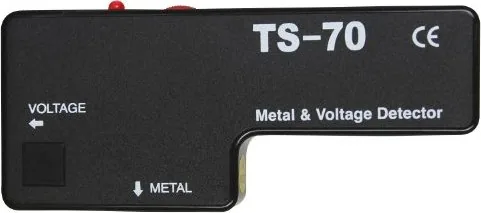
When the large end of the detector is held near metal, the LED light will stay steadily lit, and the built-in buzzer will emit a continuous sound. This confirms the presence of metal up to a depth of roughly 9 cm.
Is this answer helpful?
Rotate the blue adjustment wheel all the way up toward the light source until it clicks into place. This engages the switch-off mechanism and conserves battery life.
Is this answer helpful?
Advantages and Disadvantages
Advantages

- Detects both metal and live AC voltage with high accuracy
- Simple calibration process ensures reliable operation
- Distinct visual and audio signals differentiate between targets
- Compact design fits easily in a toolbox
Disadvantages

- Battery is not included in the package
- Requires careful calibration to avoid false positives
- Depth detection is limited to about 3.5 inches
- May struggle with heavily shielded conductors
Product Description
Unlock Precision with the Kopp Metal/Line Detector Manual
The Kopp Metal/Line Detector is an essential tool for electricians, contractors, and DIY enthusiasts who need to locate hidden infrastructure safely. This robust device allows users to identify metal pipes, conduits, and voltage-carrying wires behind walls without causing damage or risking injury. The accompanying manual provides a comprehensive guide on how to operate this versatile instrument effectively.
Setting up the detector is straightforward once you understand the calibration process. Users must insert a 9-volt battery and adjust the control wheel to the correct sensitivity level. The goal is to find the precise point where the indicator light turns off in a neutral environment. This step ensures that the device is not overly sensitive to background interference while remaining responsive to actual targets. Once calibrated, the unit is ready for action.
When searching for materials, the detector offers distinct modes based on the object type. For locating solid metal objects like water pipes or electrical conduits, users hold the larger end of the device against the surface. A steady red light and a continuous beep signal the presence of metal within approximately nine centimeters. Conversely, detecting live AC voltage requires using the smaller end of the sensor. In this mode, the device flashes its light and emits intermittent beeps to warn the user of energized lines nearby. This dual functionality makes it a critical safety asset for renovation projects.
Safety remains the top priority when using such equipment. Always adhere to local electrical codes and never assume a wall is safe just because the detector did not beep. The manual emphasizes checking the device regularly and adjusting internal potentiometers if the light behaves erratically. Proper maintenance and adherence to the instructions ensure long-lasting performance and accurate readings every time.
Search for 67,706 Manuals online


Type-in Brand or Model