
Kodak i1320 Manual
PDF manual · 42 Pages
English


Advantages and Disadvantages
Advantages

- Fast duplex scanning: up to 40 ppm color, 60 ipm duplex at 200 dpi.
- Compact, tiltable design fits tight workspaces and adjustable trays.
- Smart Touch one-touch tasks streamline emailing, PDF creation, and printing.
- Wide media support: 34–413 g/m2, ID/embossed cards, and small documents.
- Comprehensive maintenance: replaceable modules, cleaning kits, and consumables.
Disadvantages

- Requires periodic replacement of tires and consumables; nominal life ~125,000 pages.
- Drivers and bundled applications may require manual installation and correct CD selection.
- Warranty exclusions cover misuse, shipping damage, and non-Kodak parts.
- Larger documents or high-resolution scanning need more powerful PC specs (up to 4 GB RAM).
- Contains mercury—requires regulated disposal per local laws.
Ask a Question
Frequently Asked Questions
The i1320 offers duplex scanning up to 40 pages per minute and up to 60 images per minute (duplex) at 200 dpi. Black-and-white/grayscale rates can reach higher image-per-minute counts depending on model and resolution.
Is this answer helpful?
It supports minimum document sizes down to 63.5 x 50 mm and maximum up to 215 x 863 mm in the ADF, with paper weights from 34 g/m2 to 413 g/m2. The ADF holds up to 75 sheets and accepts small items like ID and embossed cards.
Is this answer helpful?
Output formats include single- and multi-page TIFF, JPEG, RTF, PDF and searchable PDF. Resolutions range from 75 to 1200 dpi, allowing flexible capture quality for archive, OCR, and presentation needs.
Is this answer helpful?
Windows drivers include TWAIN, ISIS and WIA; Linux supports TWAIN and SANE. Bundled applications may include ScanSoft PaperPort and OmniPage for document organization and OCR. Driver installation is recommended prior to connecting the scanner.
Is this answer helpful?
Routine maintenance includes cleaning rollers, separation and feed modules, vacuuming debris, wiping imaging areas with approved optics wipes, and using transport cleaning sheets. Follow Kodak procedures and use recommended cleaning products to avoid damage.
Is this answer helpful?
Kodak provides a limited warranty with on-site, depot repair, and AUR (advance replacement) options for eligible purchasers within specified regions. Warranty excludes damage from misuse, improper shipping, or non-Kodak components; proof of purchase is required.
Is this answer helpful?
Yes. The scanner is Energy Star compliant with recyclable packaging, but contains mercury and must be disposed of per local regulations. Follow safety precautions for power cords, ventilation, and approved cleaning materials.
Is this answer helpful?
Product Description

Kodak i1320 Manual: Overview and Features
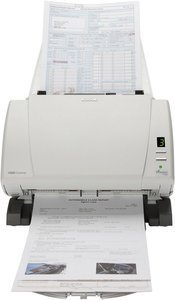
The Kodak i1320 is a high-performance duplex document scanner designed for busy workgroups and decentralized office environments. Built with reliable CCD imaging, it delivers fast color and black-and-white scanning up to 40 pages per minute (60 images per minute in duplex) at 200 dpi. Its compact footprint and tilting design let you position input and output trays to fit tight workspaces, while an optional A3 flatbed expands capability for larger or delicate originals. Smart Touch functionality simplifies frequent workflows by mapping one-touch tasks—such as emailing, PDF creation, and printing—directly to the device.
Beyond speed, the i1320 handles diverse media: envelopes, ID and embossed cards, thin or thick stock from 34 to 413 g/m2, and documents as small as 63.5 x 50 mm. The 75-sheet ADF supports batch processing, and output formats include TIFF, JPEG, RTF, PDF, and searchable PDF. Image quality options extend from 75 to 1200 dpi, with color capture and output depths suitable for accurate reproduction and OCR-ready scans.
Installation and software support are straightforward: drivers for TWAIN, ISIS, and WIA on Windows and TWAIN/SANE for Linux are provided, and bundled scanning software (PaperPort and OmniPage) enhances document management and OCR tasks. Minimum system requirements include a Core 2 Duo-class CPU and 2–4 GB RAM depending on document length and resolution.
Maintenance is user-friendly with modular feed and separation components, replaceable tires, and detailed cleaning procedures. Consumables and cleaning kits are available with Kodak catalog numbers. The scanner includes safety and environmental guidance—Energy Star compliance, recyclable packaging, and mercury content disposal notes—plus regional EMC and acoustic information.
Warranty and support options cover on-site, depot, and advance replacement (AUR) services for eligible purchasers, with clear return and packaging guidelines. Kodak provides a limited warranty with exclusions for misuse, non-Kodak parts, improper shipping, and environmental damage. Comprehensive documentation and technical support resources are available online and by phone.
The Kodak i1320 balances speed, reliability, and flexibility for offices that need robust duplex scanning, easy one-touch workflows, and maintainable hardware for sustained throughput.
Notes
- Handles duplex scanning up to 40 ppm (60 ipm) at 200 dpi.
- ADF capacity: 75 sheets; supports small documents and embossed cards.
- Output formats include searchable PDF for OCR workflows.
- Maintenance uses replaceable feed/separation modules and cleaning sheets.
- Drivers: TWAIN/ISIS/WIA for Windows; TWAIN/SANE for Linux.
Search for 371 Manuals online


Type-in Brand or Model