Manual.ly Logo

Klein Tools VDV Scout Pro 3 Manual

0.0 · 0 Ratings

PDF manual · 22 Pages

English

M: QW-35-FL
page

/ 22

Loading...
cca36a76e119cfb81735171b32f30e58c0ff page 2
2
3
ENGLISH
ENGLISH
GENERAL SPECIFICATIONS
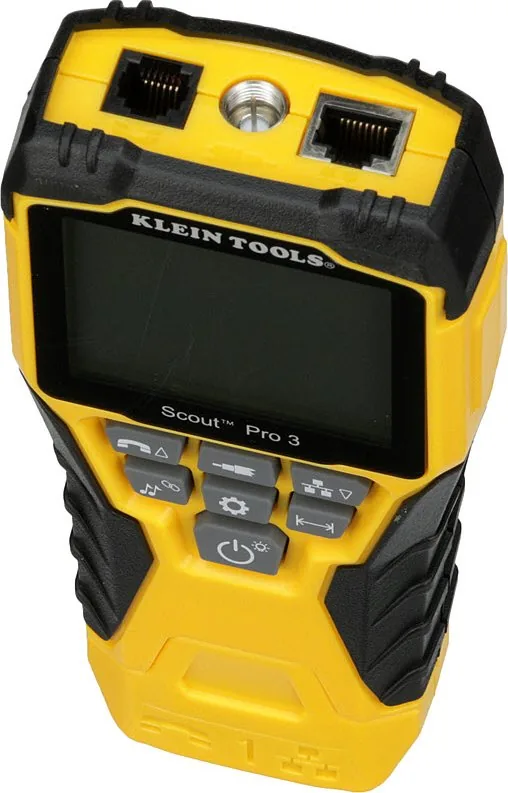
The Klein Tools VDV Scout
TM
Pro 3 is a portable voice-data-video cable tester. It tests and
troubleshoots RJ11, RJ12, RJ45 and F-connector terminated cables, and provides tone generation
for cable tracing. The VDV Scout
TM
Pro 3 also measures cable length, tests for shield, performs hub
blink testing and traces up to 19 locations (up to 5 locations with the included remotes, additional
remotes are available separately).
PORTS AND REMOTES OVERVIEW
•
Dimensions: 6.5" x 3.0" x 1.6" (16.5 x 7.6 x 4.1 cm)
•
Weight:
11 oz. (312 g) with battery and remote
•
Operating Temperature: 32° to 122 °F (0° to 50 °C)
•
Storage Temperature: -4° to 140 °F (-20° to 60 °C)
•
Humidity: 10% to 90%, non-condensing
•
Maximum Voltage (between any two connector
pins without damage):
- RJ Jack: 66V DC or 55V AC
- F-Connector: 66V DC or 55V AC
•
Battery Life (9V alkaline):
- Standby: 4 years
- Active: 50 hours (without backlight)
•
Cable Types: Shielded or unshielded; Cat7a, Cat7,
Cat6a, Cat6, Cat5e, Cat3, Coaxial
•
Length Measurement Method: Capacitance
•
Length Measurement Range:
1.5' to 1999' (0.5 m to 610 m) with 15 pF/ft
•
Length Accuracy:
(5% ft) or (5% m)
•
Length Constant Range:
10 pF/ft to 40 pF/ft (33 pF/m to 132 pF/m)
WARNINGS
To ensure the safe operation and service of the tester, please follow these instructions. Failure to
observe these warnings can result in severe injury or death.
•
The PoE jack, located on the right side of the Scout
TM
Pro 3 is the only jack designed for PoE energised
cables. Connecting AC energised cables to any port may damage it and pose a safety hazard to the user.
•
Improperly terminated RJ plugs have the potential to damage the jacks on the VDV Scout
TM
Pro 3. Visually
inspect an RJ plug before inserting it into the tester. The contacts should always be recessed into the plastic
housing of the plug. Plugging 6-position plugs into the 8-position jack on the tester has the potential to
damage the outer-most contacts of the jack, unless the plug is specifically designed for that purpose.
SYMBOLS ON THE TESTER
Warning or Caution Do NOT use on energised circuits
Always wear approved eye protection Read the instructions
Conformité Européenne - Conforms with European Economic Area directives
This symbol indicates that the equipment and its accessories shall be subject to separate
collection and correct disposal
RJ45 Port: Data cable, Ethernet cable, Cat5e, Cat6, Cat6a, Cat7, Cat7a.
F-Connector Port: Video cable, coaxial cable, RG6/RG6Q cable, RG59 cable.
RJ11/12 Port: Voice cable, POTS (plain old televoice service) cable, 4-wire cable, 6-wire cable,
2 twisted-pair cables, 3 twisted-pair cables, Cat3.
VDV SCOUT
TM
PRO 3 TESTER LOCATION ID REMOTES
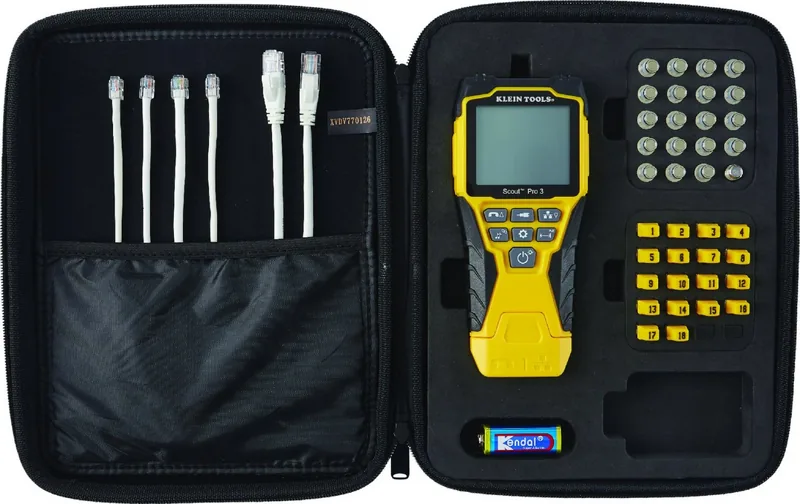
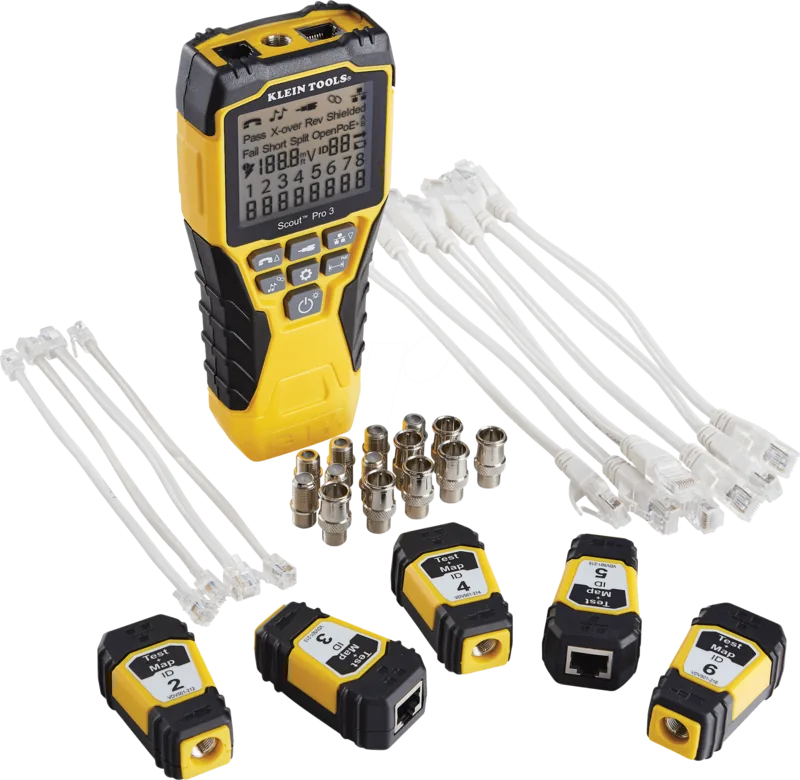
SELF-STORING TEST + MAP™ ID REMOTE (VDV501-210)
TEST + MAP™ ID REMOTES (VDV501-2## SERIES)
Use for cable location identification mapping and/or continuity testing. Self-storing remotes display
on tester as Remote ID No. 1. Included with all VDV Scout
TM
Pro 3 models.
Use for cable location identification
mapping and continuity testing.
Remotes display on tester asRemote ID
Nos. 1-12. Set Nos. 2–6 included with
VDV500-853 and sold separately, set
Nos. 7–12 sold separately, individual
remote Nos. 1–12 each sold separately.
RJ11/12
port
RJ45
port
F-connector
port
F-connector port
RJ11/12 port*RJ45 port*
PoE port*
Use for cable location identification mapping.
Set Nos. 1–5 included with VDV500-851,
setNos. 1–18 included with VDV501-852 and
sold separately.
KEYPAD FUNCTION
• VOICE / UP BUTTON
A
: Performs wiremap test on RJ11/RJ12
terminated cable, toggles selection upward in other modes.
• VIDEO BUTTON
B
: Performs continuity test on F-terminated coax cable.
• DATA / DOWN BUTTON
C
: Performs wiremap test on RJ45
terminated cable, toggles selection downward in other modes.
• TONE / HUB BLINK BUTTON
D
: Cycles through available
tone cadences, initiates Hub Blink.
• SETTINGS BUTTON
E
: Selects feet or metres,
enters Length Constant Edit mode.
• LENGTH / PoE BUTTON
F
: Measures cable length, initiates PoE test.
• POWER / BACKLIGHT BUTTON
G
: Turns unit on or off, turns backlight on or off.
A
D
G
F
E
B C
• VOICE / UP BUTTON
A
: Short Press: Initiates wiremap test on RJ11/RJ12 terminated cable. When in Tone or
Length Test mode, the first short press selects Voice mode, while repeated short presses selects wires orpairs of
wires. Long press: Turns Loop mode on or off. When in Tone or Length Test mode, returns to the home screen.
When in Settings mode, changes UOM from feet to metres, or increases the length contant value.
• VIDEO BUTTON
B
: Short Press: Initiates continuity test on an F-terminated coax cable.
When in Tone or Length
Test mode, a short press selects Video mode.
Long Press:
Turns Loop mode on or off. When in Tone or Length
Test mode, returns to the home screen.
• DATA / DOWN BUTTON
C
:
Short Press: Initiates wiremap test on RJ45 terminated cable. When in Tone or Length Test mode, first short press
selects Data mode, while repeated short presses select wires or pairs of wires. Long Press: Turns Loop mode on or
off. When in Tone or Length Test mode, returns to the home screen. When in Settings mode, changes UOM from
feet to metres, or increases the length contant value.
• TONE / HUB BLINK BUTTON
D
: Short Press: Repeated short presses will toggle through the available tone
cadences. Long Press: Initiates Hub Blink.
NOTE: DO NOT attempt to use Hub Blink function when connected to a
Power over Ethernet (PoE) active port.
• SETTINGS BUTTON
E
: Short Press: Enters Length Constant edit mode (use the UP
A
and DOWN
C
buttons
to adjust the value). Default for Length Constant mode is the wire pair of Pins 1 and 2 of data/RJ45 cable, and
the wire pair of Pins 3 and 4 of voice/phone cable. See the LENGTH CONSTANT section for more details. Second
Short Press: Displays option of feet or metres (use the UP
A
and DOWN
C
buttons to change). See the
LENGTH MEASUREMENT section for details. Long Press: Exits Settings mode and returns to the home screen.
• LENGTH / PoE BUTTON
F
: Short Press: Initiates cable length test. Test will default to a cable connected to the
RJ45 port. By default, the test will initiate on the first wire with no faults found. See the LENGTH MEASUREMENT
and LENGTH CONSTANT sections for more details.
Long Press: Initiates PoE test.
• POWER / BACKLIGHT BUTTON
G
: Short Press: First short press turns the unit on, repeated short presses will
turn thebacklight on and off. Press the power button a second time to turn the LCD backlight on or off.
Long Press: Turns unit off.
NOTE: Unit will automatically power off after 5 minutes of inactivity, or after
60minutes when in Tone mode.
IN DETAIL
QUICK REFERENCE
RJ45
port
port
F-connector
port
LanMap™
Location ID Remote**
VDV526-055
RJ45
connector
**Cannot be used to perform wire map or
cable length tests.
*The RJ jacks share internal connections, so only one RJ cable can be connected at a time for accurate cable
test results. However, an RJ cable and a coax cable may be connected at the same time. In ID mode, all
connectors on the VDV Scout
TM
Pro 3 may be connected at the same time.
CONNECTORS
Barrel Connector
VDV814-609
Female-to-female F-connector
Use with F-connector port
CoaxMap™
Location ID Remote**
VDV512-056
F-connector

Chat with your Klein Tools VDV Scout Pro 3 manual using AI

Get instant AI answers from your Klein Tools VDV Scout Pro 3 manual

Ask anything about the Klein Tools VDV Scout Pro 3. Answers come from this manual, with the pages they are based on.

VDV Scout Pro 3 Maintenance Schedule

As needed
Clean the instrument with a damp cloth

Turn the instrument off and disconnect any cables. Clean using a damp cloth only; do not use abrasive cleaners or solvents.

When depleted
Replace the 9V alkaline battery

Replace the battery when the low battery icon illuminates. Loosen the screw, remove the cover, and install a new 9V alkaline battery.

Before prolonged storage
Remove batteries during long-term storage

Remove the batteries when the instrument is not in use for a prolonged period of time to prevent damage.

M: qwen/qwen3.8-flash

Ask a Question

0/1000

Do you recommend VDV Scout Pro 3?

Yes No

Frequently Asked Questions

A

It supports RJ11, RJ12, RJ45, and F-connector terminated cables for voice, data, and video applications including shielded and unshielded types.

Is this answer helpful?

A

With included remotes and additional sets, it can trace up to 19 drop locations for troubleshooting and mapping purposes.

Is this answer helpful?

A

Yes, it has a dedicated PoE port to test for power presence, voltage levels, and wiring configuration safety.

Is this answer helpful?

A

Length accuracy is within five percent based on the cable's length constant setting using capacitance properties.

Is this answer helpful?

A

The tester displays a warning symbol and will not run the test to prevent damage and ensure user safety.

Is this answer helpful?

A

It uses a standard 9-volt alkaline battery which provides standby power for four years with active usage time of 50 hours.

Is this answer helpful?

A

Yes, it detects shorts, splits, opens, and miswires with clear digital indicators on the LCD screen.

Is this answer helpful?

M: QW-35-FL

Advantages and Disadvantages

Advantages

  • Detects short faults, open faults, reversals, miswires and split pairs for voice, data and video.
  • Identifies up to 19 cable locations using remote units for accurate digital mapping and tracing.
  • Illuminates switch ports using Hub Blink function to trace cables to specific network equipment.
  • Measures cable length up to 1999 feet with high accuracy based on cable capacitance.
  • Tests Power over Ethernet wiring and voltage to ensure safe operation on active networks.
VS

Disadvantages

  • Full location ID requires purchasing additional remotes beyond the single included unit.
  • Active battery life is limited to fifty hours requiring careful planning during extended jobs.
  • Length accuracy depends on user setting the correct constant for the specific cable type.
  • Cannot be used on energized AC circuits so proper safety procedures are required.
  • Six position plugs can damage the outer contacts if not specifically designed for the device.
M: QW-35-FL

Product Specification

Type

Cable Tester

Jack

RJ11, RJ12, RJ45, F-connector

Features

PoE Tester, Range (2001.31 ft), battery powered

M: QW-35-FL

Product Description

Klein Tools VDV Scout Pro 3 Overview

The modern networking environment requires precision and reliability. The Klein Tools Scout Pro 3 Tester with Remote Location Unit, PoE Tester offers a comprehensive solution for technicians. This device is designed to test voice, data, and video cables. It detects short faults, open faults, reversals, miswires, crossover wiring and split pairs. The tester supports RJ11, RJ12, RJ45 and F-connector terminated cables. One key feature is the location identification mapping capability. Users can trace up to 19 locations with remotes.

Performance and Measurement

The tool measures cable length using capacitance. The range extends from one point five feet to one thousand nine hundred ninety nine feet. Accuracy is within five percent. The large backlit LCD ensures visibility in low light. Auto power-off conserves the nine volt alkaline battery. This battery lasts up to fifty hours of active use. Standby mode keeps power for four years.

Connectivity and Tracing

Cable identification is simplified with LanMap and CoaxMap location remotes. These remotes identify location only. Test Plus Map ID remotes identify location and perform tests. This versatility makes it a staple for network technicians. The device includes a Tone Generator for cable tracing. It places a low frequency voltage on the cable for probing. This allows one cable to be traced.

Safety and Usage Guidelines

The Klein Tools Scout Pro 3 Tester with Remote Location Unit, PoE Tester also features a Cable Tester Manual style of operation for clarity. Users can verify Power over Ethernet wiring safely. It warns if voltage is detected on RJ45 ports. This prevents damage during testing. The Hub Blink function illuminates switch ports. This aids in tracing cables to specific equipment.

Specifications and Construction

Installation involves inserting the nine-volt battery. The dimensions are compact at six point five inches long. Weight is eleven ounces including battery. Storage temperature ranges from minus four to 140 degrees Fahrenheit. It handles humidity between ten and ninety percent.

Operational Features

The keypad layout supports voice, video, data, tone, settings, length and power. Each has specific functions like Hub Blink or Loop mode. This organization aids in quick operation during field work.

Conclusion and Benefits

In conclusion, this tester is a comprehensive diagnostic tool. It covers multiple cable types and protocols. The remote units expand its utility across large sites. Digital tracing reduces physical tracing time. Accuracy in length measurement ensures proper cable management. It supports both data and voice lines. Video coax cable testing is also available for video signals.

Technicians will appreciate the layout of the keypad. Connectivity checks are faster and more accurate. Errors are identified quickly which reduces downtime. Whether in wiring closets or routers, the tool performs reliably. It streamlines the testing process significantly.

Final thought: Overall, the Klein Tools Scout Pro 3 Tester with Remote Location Unit, PoE Tester, Cable Tester Manual represents a top choice for cable diagnosis. It combines multiple functions into one portable unit. Reliable performance ensures network integrity. It is the ideal investment for maintaining complex cabling systems efficiently.

M: QW-35-FL

© Copyright 2026 Manual.ly