Manual.ly Logo

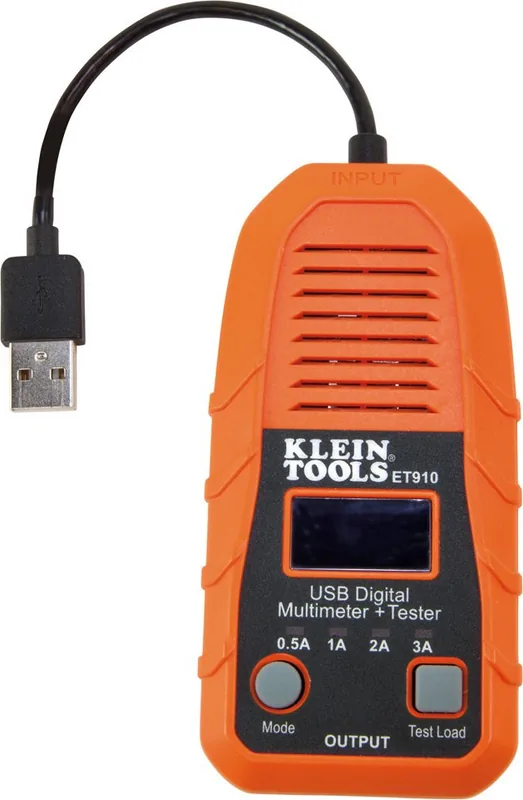
Klein Tools ET910 Manual

0.0 · 0 Ratings

PDF manual · 4 Pages

English

M: QW-35-FL
page

/ 4

Loading...
eddd86be8bcd7deaa3f939ab238ca0f33456 page 1
ENGLISH
NOTE: No user-serviceable parts inside.
FIG. 1
FIG. 2
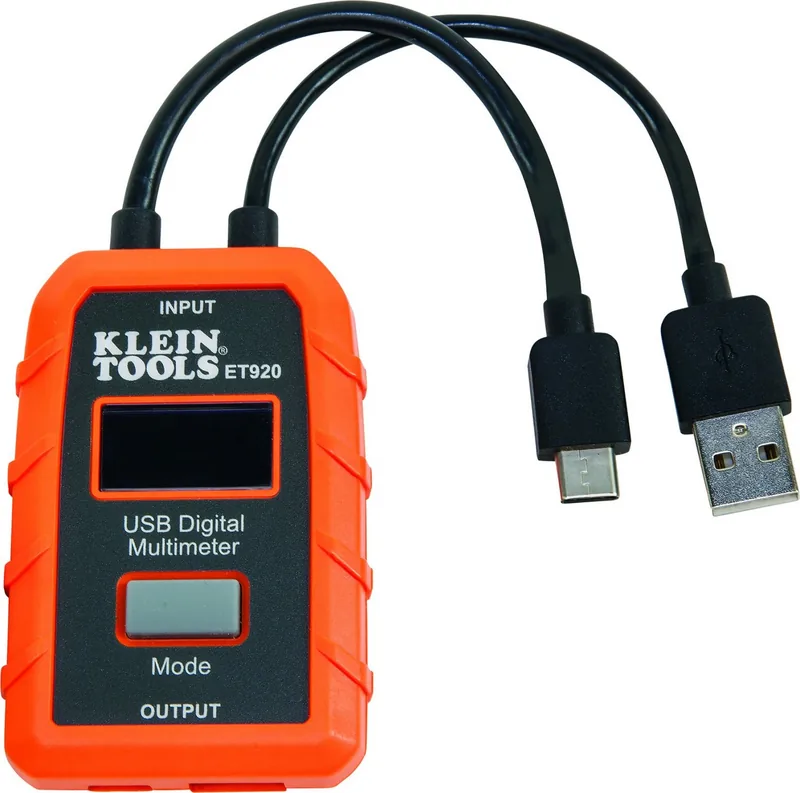
ET920
INSTRUCTION MANUAL - USB DIGITAL METER - TYPES A AND C
1
2
5
4
3
6
1. Power source INPUT (USB-A)
2. Power source INPUT (USB-C)
3. Load OUTPUT (USB-A)
4. Load OUTPUT (USB-C)
5. Mode button
6. LCD display
A. DC voltage
B. DC current
C. Capacity/Charge delivered (mAh)
D. Energy delivered (Wh)
E. Resistance (Ω)
F. Elapsed Time (Hour:Min:Sec)
G. Memory Location (M:1, M:2, etc)
H. Memory Clear/Reset ("CLR")
I.Connector type in use (USB-A or USB-C)
##.## V
#.## A
USB-#
###### mAh ####Wh
###:##:## ###.#Ω
I
Default Screen
C
B
F
A
Memory Screen
##.## V CLR
#.## A
###### mAh ####Wh
###:##:## ###.#Ω
E
D
G H
C
B
F
A
WARNINGS
T
o ensure safe operation and service of the tester, follow these instructions. Failure to observe these
warnings can result in severe injury or death.
• This tester will NOT display current below 50 mA, even if it is allowing this to pass through.
NOTE: The
display will show zero current.
• DO NOT use with ports that operate outside of the rated voltage and current.
• Before each use verify tester operation by measuring a known voltage or current.
• NEVER use on a circuit with voltage or current that exceeds the maximums specified for this device.
Use caution when working with voltages above 25V AC RMS or 60V DC. Such voltages pose a shock
hazard.
Voltage above 24V DC will damage product.
Display will read "OVERLOAD" in this condition
and output port will be disabled.
• DO NOT use during electrical storms or in wet weather.
• DO NOT use if tester appears to be damaged.
• Use caution when working with voltages above 25V AC RMS or 60V DC. Such voltages pose a shock
hazard.
NOTE: Voltage above 24V DC will damage product.
• Always adhere to local and national safety codes. Use personal protective equipment to prevent shock
and arc blast injury where hazardous live conductors are exposed.
CAUTION
• DO NOT attempt to repair this tester. There are no serviceable parts.
• DO NOT modify this tester in any way.
• DO NOT expose to extremes in temperature or high humidity.
• This tester will NOT be able to monitor a source port if any of the following conditions occur:
• The USB port or plug is not properly connected.
• The source device shuts down. Some portable storage batteries have auto-shutdown or standby
modes to save power if no load is detected from downstream device.
FUNCTION BUTTONS (FIG. 1)
MODE BUTTON
5
(Screen Toggle/Data Storage/Memory reset)
The Mode button serves three purposes:
1. Switch between screens (FIG. 2):
• From the default screen, pressing and releasing once will switch to the Memory
Screen.
• When in the Memory Screen, repeated pressing will cycle through all 10 memory
locations, beginning with M:1A or M:1C.
NOTE: If no data has been stored into
memory, pressing the Mode button will do nothing. The ET920 will only display
memory locations containing stored data.
2. Data/Memory Storage and Recall:
• To record a reading during live monitoring event, press and hold the Mode
button for 3 seconds. Release the button after the memory location (i.e. M:1A)
flashes momentarily on the screen. The next set of readings will be stored at the
next available location until all 10 memory locations are used.
NOTE: After all
10 locations are used, subsequent readings will overwrite the original 10 stored
readings, beginning with M:1. The memory location will reflect the connector type
in use when the data was stored (i.e. "M:1A" if USB-A, "M:1C" if USB-C). NOTE:
When in the Memory screen, if the Mode button is not pressed within 3 seconds,
the display will return to the Default screen.
3. Memory Reset:
• To reset or erase all data in memory, press and hold the Mode button for 5 seconds
from the Memory screen until the letters CLR flash in the upper right corner (FIG.
2). All data in memory will be erased in all 10 memory locations.
GENERAL SPECIFICATIONS
The Klein Tools ET920 is a USB digital meter for both USB-A (Type A) and USB-C (Type C)
ports. It accurately and reliably measures and displays the USB port voltage, current,
capacity, energy and resistance simultaneously. It can function with any USB-A and most
USB-C ports that have the ability to deliver power. It requires no batteries, as it draws power
from the power source.
• Measurement Range:
Voltage: 3 to 20V DC
Current: 0.05 to 3A (Type A), 0.05 to 5A (Type C)
Charge delivered: 99,999mAh MAX*
Energy delivered: 999Wh MAX*
Resistance: 400Ω MAX
Elapsed Time: Up to 999 hours, 59 min, 59 sec*
*
Based on display layout
• Operating and Storage Altitude: Up to 6562 ft. (2000 m)
• Operating and Storage Temp: 14° to 122°F (-10° to 50°C)
• Relative Humidity: <95% non-condensing
• Dimensions: Tester: 2.95" x 1.96" x 0.6" (75 x 50 x 15 mm)
Cable: Approx. 4" (100 mm)
• Weight: 1.7 oz. (49 g)
• Pollution degree: 2
• Drop Protection: 6.6 ft. (2 m)
• Ingress Protection: IP20
• Compatibility: Qualcomm Quick Charge® Compatible
• Standards:
EN 61326-1, EN61326-2-2, FCC Part 15B VOC.
Conforms to UL STD. 61010-1, 61010-2-030.
Certified to CSA STD. C22.2 No. 61010-1, 61010-2-030.
Specifications subject to change.
OPERATING INSTRUCTIONS
MONITORING MODE
NOTE: USB-A and USB-C sides CANNOT be used simultaneously.
The rst device connected, whether USB-A or USB-C, will be the
monitored source.
NOTE: The input plug must be connected to a powered USB device
before the downstream device is connected to the output port.
"Downstream device" refers to any device that has the ability to
draw current over USB.
1. Connect one of the ET920’s input connectors (USB-A or USB-C) to
the USB port that needs to be monitored.
• The LCD screen will turn on with Klein Tools logo screen and
move quickly to the Default Screen (FIG 2).
NOTE: For USB-C, a
downstream device must be connected to turn on the ET920.
• If the source port has power, it should only display a live voltage
reading within the operating range, 3-20V DC.
NOTE: Most USB
ports deliver ~5V DC.
2. Connect the device being charged to the output port of the ET920.
The display will show actual readings (FIG. 2).
NOTE: "mAh" resets only when source is disconnected.
CLEANING
Be sure the tester is disconnected from both the input and output port.
Use clean, dry, soft lint-free cloth to wipe down the entire unit.
•
Do NOT use abrasive cleaners or solvents.
STORAGE
Do not expose to high temperatures or humidity. After a period of
storage in extreme conditions exceeding the limits mentioned in the
General Specifications section, allow the tester to return to normal
operating conditions before using.
DISPOSAL / RECYCLE
Do not place equipment and its accessories in the trash. Items must
be properly disposed of in accordance with local regulations. Please
see www.epa.gov or www.erecycle.org for additional information.
CUSTOMER SERVICE
KLEIN TOOLS, INC.
450 Bond Street, Lincolnshire, IL 60069
1-877-553-4676
www.kleintools.com
SYMBOLS ON TESTER
This product has been independently tested
by Intertek and meets applicable published
standards
Conformité Européenne: Conforms with
European Economic Area directives
Read instructions before using
USB
Important information: It is important
that users of this tester read, understand,
and follow all warnings, cautions, safety
information, and instructions in this
manual before operating this tester. Failure
to follow instructions could result
in death or serious injury.
Warning – Risk of electric shock

Chat with your Klein Tools ET910 manual using AI

Get instant AI answers from your Klein Tools ET910 manual

Ask anything about the Klein Tools ET910. Answers come from this manual, with the pages they are based on.

ET910 Maintenance Schedule

Before each use
Verify tester operation

Measure a known voltage or current to ensure the tester is functioning correctly before starting work.

As needed
Clean the unit

Disconnect from input and output ports. Wipe with a clean, dry, soft lint-free cloth. Do not use abrasive cleaners or solvents.

M: qwen/qwen3.8-flash

Ask a Question

0/1000

Do you recommend ET910?

Yes No

Frequently Asked Questions

A

No, the Klein Tools ET920 does not require internal batteries. It draws all necessary power directly from the USB source connection it is monitoring. This eliminates the need for battery replacements and ensures it never loses power during use.

Is this answer helpful?

A

The device measures voltage in the range of 3 to 20 volts DC. However, you must exercise caution with voltages above 25 volts AC RMS or 60 volts DC. Operating above 24 volts DC can damage the product.

Is this answer helpful?

A

To save a reading, press and hold the Mode button for 3 seconds while monitoring. The memory location will flash to confirm. You can recall this data by switching to the Memory Screen. There are ten memory locations available for storage.

Is this answer helpful?

A

No. The input plugs for USB-A and USB-C cannot be used at the same time. The first device connected, whether USB-A or USB-C, will be the monitored source. Only one connection type is active at once.

Is this answer helpful?

A

If the display reads OVERLOAD, the output port is disabled. This usually happens if voltage or current exceeds the maximums specified. Disconnect the power source immediately. Do not attempt to use the unit if it indicates overloading.

Is this answer helpful?

A

The device has an Ingress Protection rating of IP20. It is not waterproof. You should not use the meter during electrical storms or in wet weather. Keep it dry to prevent damage to the internal electronics.

Is this answer helpful?

A

To reset all data, go to the Memory Screen. Press and hold the Mode button for 5 seconds until the letters CLR flash. This action will erase all data stored in all ten memory locations effectively.

Is this answer helpful?

M: QW-35-FL

Advantages and Disadvantages

Advantages

  • Draws power directly from USB source without needing internal batteries
  • Measures voltage, current, capacity, energy, and resistance simultaneously on one screen
  • Compatible with both USB-A and USB-C ports for flexible connectivity
  • Offers drop protection up to 2 meters for durability in field work
  • Stores up to 10 memory locations for reviewing data later
VS

Disadvantages

  • Will not display current readings below 50 milliamps
  • Voltage above 24 volts DC can permanently damage the device
  • USB-A and USB-C ports cannot be used at the same time
  • No user-serviceable parts inside so it cannot be repaired
  • Cannot monitor source if the upstream device shuts down
M: QW-35-FL

Product Description

Klein Tools ET920 USB Digital Multimeter Analysis

This device is designed for professionals needing precise USB power monitoring. The unit eliminates the need for internal batteries by drawing power directly from the source connection. It accurately measures voltage, current, capacity, energy, and resistance simultaneously. Users often consult the Klein Tools ET9x0 USB Digital Multimeter Manual for initial setup details.

Performance Metrics

The LCD display provides clear visual feedback for all readings. Voltage ranges from 3 to 20 volts DC. Current measurement reaches 3 amps for USB-A and 5 amps for USB-C. The meter tracks charge delivered in milliamp hours. It also monitors energy delivery in watt-hours. Resistance testing covers up to 400 ohms. Elapsed time tracking supports long duration tests.

Memory Functions

Storage capabilities allow recording ten distinct data points. Pressing the mode button saves readings during live monitoring. The screen flashes to confirm the memory location. Data is stored separately for USB-A and USB-C connectors. This distinction ensures accurate reference for specific ports. Users can reset the entire memory bank when needed.

Safety and Warnings

Operating safety is a priority for this tool. Do not use on circuits exceeding 25 volts AC RMS. Voltage above 24 volts DC can damage the product. The display shows overload if limits are exceeded. Never use during electrical storms or wet weather. Do not attempt to repair the unit yourself. There are no user-serviceable parts inside.

Maintenance and Durability

Cleaning requires a dry, lint-free cloth. Solvents and abrasive cleaners are prohibited. Storage must avoid extreme temperatures or humidity. The device offers drop protection up to two meters. It conforms to UL and CSA safety standards. Compatibility includes Qualcomm Quick Charge technology.

Specifications and Conclusion

Dimensions are approximately three inches by two inches. Weight stays under two ounces for portability. Altitude operation supports up to 2000 meters. These specs ensure reliability in field conditions. Technicians rely on this meter for charging diagnostics. It is an indispensable part of modern repair kits. The manual emphasizes safety procedures. Users must respect electrical boundaries. Always verify operation before critical tasks. This ensures long equipment life.

M: QW-35-FL

© Copyright 2026 Manual.ly