
KitSound Hive2o Manual
PDF manual · 8 Pages
English



Quick check
Incorrect answer, please try again.
Chat with your KitSound Hive2o manual using AI
Get instant AI answers from your KitSound Hive2o manual
Ask anything about the KitSound Hive2o. Answers come from this manual, with the pages they are based on.
Ask a Question
Do you recommend Hive2o?
Yes NoFrequently Asked Questions
The IP67 rating ensures the speaker is protected against dust and water immersion. It can be submerged in water up to one meter in depth for thirty minutes. However, you should not expose the device to water while it is charging to avoid permanent damage or electrical hazards.
Is this answer helpful?
Long press the Multi-Function Button to turn on and enter pairing mode. The LED indicator will flash white. Turn on Bluetooth on your device, search for new devices, and select 'KS Hive2o'. Enter 0000 if prompted for a passcode. Once connected, the LED will turn solid white.
Is this answer helpful?
Yes, you can pair two speakers together using True Wireless Stereo mode. Both units must be turned on and in pairing mode. Double press the Multi-Function Button on both to initiate pairing. The master will connect to the slave, and both will flash quickly before connecting to your device.
Is this answer helpful?
The internal battery supports up to four hours of playback time. Charging takes up to eight hours via the included micro USB cable. The LED indicator glows solid red while charging and turns off when fully charged. It is recommended to recharge every three months if unused.
Is this answer helpful?
When in Bluetooth mode, you can answer or end calls by short pressing the Multi-Function Button. To reject an incoming call, press the button twice. Ensure you are at least one meter away from the microphone for best call results and voice clarity.
Is this answer helpful?
If the speaker has not been used for ninety days, it may enter battery protection mode. Connect the Hive 2o to a power source using the micro USB cable to cancel this mode. Recharge it fully before attempting to use it again for optimal performance.
Is this answer helpful?
Advantages and Disadvantages
Advantages

- IP67 waterproof rating allows submersion up to one meter for thirty minutes
- TWS mode enables pairing of two units for true wireless stereo sound
- Built-in microphone supports hands-free call handling in Bluetooth mode
- Compact and lightweight design fits easily into travel bags
Disadvantages

- Battery playtime is limited to up to four hours of continuous use
- Charging time requires up to eight hours for a full battery
- Device enters battery protection mode after ninety days of non-use
- Audio distortion may occur if source device volume exceeds ninety-five percent
Product Specification
Power
5W RMS
Display
No
Tuner
No
Frequency Range
20Hz-20kHz
Connections
AUX In (3.5mm Jack)
Wireless
Bluetooth 4.2
Power Supply
Li-Polymer Battery (600mAh), USB
Playback Time
4h
Features
Waterproof (IP67), Stereo-Pairing, Hands-Free
Dimensions
2.99x3.58x2.87 inches (WxHxD)
Weight
0.46 lbs
Product Description
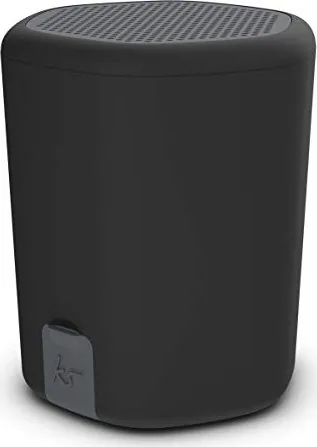
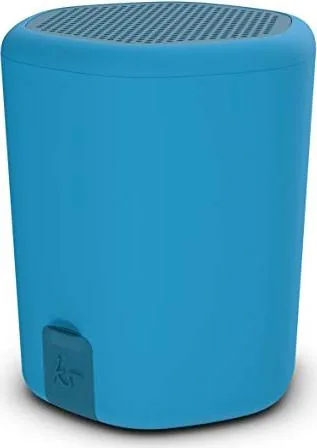
The KitSound Hive 20 stands out as a versatile portable speaker perfect for modern lifestyles. Whether you are at the beach or in the living room, durability meets performance. Audio enthusiasts appreciate the compact design that does not compromise on power. This device connects seamlessly via Bluetooth technology. It allows you to stream music wirelessly from tablets or smartphones.
Waterproof Durability
One of the standout features is the IP67 rating. This standard ensures protection against dust and immersion. You can submerge it in water up to one meter deep for thirty minutes. However, caution is advised. Do not expose the unit while it is charging. Always ensure all cable connections are removed and the cap is tightly closed before water exposure. This prevents permanent damage from liquids. Following the advice found in the KitSound Hive 20 Manual guarantees safety.
Power and Battery
The internal battery supports up to four hours of playback. Charging requires a micro USB cable and takes around eight hours for a full charge. During charging, the LED indicator glows solid red. Once fully charged, the light turns off. If unused for ninety days, the device enters protection mode to prevent deep discharge. Recharge it every three months to maintain health. Low battery levels below thirty percent should be charged immediately for best sound quality.
Connectivity and Controls
Connectivity extends to TWS mode for stereo sound capabilities. You can pair two speakers together for a wider soundstage. The master unit finds the slave unit automatically during this process. Bluetooth 4.2 ensures stable transmission up to ten meters away. The multi-function button controls playback functions efficiently. Hold it for two seconds to turn the unit on or off. Single presses manage play and pause actions during media consumption. Calls can be handled directly through the built-in microphone for hands-free convenience.
Audio Quality Considerations
Sound quality is enhanced by the 45 mm driver unit. However, be mindful of volume settings on your source device. Running it at one hundred percent may cause digital distortion at the output. Aim for ninety-five percent on the player for maximum audio clarity. Frequencies range from twenty hertz to twenty kilohertz. This provides a balanced listening experience. The speaker is lightweight at two hundred ten grams. It fits easily into bags for travel. Enjoy high-fidelity sound without the hassle of tangled wires.
Conclusion
This portable speaker offers excellent value for money. It combines ruggedness with ease of use. The provided accessories include the speaker, cable, and necessary documentation. Setup is intuitive for most users. Keep the device dry when not in protected mode to ensure longevity.
Search for 67,732 Manuals online


Type-in Brand or Model