
KeySonic KSM-5030M Manual
PDF manual · 12 Pages
English



Quick check
Incorrect answer, please try again.
Chat with your KeySonic KSM-5030M manual using AI
Get instant AI answers from your KeySonic KSM-5030M manual
Ask anything about the KeySonic KSM-5030M. Answers come from this manual, with the pages they are based on.
Ask a Question
Do you recommend KSM-5030M?
Yes NoFrequently Asked Questions
It uses a silicone surface, IP68 protection, and touch-based scrolling, making it easier to clean and better suited to hygienic or shared-use environments than a standard mouse.
Is this answer helpful?
Yes. The mouse is compatible with Windows and macOS. On Windows, it installs automatically after connection, and then it works as a plug-and-play device.
Is this answer helpful?
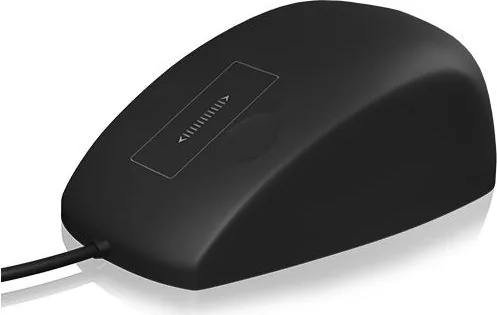
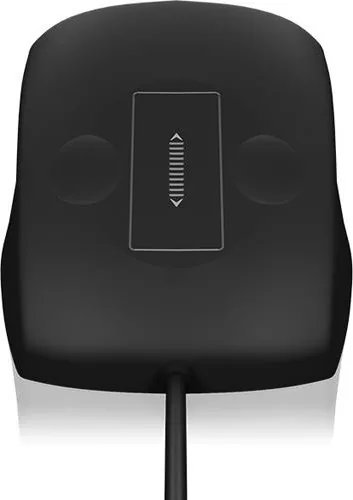
Place your finger on the scroll area in the center of the mouse. Swipe toward you to scroll down and away from you to scroll up.
Is this answer helpful?
Yes. The instructions allow cleaning with water, detergent, disinfectant, or alcohol. However, avoid aggressive solvents and make sure the mouse is not exposed to excess moisture.
Is this answer helpful?
It is designed with IP68 protection, which helps it resist water and dust. That makes it a stronger choice for environments where cleanliness and durability matter.
Is this answer helpful?
Do not use methylbenzene, xylene, gasoline, kerosene, or acetone. These can damage the material or surface of the mouse.
Is this answer helpful?
Advantages and Disadvantages
Advantages

- IP68 protection helps the mouse resist water and dust in demanding environments.
- Silicone surface is easier to clean and better suited for hygienic workflows.
- USB plug-and-play setup keeps installation fast on Windows and macOS.
- Touch-based scrolling removes the need for a traditional wheel and stays easy to wipe.
- 1.8 m cable gives flexible placement on desks and shared workstations.
Disadvantages

- Touch scrolling may feel unfamiliar to users who prefer a physical scroll wheel.
- Cleaning rules exclude several common solvents, so maintenance must be careful.
- The wired design offers stability but no wireless freedom.
- Specialized hygienic design may not appeal to users wanting a standard everyday mouse.
Product Specification
Suitability
both hands (left hand, right hand)
Buttons
3 (total), 2 (main), 1 (scroll wheel click), Touchscroll
Scroll wheel
1x 2-way, Touchscroll
Tracking
LED-red/IR
Lighting
N/A
Connection
wired (70.87 in), USB-A 2.0
Power supply
USB
Dimensions (WxHxD)
2.56x1.61x4.61 in
Approximate volume
5.00 in^3 (approximate shape)
Weight
5.50 oz
Special features
IP68 certified
Product Description
KeySonic KSM-5030M Silicone Mouse: Clean, Durable, and Ready for Busy Workspaces
The KeySonic KSM-5030M Silicone Mouse Manual points to a mouse designed with hygiene and practicality in mind. Instead of a typical plastic shell, this model uses a smooth silicone surface that feels different from standard office mice and is easier to keep clean. It is a strong fit for shared desks, medical-adjacent environments, labs, and any place where regular wiping and dependable daily use matter.
Built for easy cleaning
One of the standout features of the KSM-5030M is its IP68 water and dust protection. That level of sealing makes it much better suited to challenging environments than a regular mouse. The surface can be cleaned with common agents such as water, detergent, disinfectant, or alcohol, which helps maintain a more hygienic setup over time. For users who value cleanliness, that is a real advantage.
Simple use, no complicated setup
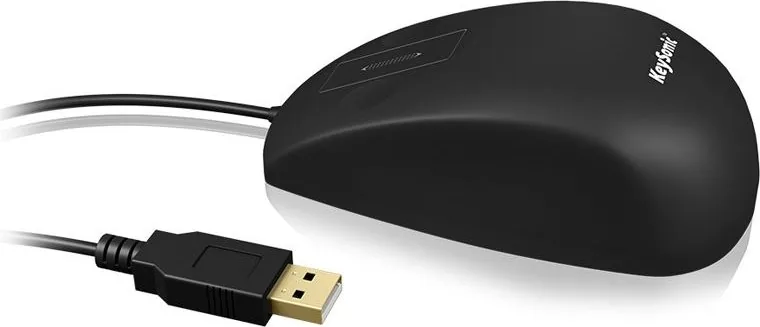
The mouse connects through a 1.8-meter USB Type-A cable, so there is no battery to charge and no wireless pairing to worry about. Just plug it in and start working. It supports Windows and macOS, and on Windows systems it installs automatically. That plug-and-play approach makes it ideal for offices, public terminals, and shared workstations where convenience matters.
Touch scrolling and dependable everyday performance
Instead of a traditional scroll wheel, the KSM-5030M uses a touch sensor in the center area for scrolling. A swipe toward you scrolls down, while a swipe away scrolls up. This design keeps the mouse surface smooth and easier to sanitize. The operating range is also broad, from -20°C to +70°C, adding to its versatility in different work settings.
A practical choice for clean environments
While the mouse is built to withstand tough conditions, it still deserves careful handling. The instructions recommend avoiding aggressive solvents, keeping moisture away from internal electronics where possible, and cleaning with non-abrasive materials. In short, this is a specialized mouse that combines hygiene, durability, and everyday simplicity in one compact accessory.
Notes
- Best suited for spaces where frequent cleaning is important.
- Not intended for harsh solvent-based cleaning.
- Plug-and-play design keeps setup fast and straightforward.
Search for 67,732 Manuals online


Type-in Brand or Model