
KeySonic KSK-8031INEL Manual
PDF manual · 11 Pages
English



Quick check
Incorrect answer, please try again.
Chat with your KeySonic KSK-8031INEL manual using AI
Get instant AI answers from your KeySonic KSK-8031INEL manual
Ask anything about the KeySonic KSK-8031INEL. Answers come from this manual, with the pages they are based on.
Ask a Question
Do you recommend KSK-8031INEL?
Yes NoFrequently Asked Questions
This keyboard is specifically designed for Windows® systems. While it may physically connect to Mac computers, full functionality and key mapping are optimized for Windows. Users should verify compatibility requirements before purchasing for non-Windows environments.
Is this answer helpful?
Safe cleaning agents include water, mild detergent, disinfectants, and alcohol. It is crucial to avoid harsh solvents such as acetone, methylbenzene, xylene, gasoline, or kerosene, as these can permanently damage the surface and internal components.
Is this answer helpful?
You can control the backlight using the dedicated function keys. Press the minus key to make the light darker and the plus key to make it brighter. There is also a specific combination to toggle the backlight on and off completely depending on the firmware version.
Is this answer helpful?
Yes, the keyboard meets the IP68 standard, meaning it is fully protected against dust and can withstand temporary immersion in water. However, you should still use the ON/OFF switch to cut power before exposing it to liquids for cleaning purposes.
Is this answer helpful?
RaidSonic Technology GmbH typically provides a warranty period for their products. Please refer to the official documentation or contact support at [email protected] for specific warranty terms and coverage details applicable to your region.
Is this answer helpful?
The device is engineered to operate safely within a temperature range of -20°C to +70°C. Exposing the keyboard to temperatures beyond these limits may cause overheating, failure, or permanent damage to the electronic components.
Is this answer helpful?
Advantages and Disadvantages
Advantages

- IP68 rated for complete waterproof and dustproof protection suitable for hygienic industries
- Integrated 140 cm USB cable provides excellent reach and reduces clutter
- Dedicated ON/OFF switch allows safe power cycling during rigorous cleaning procedures
- Adjustable blue backlight and LED indicators enhance visibility in low-light environments
- True Plug and Play functionality requires no driver installation for immediate use
Disadvantages

- Requires strict adherence to specific cleaning agents to avoid chemical damage
- Large full-size form factor may consume significant desk space in compact setups
- Non-replaceable integrated cable could limit lifespan if the wire sustains damage
- Operating temperature extremes might affect peripheral components outside the specified range
- No wireless connectivity option limits placement flexibility compared to Bluetooth models
Product Specification
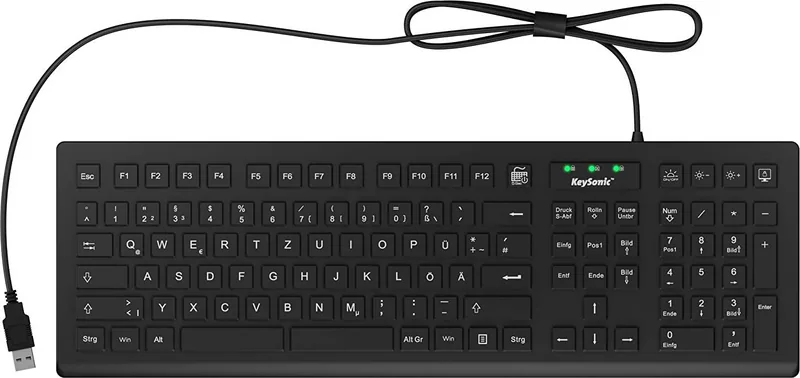
Layout
DE
Type
Rubber Dome
Lighting
blue
Keycap Level
regular, with frame, chiclet
Keycap Format
flat
Keycap Dome
straight
Numpad
Standard
Cursor Block
Standard
Control Keys
Standard
Enter Key
shortened
Delete Key
Standard
Status Indicator
Caps Lock, Num, Scroll
Wrist Rest
N/A
Housing
Silicone
Connection
wired (4.59 ft), USB-A 2.0
Power Supply
USB
Dimensions (WxDxH)
17.32x0.55x5.51 in
Weight
1.76 lbs
Features
splash-proof + IP68, rubberized surface, coated
Product Description
KeySonic KSK-8031 INEL DE - Read, Download & Print Free
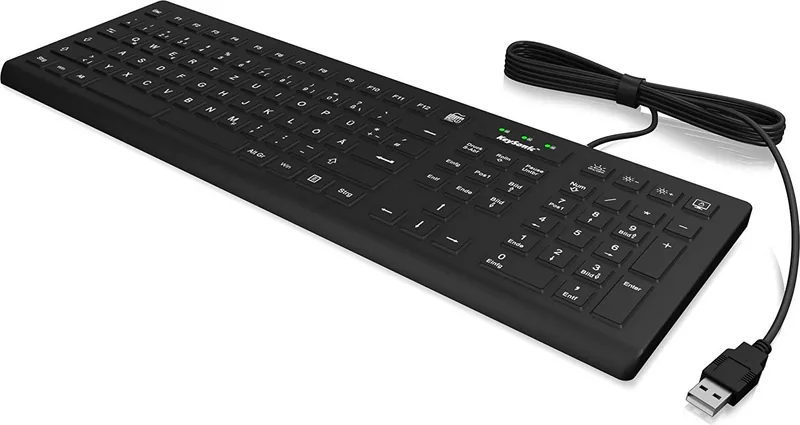
The KeySonic KSK-8031 INEL DE stands as a robust solution for demanding industrial environments where hygiene and durability are paramount. Designed specifically for Windows systems, this full-size keyboard integrates seamlessly into workflows that require frequent cleaning or exposure to harsh conditions. Its IP68 rating ensures complete protection against dust and water immersion, making it ideal for food processing plants, laboratories, and heavy manufacturing facilities.
One of the standout features of this device is its user-friendly design tailored for longevity. The integrated USB cable measures an impressive 140 cm, offering flexibility in setup without the need for extension cords. The unit includes a dedicated ON/OFF switch, allowing users to completely power down the device during deep cleaning cycles to prevent any internal damage from moisture or chemicals. This level of control is essential for maintaining operational safety and equipment integrity.
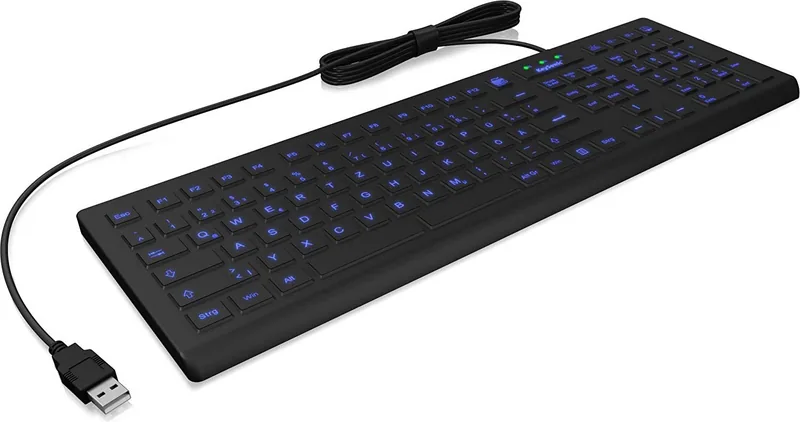
Visual feedback is provided through adjustable blue backlighting, which can be dimmed or brightened to suit varying lighting conditions. The keyboard also features illuminated indicators for the Num Lock, Caps Lock, and Scroll Lock keys, ensuring operators never lose track of their input status even in low-light scenarios. With Plug and Play technology, no driver installation is required, enabling immediate use upon connection to a host computer.
Maintenance is straightforward yet critical for performance. While the keyboard can withstand standard cleaning agents like water, detergent, disinfectants, and alcohol, it must never be exposed to aggressive solvents such as acetone, gasoline, or kerosene. The operating temperature range spans from -20°C to +70°C, demonstrating its resilience against extreme environmental fluctuations. Users can easily lock their computer directly from the keyboard with a single press, adding a layer of security to shared workstations.
Important Notes
Always ensure the device is disconnected before cleaning to avoid short circuits. Keep small packaging parts away from children to prevent suffocation hazards. Dispose of the product according to WEEE regulations and do not place it in domestic waste bins.
Search for 67,732 Manuals online


Type-in Brand or Model