

KeySonic KSK-8030IN Manual
PDF manual · 8 Pages
English



Quick check
Incorrect answer, please try again.
Chat with your KeySonic KSK-8030IN manual using AI
Get instant AI answers from your KeySonic KSK-8030IN manual
Ask anything about the KeySonic KSK-8030IN. Answers come from this manual, with the pages they are based on.
Ask a Question
Do you recommend KSK-8030IN?
Yes NoFrequently Asked Questions
It is best used in environments that need a hygienic, durable, and easy-to-clean keyboard. Its sealed, industrial-style design makes it suitable for workplaces where dust, moisture, and frequent cleaning are common.
Is this answer helpful?
No. It supports Plug & Play via USB, so it usually works right after being connected. Windows automatically installs it, and no separate driver setup is needed for normal use.
Is this answer helpful?
Yes. The keyboard can be cleaned with water, detergent, disinfectants, or alcohol. Avoid aggressive chemicals like acetone, gasoline, or kerosene, as they may damage the material.
Is this answer helpful?
Yes. It is rated IP68, which means it is designed for strong protection against water and dust. That makes it a better fit for harsh or hygiene-sensitive environments than a standard keyboard.
Is this answer helpful?
It is intended for Windows systems. The layout and installation process are optimized for Windows, and the keyboard is recognized automatically when connected to a compatible USB port.
Is this answer helpful?
Connect the USB Type-A plug to a free port on your computer and wait for Windows to finish installation. Also make sure the keyboard is used in suitable conditions and cleaned according to the manual.
Is this answer helpful?
Advantages and Disadvantages
Advantages

- IP68 protection helps resist water and dust in demanding workspaces.
- Full-size German layout offers a familiar typing experience for Windows users.
- Plug & Play USB setup makes installation quick and driver-free.
- Resistant key printing improves long-term readability.
Disadvantages

- Primarily designed for Windows, so cross-platform support may be limited.
- Requires careful cleaning; strong solvents can damage the surface.
- The fixed 180 cm cable may not suit every desk setup.
- Lacks advanced extras such as programmable keys or multimedia features.
Product Specification
Layout
DE
Type
Rubber Dome
Backlighting
N/A
Keycap level
regular, framed, Chiclet
Keycap format
flat
Keycap dome
straight
Numeric keypad
Standard
Cursor block
Standard
Control keys
Standard
Enter key
shortened
Delete key
Standard
Status indicator
Capslock, Num, Scroll
Palm rest
N/A
Housing
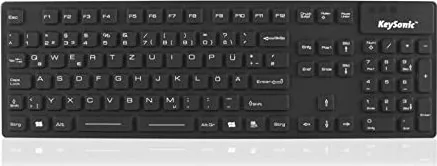
Silicone
Housing color
monochrome, black
Keycap finish
monochrome, black
Key labeling
monochrome, white
Connection
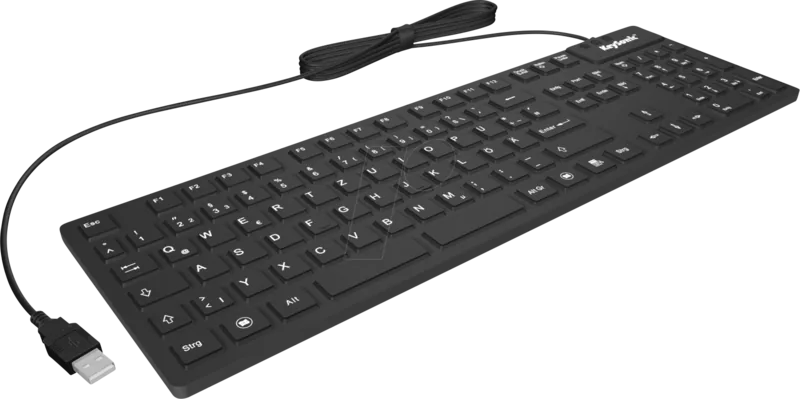
wired (5.91ft), USB-A 2.0
Power supply
USB
Dimensions (WxHxD)
17.32x0.47x5.43in
Weight
2.05lb
Special features
splash-proof + IP68, antibacterial coating, rubberized surface, encased
Product Description
KeySonic KSK-8030IN Silicone Keyboard, black, USB, DE Manual
The KeySonic KSK-8030IN Silicone Keyboard is built for users who need a practical, easy-to-clean input device with a strong focus on hygiene and reliability. Designed in a full-size German layout, it fits naturally into everyday Windows setups while also meeting the demands of work environments where cleanliness matters. The black finish gives it a professional look, and the USB connection keeps installation simple and fast.
What makes this keyboard stand out is its industrial-style construction and protective design. With IP68 water and dust resistance, it is made to handle challenging surroundings better than a standard office keyboard. That makes it a smart choice for medical, laboratory, workshop, or food-related spaces where spills, dust, and frequent cleaning are part of daily use. The integrated 180 cm USB cable also adds flexibility, allowing the keyboard to be positioned comfortably on a desk or workstation.
Another useful detail is the resistant key print, which helps prevent lettering from fading over time. This is especially valuable in high-use settings where durability is just as important as comfort. Since it works with Plug & Play functionality, there is no need for driver installation. Simply connect it to a free USB Type-A port, and Windows typically recognizes it within moments.
The keyboard is also designed with maintenance in mind. It can be cleaned with water, detergent, disinfectants, or alcohol, making routine hygiene easier to manage. At the same time, it is important to avoid harsh substances such as acetone, gasoline, or kerosene, which could damage the surface. The device is rated for an operating temperature range from -20°C to +70°C, showing that it is meant for tough environments rather than fragile desk use.
Overall, the KeySonic KSK-8030IN blends convenience, durability, and hygiene in one compact solution. It is a dependable option for anyone looking for a robust keyboard that is simple to connect, easy to sanitize, and ready for demanding conditions.
Notes
- Best suited for Windows-based systems
- Keep the keyboard away from harsh solvents
- Ideal for environments where frequent cleaning is required
- Check the manual before first use for proper handling and care
Search for 67,732 Manuals online


Type-in Brand or Model