

KeySonic KSK-6031INEL Manual
PDF manual · 12 Pages
English



Quick check
Incorrect answer, please try again.
Chat with your KeySonic KSK-6031INEL manual using AI
Get instant AI answers from your KeySonic KSK-6031INEL manual
Ask anything about the KeySonic KSK-6031INEL. Answers come from this manual, with the pages they are based on.
Ask a Question
Do you recommend KSK-6031INEL?
Yes NoFrequently Asked Questions
The keyboard has an IP68 rating, meaning it is fully dust-tight and can be immersed in water beyond one meter depth for extended periods without damage.
Is this answer helpful?
Use water, detergent, disinfectant, or alcohol. Avoid aggressive solvents like acetone, gasoline, or kerosin which can cause scratches or short circuits.
Is this answer helpful?
No, it is Plug and Play compatible with Windows systems and will install automatically upon connection without needing external drivers.
Is this answer helpful?
The device functions reliably within a temperature range of -20 degrees Celsius to +70 degrees Celsius.
Is this answer helpful?
Press the ON/OFF BACKLIGHT button to cycle through brightness levels or turn the light off completely.
Is this answer helpful?
While designed primarily for Windows, basic typing functions work on most systems, but specialized keys may not function as intended without configuration.
Is this answer helpful?
Turn the device off immediately using the switch, dry it thoroughly with a cloth, and ensure no moisture remains before reconnecting power.
Is this answer helpful?
Advantages and Disadvantages
Advantages

- IP68 water and dust proof rating ensures durability in harsh environments
- Adjustable blue backlight improves visibility in low-light conditions
- Dedicated ON/OFF switch facilitates safe and thorough cleaning procedures
- Plug and Play compatibility eliminates the need for driver installation
- Long 140 cm integrated USB cable provides flexible positioning options
Disadvantages

- Requires specific cleaning agents to avoid damaging the surface finish
- Not suitable for use in temperatures exceeding +70 degrees Celsius
- Large full-size footprint may not fit compact desk setups easily
- No wireless connectivity options limiting placement flexibility
- Strict safety warnings require careful adherence during assembly and use
Product Specification
Layout
DE
Type
Rubber Dome
Lighting
blue
Keycap Level
regular, with frame, chiclet
Keycap Format
flat
Keycap Crown
straight
Numpad
Standard
Cursor Block
Standard
Control Keys
proprietary
Enter Key
shortened
Delete Key
enlarged
Status Indicator
Caps Lock, Num, Scroll
Wrist Rest
N/A
Housing
Silicone
Connection
wired (5.9ft), USB-A 2.0
Power Supply
USB
Dimensions (WxDxH)
14.96x0.47x5.12in
Weight
1.36lbs
Features
splash-proof + IP68, rubberized surface, covered
Product Description
KeySonic KSK-6031 INEL DE - Read, Download & Print Free
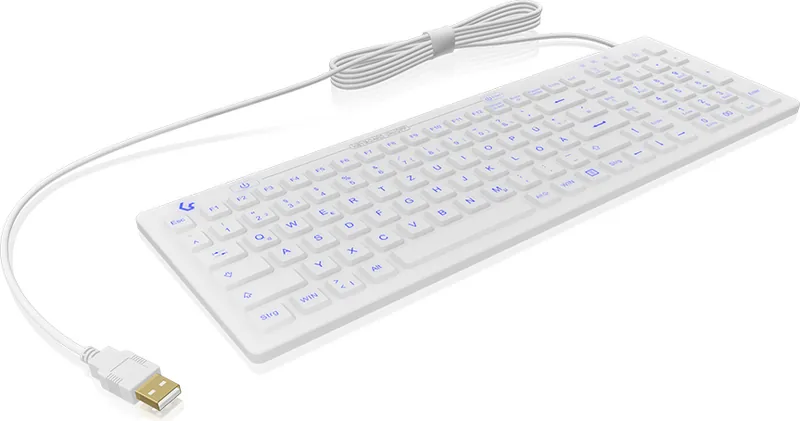
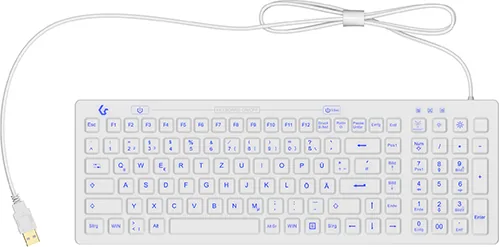
The KeySonic KSK-6031 INEL DE represents a robust solution designed specifically for demanding industrial environments where hygiene and durability are paramount. This full-size keyboard is engineered to withstand the rigors of professional use while maintaining strict safety standards for operators. Its primary design philosophy centers on creating a seamless interface between user and machine without compromising on cleanliness or operational continuity.
Constructed with high-grade materials, this device boasts an IP68 rating, ensuring it is completely protected against dust ingress and capable of enduring immersion in water. This makes it an ideal choice for food processing plants, pharmaceutical facilities, and other sectors requiring frequent and rigorous cleaning protocols. The integrated USB cable extends 140 cm, providing ample reach for ergonomic setups without the need for additional adapters.
User interaction is enhanced through intelligent features such as an adjustable blue backlight. Operators can toggle illumination settings to suit varying lighting conditions, reducing eye strain during night shifts or in dimly lit warehouses. The ON/OFF switch allows users to completely power down the unit before applying harsh cleaning agents, preventing accidental key presses and extending the lifespan of internal components. Despite its rugged build, the keyboard remains plug-and-play compatible with Windows systems, eliminating the need for complex driver installations.
Safety is woven into every aspect of the product's design. The manual emphasizes critical precautions regarding electrical shock, heat dissipation, and data integrity. Users are advised to avoid exposing the device to extreme temperatures outside the specified range of -20° C to +70° C. Proper disposal procedures are also highlighted to ensure environmental compliance under WEEE directives. By following the recommended cleaning guidelines using mild detergents and avoiding solvents like acetone, users can maintain the device's pristine condition indefinitely.
Whether you are managing a busy production line or working in a sterile laboratory, the KeySonic KSK-6031 INEL DE offers reliability that standard office peripherals cannot match. Its durable construction and hygienic design make it a staple for modern industrial workflows.
Important Notes
- Always disconnect power before deep cleaning.
- Keep small parts away from children to prevent suffocation risks.
- Ensure adequate ventilation to prevent overheating.
- Back up data before connecting new hardware.
Search for 67,732 Manuals online


Type-in Brand or Model