
KeySonic ACK-109BL Manual
PDF manual · 2 Pages
English



Quick check
Incorrect answer, please try again.
Chat with your KeySonic ACK-109BL manual using AI
Get instant AI answers from your KeySonic ACK-109BL manual
Ask anything about the KeySonic ACK-109BL. Answers come from this manual, with the pages they are based on.
Ask a Question
Do you recommend ACK-109BL?
Yes NoFrequently Asked Questions
The keyboard connects via USB and includes a PS/2 adapter for systems with legacy PS/2 keyboard ports, offering plug-and-play installation on most modern Windows systems.
Is this answer helpful?
Yes — the silicone, sealed design is dustproof and offers protection against water exposure in normal use, but it is not rated for continuous full immersion or prolonged exposure to aggressive liquids.
Is this answer helpful?
The optional blue EL keypad illumination can be switched on and off using the keyboard’s EL on/off control; consult your system documentation if special BIOS support is required for related functions.
Is this answer helpful?
Many older OS versions may not auto-recognize USB keyboards. If problems occur, update the OS, check BIOS USB keyboard support, or use the supplied PS/2 adapter to connect via a PS/2 port.
Is this answer helpful?
The sealed full-travel membrane keys are rated for an expected lifetime of approximately one million keystrokes per key, designed for long-term professional use in challenging environments.
Is this answer helpful?
Remove coarse debris with a soft brush, compressed air, or vacuum. Clean fine dirt with a damp cloth, rubbing alcohol, or disinfectant. Avoid harsh solvents and do not immerse the keyboard or cable in water.
Is this answer helpful?
Operating temperatures range from 0 °C to +60 °C and storage from –20 °C to +80 °C. Avoid extreme heat above +80 °C, temperatures below –40 °C, and exposure to oils, solvents, strong acids or alkalis.
Is this answer helpful?
Advantages and Disadvantages
Advantages

- Flexible, foldable and rollable silicone design for easy transport and storage.
- Sealed full-travel membrane keys provide quiet, tactile feedback and ~1,000,000 keystroke life.
- Dual interface: USB with included PS/2 adapter for wide compatibility.
- Dustproof and waterproof design with full humidity tolerance for harsh environments.
- Optional switchable blue EL keypad illumination and blue status LEDs for visibility.
Disadvantages

- Membrane keys may feel less precise than mechanical switches for heavy typists.
- Not suitable for continuous full immersion or exposure to aggressive chemicals.
- Maximum operating temperature and mechanical limits restrict extreme-environment use.
- Cable is fixed at 1.5 m; no wireless option limits some mobile scenarios.
- Some legacy OS/BIOS setups may require updates or PS/2 use for reliable recognition.
Product Specification
Layout
DE
Type
Rubber Dome
Backlighting
N/A
Keycap Profile
regular, framed, Chiclet
Keycap Shape
flat
Keycap Top
straight
Numpad
Standard
Arrow Keys
Standard
Control Keys
Standard
Enter Key
Standard
Delete Key
Standard
Status Indicator
N/A
Palm Rest
N/A
Material
Silicone
Connection
wired (4.92 ft), USB & PS/2 keyboard
Power Supply
USB
Dimensions (WxHxD)
19.29x0.59x5.39in
Weight
0.71 lb
Special Features
3 multimedia keys, splash-proof + IP68, foldable, rubberized surface, sheathed
Product Description
KeySonic ACK-109BL Full-size Rubber Keyboard, PS/2 & USB, DE Manual
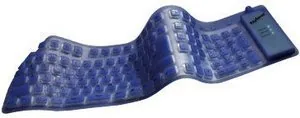
The KeySonic ACK-109BL is a full-size, flexible silicone keyboard designed for demanding environments and mobile use. Built with sealed membrane full-travel keys and optional blue EL keypad illumination, it combines tactile feedback with quiet operation. The keyboard is foldable and rollable for compact transport, resistant to dust and water, and features three ACPI keys (Power, Sleep, Wake Up) plus blue status LEDs for Caps Lock, Num Lock and Scroll Lock. With both USB and PS/2 connectivity (PS/2 adapter included) it supports plug-and-play installation across legacy and modern Windows systems.
Sturdy and engineered for professional settings, the ACK-109BL suits workshops, laboratories, food service, medical environments, and outdoor applications. The sealed construction helps protect internal electronics and enables cleaning with damp cloths, disinfectants, or compressed air for coarse debris. The membrane keys are rated for approximately one million keystrokes per key, and the keyboard operates on +5 VDC with a maximum current draw of 250 mA. Operating temperature ranges and full humidity tolerance make it adaptable to harsh conditions, while CE certification ensures compliance with relevant standards.
Installation is straightforward: power down, connect via USB or the supplied PS/2 adapter if a legacy port is preferred, and boot. Modern operating systems generally recognize the device automatically; older systems may require BIOS updates or PS/2 use. The EL illumination can be toggled on and off as needed. The manual includes user guidance for BIOS/OS compatibility, locale settings, cleaning procedures, and warnings about exposures that can damage the keyboard (sharp objects, extreme heat, full immersion, aggressive chemicals, prolonged heavy compression, or extreme deformation).
Compact, rugged and practical, the ACK-109BL is aimed at users who need a durable, portable input device that balances tactile responsiveness with silent operation. Its combination of environmental resilience, dual-interface compatibility, and optional backlight make it useful where reliability and hygiene are priorities.
Notes
- Optional blue EL illumination is user-toggleable.
- Includes USB cable (1.5 m) and PS/2 adapter.
- Rated life: ~1,000,000 strokes per key.
- Not designed for permanent full submersion or exposure to strong solvents.
Search for 67,732 Manuals online


Type-in Brand or Model
repellendus_distinctio
9 months ago
Is this keyboard comfortable for long daily typing, or is it mainly meant for travel use (for example with a Zaurus SL-C3000)?
Manual.ly
9 months ago
Based on user feedback, this keyboard works well on the go and with devices like the Zaurus SL-C3000 and a PC. Because of its naturally flat design, many customers find it more suitable for travel, short to medium sessions, and on-the-bed/on-the-desk use rather than intensive, all-day typing. If you plan to type for hours every day, you may prefer a full-size, more ergonomic keyboard with more height and key travel. For longer work sessions, try using a stable desk setup and take regular breaks to reduce hand and wrist strain.