
Kenwood KMM-BT506DAB Manual
PDF manual · 136 Pages
English



Quick check
Incorrect answer, please try again.
Chat with your Kenwood KMM-BT506DAB manual using AI
Get instant AI answers from your Kenwood KMM-BT506DAB manual
Ask anything about the Kenwood KMM-BT506DAB. Answers come from this manual, with the pages they are based on.
KMM-BT506DAB Maintenance Schedule
Wipe off dirt on the faceplate with a dry silicone or soft cloth.
Detach the faceplate and clean the connector gently with a cotton swab without damaging it.
Ask a Question
Do you recommend KMM-BT506DAB?
Yes NoFrequently Asked Questions
Yes. The unit supports DAB/DAB+ digital radio with service/ensemble scanning, text/data support and automatic service list updates for current station information.
Is this answer helpful?
You can register up to five Bluetooth devices. At runtime the receiver supports up to two connected phones and one connected Bluetooth audio device simultaneously, while allowing switching among paired audio devices when in BT AUDIO source.
Is this answer helpful?
Yes. Alexa works via the Alexa mobile app on your smartphone. After pairing the phone by Bluetooth and setting up the device in the Alexa app, you can press the unit’s Alexa control, speak through the supplied mic and use Alexa voice features.
Is this answer helpful?
The receiver offers 2-way or 3-way crossover selection, speaker-size presets, adjustable crossover frequencies/slopes, digital time alignment (DTA), manual and preset EQs, bass boost, loudness, space enhancement and sound reconstruction.
Is this answer helpful?
Spotify works via USB for iPhone/iPod touch (connect using the Lightning cable or adapter) or via Bluetooth for Android. Ensure SPOTIFY SRC is enabled in SOURCE SELECT and use the Spotify app on your phone for playback control.
Is this answer helpful?
Yes. Firmware updates for the system and DAB are supported. Use the F/W UPDATE function in the menu and follow instructions on Kenwood’s support site for update files and procedures.
Is this answer helpful?
Ensure a 12V negative-ground system, disconnect the battery before wiring, follow ISO wiring pinouts, avoid shorting the battery or chassis, and consider professional installation for crossover, amplifier and antenna wiring.
Is this answer helpful?
Advantages and Disadvantages
Advantages

- DAB/DAB+ support with automatic service list updates for clear digital radio reception
- Comprehensive Bluetooth features: HFP, A2DP, AVRCP, multi-device pairing and hands-free calling
- Extensive audio tuning: 2/3-way crossover, DTA, manual EQ, preset EQs, bass boost and loudness
- USB/iPod support with file/folder navigation, quick/skip search and multi-drive selection
- App and voice integration: KENWOOD Remote, Spotify control, and Amazon Alexa compatibility
Disadvantages

- Advanced tuning and installation require time or professional setup to fully exploit features
- Some Bluetooth behaviors and features depend on connected phone OS and firmware
- Antenna or accessory power settings may need adjustment for passive boosters or installations
- Only one Alexa connection at a time; reconnect procedures required after certain interruptions
- Limited display text for accented characters; some device-specific features may be unavailable
Product Specification
Type
Digital Receiver, 1-DIN
Display
7-Segment
Navigation
no
TMC
no
Tuner
FM, AM, LW, DAB, DAB+
Media
USB Storage
Audio Formats
AAC, FLAC, MP3, WAV, WMA
Power
4x 22W RMS, 4x 50W Peak, MOSFET
Connections
2x Pre-amplifier Output (2.50V), 1x AUX In (Front), 1x USB 2.0 (Front), Bluetooth 4.2
Anti-theft Protection
detachable Control Panel
Software Features
Voice Control (Amazon Alexa), Spotify Control
Features
Hands-free System, Remote Control (optional), variable Illumination, USB Charging Function (1.5A), 13-Band Equalizer
Product Description
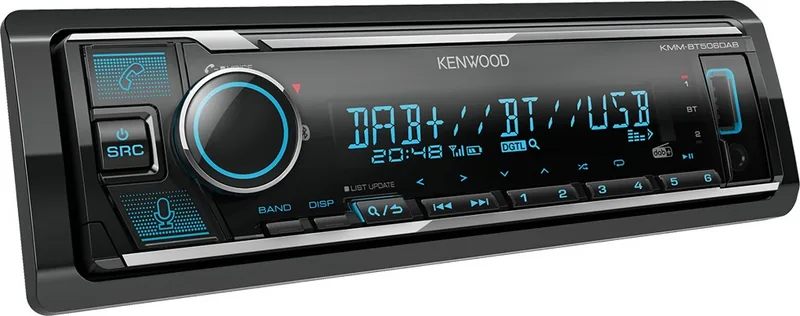
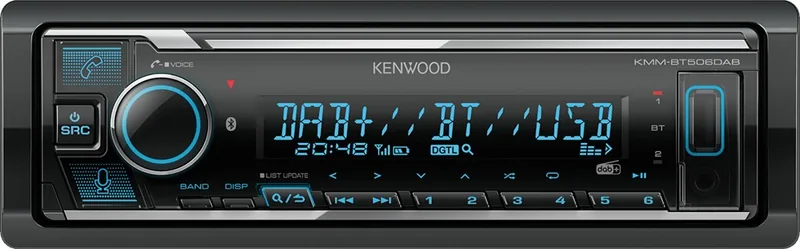
Kenwood KMM-BT506DAB — Powerful, modern digital media receiver
The Kenwood KMM-BT506DAB is a feature-rich digital media receiver designed to modernize in-car audio with DAB digital radio, Bluetooth streaming and hands-free calling, USB/iPod support, Spotify integration and extensive audio tuning. It blends straightforward operation with advanced sound shaping to suit daily commuters and audio enthusiasts alike.
What it offers
At its core, the KMM-BT506DAB supports DAB/DAB+ digital radio for clear, interference-free broadcasts and quick ensemble/service scans. The receiver includes a DAB antenna input and automatic service list updates to keep stations current. Analog FM/AM reception is also available with RDS features, PTY search and traffic/announcement handling.
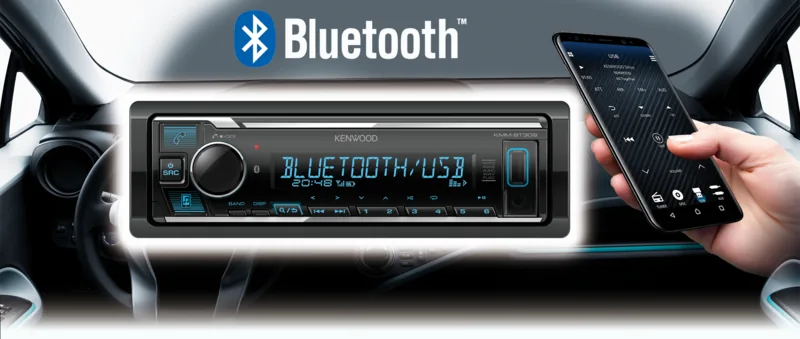
Bluetooth connectivity supports phone calls (HFP), high-quality audio streaming (A2DP) and remote control (AVRCP). Pairing is simple, and the unit can remember multiple devices, allowing two phones and one audio device to be connected simultaneously (with flexible audio-device switching available). Built-in microphone support and adjustable mic gain, noise reduction and echo cancellation improve call clarity.
Mobile app integration is supported via KENWOOD Remote, and the receiver works with Amazon Alexa for voice-driven music, info and smart-home commands when paired with a smartphone. Spotify playback is supported through USB or Bluetooth, including playback controls, radio, save-to-library and shuffle/repeat functions.
USB and iPod compatibility allow direct playback and folder/file navigation, fast search, alphabet search and drive selection (for multi-drive setups). An auxiliary input with custom naming offers simple connection for other portable players.
Sound and customization
Kenwood provides deep audio tuning: selectable 2-way or 3-way crossover modes, speaker-size presets, adjustable crossover frequencies and slopes, phase and gain controls, digital time alignment (DTA) with automatic distance-based calculation, and a range of EQ tools including manual EQ, preset EQs, bass boost, loudness, space enhancement and sound reconstruction. Subwoofer outputs, preouts and configurable preout switching let you add amplifiers and subs.
Display and illumination are highly configurable too — multi-zone illumination color selection, dimmer schedules, brightness for day/night, demo mode, scrolling text and level meters. Firmware is updatable via the Kenwood site.
Practical installation and safety
The unit is designed for standard single-DIN mounting with a detachable faceplate and includes wiring harness guidance, ISO connector pinouts and safety cautions. It runs on 12V negative-ground systems, includes numerous software licenses for bundled components, and conforms to EU directives (CE/RoHS) with manufacturer declarations.
Notes
- DAB service list updates can take a few minutes; avoid interrupting the update.
- For optimal call quality, adjust MIC GAIN, NR LEVEL and ECHO CANCEL in the BT settings.
- Use the correct crossover type for your speaker wiring (2-way vs 3-way) to avoid damage.
Search for 67,706 Manuals online


Type-in Brand or Model