
Kensington SD4800P Manual
PDF manual · 16 Pages
English



Quick check
Incorrect answer, please try again.
Chat with your Kensington SD4800P manual using AI
Get instant AI answers from your Kensington SD4800P manual
Ask anything about the Kensington SD4800P. Answers come from this manual, with the pages they are based on.
Ask a Question
Do you recommend SD4800P?
Yes NoFrequently Asked Questions
The SD4800P is a USB-C docking station that expands a compatible laptop with monitor outputs, USB ports, Gigabit Ethernet, and USB-C Power Delivery. It is intended to create a more complete desktop-style workspace through one main laptop connection.
Is this answer helpful?
The dock lists USB 3.1 Gen 2 performance of up to 10Gbps for compatible connections. Actual transfer speeds depend on the host computer, connected device, cable, and workload.
Is this answer helpful?
Yes. Its USB-C Power Delivery capability is listed at up to 60W. Confirm your laptop's charging requirements, since devices needing more than 60W may charge slowly or use supplemental power.
Is this answer helpful?
The dock provides DisplayPort and HDMI video connectivity. The material also indicates scalable display setups, with supported results depending on the connected computer's DisplayPort capability and selected video mode.
Is this answer helpful?
Yes, compatible configurations can support 4K resolution. Depending on USB-C lane allocation, DisplayPort generation, and monitor arrangement, 4K may operate at either 30Hz or 60Hz.
Is this answer helpful?
Yes. It includes a Gigabit Ethernet port supporting 10/100/1000Mbps network speeds. This can provide a dependable wired connection when connected to a suitable network.
Is this answer helpful?
Advantages and Disadvantages
Advantages

- USB 3.1 Gen 2 connectivity supports data transfers up to 10Gbps for compatible devices.
- Provides up to 60W USB-C Power Delivery to charge many compatible laptops during use.
- DisplayPort and HDMI connections support flexible multi-monitor configurations.
- Gigabit Ethernet offers stable 10/100/1000Mbps wired network connectivity.
- Includes USB 3.1 Gen 1 and USB 2.0 support for a broad range of peripherals.
Disadvantages

- Maximum display resolution and refresh rate depend heavily on the laptop's USB-C video capabilities.
- Some multi-display configurations may reduce available resolution or refresh rate.
- A compatible USB-C port with DisplayPort Alt Mode is required for video output.
- The recommended MicroSaver 2.0 keyed lock is sold separately.
Product Specification
Type
LAN adapter, USB hub, video adapter
Form factor
1 x external, wired
Host connection
1 x USB-C 3.1 (port, 10 Gb/s, USB-C with DisplayPort 1.4, USB PD max. 60 W), 1 x USB-C 3.1 (plug via cable, 10 Gb/s, 3.28 ft cable length)
Ports
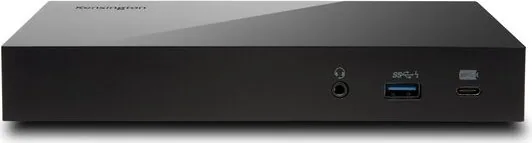
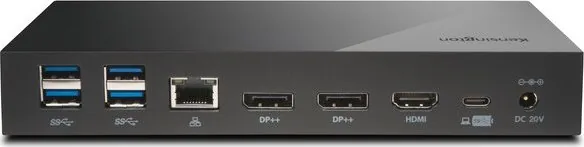
1 x RJ-45, 1 x USB-C 3.1 (port), 5 x USB-A 3.1 (port), 1 x HDMI 2.0 (port), 2 x DisplayPort 1.1 (port), 1 x audio jack (port)
Data transfer
1 x RJ-45 (10/100/1000Base-T), 1 x USB-C 3.1 (port, 10 Gb/s, 5 V/3 A/15 W), 1 x USB-A 3.1 (port, 10 Gb/s, USB BC 1.2, 5 V/2.4 A/12 W), 4 x USB-A 3.1 (port, 10 Gb/s, 5 V/0.9 A/4.5 W), 1 x HDMI 2.0 (port, max. 3840 x 2160 at 30 Hz), 2 x DisplayPort 1.1 (port, max. 1 x 3840 x 2160 at 30 Hz or 2 x 1920 x 1080 at 60 Hz), 1 x audio jack (port, 0.14 in)
Power supply
Power is not supplied via host connection, power input (1 x DC barrel plug, 20 V), external power adapter required and included (20 V/6.75 A/135 W)
Dimensions
5.31 x 0.63 x 3.03 in (W x H x D)
Weight
3.88 oz
Case color
black
Compatibility
universal
Special features
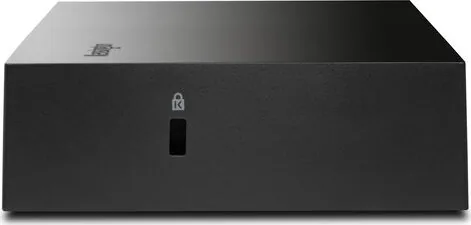
Security lock (Kensington Security Slot), on/off switch, VESA (2.95 x 2.95/3.94 x 3.94 in)
Manufacturer warranty
three years
USB notation
Link
Product Description
Kensington SD4800P USB-C 10Gbps Scalable Video Docking Station, USB-C 3.1 Socket - Read, Download & Print Free
The Kensington SD4800P Universal USB-C Scalable Video Dock is designed to turn a compatible USB-C laptop into a more capable desktop workspace. It combines high-speed data transfer, wired networking, display expansion, and Power Delivery in one compact docking solution. For professionals who regularly move between desk setups, this dock helps reduce cable clutter while keeping essential peripherals connected.
High-Speed USB-C Connectivity
At the center of the setup is a USB 3.1 Gen 2 connection capable of up to 10Gbps transfer speeds. This makes the dock a practical choice for external storage, fast accessory connections, and demanding everyday workflows. It also includes USB 3.1 Gen 1 and USB 2.0 connections, allowing users to support a mix of newer and legacy peripherals such as keyboards, mice, printers, headsets, and flash drives.
The dock supports USB Battery Charging 1.2-compatible devices, with charging output listed at up to 5V/2.4A. A USB-C Power Delivery connection can provide up to 60W, helping keep many compatible laptops charged while they remain connected to displays and accessories.
Flexible Display Expansion
Kensington SD4800P USB-C 10Gbps Scalable Video Docking Station, USB-C 3.1 Socket - Read, Download & Print Free highlights a versatile video configuration with DisplayPort and HDMI connectivity. The available resolution depends on the computer's USB-C video capability, DisplayPort version, lane allocation, and the selected operating mode.
Supported configurations shown for compatible systems include Full HD output at 60Hz, 2560 x 1440 at 60Hz, and 4K output. Some configurations can support 3840 x 2160 at 60Hz, while others may be limited to 4K at 30Hz. This scalable approach lets users prioritize either more displays or greater video bandwidth, depending on the host device and workspace needs.
Network and Workspace Features
A Gigabit Ethernet port supports 10/100/1000Mbps wired networking, offering a reliable alternative to wireless connections for office work, large transfers, and stable conferencing. The dock is suited to users who need a clean desk connection point for monitors, storage, network access, and charging.
Notes
- Confirm that the laptop USB-C port supports the required DisplayPort Alt Mode and Power Delivery features.
- Display resolution and refresh rate vary by host hardware, monitor setup, cable quality, and video mode.
- A Kensington MicroSaver 2.0 keyed lock is recommended for physical security but is sold separately.
Search for 67,732 Manuals online


Type-in Brand or Model