

Kensington SD4600P Manual
PDF manual · 14 Pages
English



Quick check
Incorrect answer, please try again.
Chat with your Kensington SD4600P manual using AI
Get instant AI answers from your Kensington SD4600P manual
Ask anything about the Kensington SD4600P. Answers come from this manual, with the pages they are based on.
Ask a Question
Do you recommend SD4600P?
Yes NoFrequently Asked Questions
Yes, it supports USB Battery Charging 1.2 with 60W capability.
Is this answer helpful?
The specs focus on data peripherals. Monitor support usually via USB-C alt mode depending on laptop.
Is this answer helpful?
It enters standby one minute after all devices are unplugged.
Is this answer helpful?
No, the lock must be purchased separately.
Is this answer helpful?
Global support is available through Kensington channels worldwide.
Is this answer helpful?
Yes, FCC, IC, and ErP compliance are confirmed for this device.
Is this answer helpful?
Advantages and Disadvantages
Advantages

- High speed USB 3.1 connectivity with 5Gbps transfer rates for fast data access.
- Integrated Ethernet port ensures reliable wired network connectivity for office use.
- Supports USB Battery Charging 1.2 allowing up to 60W power delivery for devices.
Disadvantages

- Physical security lock sold separately requires additional budget for safety measures.
- Standby mode activation delay of one minute after unplugging might surprise users.
- Some legacy features may not be supported on newer USB-C only laptops without adapters.
Product Specification
Compatibility
USB-C 3.0
Ports
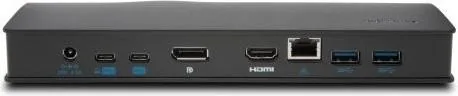
3x USB 3.0, 1x USB-C 3.0, 1x HDMI, 1x DisplayPort, 1x Gb LAN, 2x Audio Jack
Power Supply
External
Dimensions
8.54x3.74x1.02 in
Features
Security Lock (Kensington)
Product Description
Kensington Docking Stations
Overview
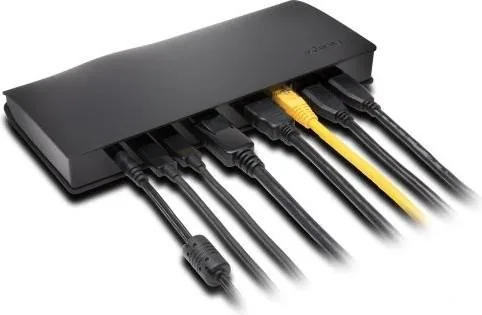
The Kensington SD4600P USB 3.0 Type-C Universal Docking Station transforms your single port laptop into a powerful workstation hub. Designed for professionals who demand connectivity without clutter, this device consolidates multiple connections into one cable solution. By utilizing the USB-C interface, users gain access to high-speed data transfer capabilities alongside essential peripheral connections. The docking station supports USB 3.1 with speeds reaching 5Gbps, ensuring substantial data moves quickly between your computer and external drives or hubs. This performance level ensures that modern workflows remain uninterrupted even when accessing massive storage solutions or high-resolution external monitors. It also supports various video outputs through compatible systems to drive multiple screens for enhanced productivity.
Connectivity and Power
One of the standout features is the integrated 10/100/1000 BT Ethernet port, providing a stable wired network connection when Wi-Fi is unreliable. This is crucial for remote workers, video conferencing, and sensitive data transfers. Additionally, the unit includes multiple USB 3.0 and USB 2.0 ports, allowing you to connect keyboards, mice, webcams, and legacy peripherals seamlessly without needing multiple dongles. Power delivery is another key aspect, as the SD4600P supports USB Battery Charging 1.2 standards, enabling compatible devices to charge at 60W while connected. This power management capability simplifies the power supply requirements for a full desk setup.
Standards and Security
Reliability is paramount, and this docking station meets rigorous international standards for electromagnetic compatibility and environmental safety. It complies with FCC rules, ensuring it does not interfere with radio communications in residential or office settings. European markets benefit from ErP compliance, meaning the unit consumes less than 0.5W in standby mode, promoting energy efficiency and reducing costs over time. The device enters standby mode one minute after unplugging to save power. Users note that a physical security lock is sold separately for protection. The Kensington Computer Products Group backs this hardware with global support channels across various continents. The SD4500 model offers similar connectivity but with slight variations in power delivery, giving consumers options based on their specific charging needs. Ultimately, maximizing efficiency requires reliable hardware that adapts to your needs without causing friction. If you require enhanced portability or specific connectivity options, this series provides a robust foundation for expanding your system capabilities efficiently.
Search for 67,732 Manuals online


Type-in Brand or Model