
Kensington SD3600 Manual
PDF manual · 14 Pages
English



Quick check
Incorrect answer, please try again.
Chat with your Kensington SD3600 manual using AI
Get instant AI answers from your Kensington SD3600 manual
Ask anything about the Kensington SD3600. Answers come from this manual, with the pages they are based on.
Ask a Question
Do you recommend SD3600?
Yes NoFrequently Asked Questions
The SD3600 is optimized for Windows (including Windows 7, 8, 8.1, 10) with drivers via Windows Update and Kensington downloads. macOS and Linux may work for basic functions but can have limited or no support for advanced features.
Is this answer helpful?
Most SD3600 models offer limited or no laptop charging via USB 3.0. Power delivery varies by SKU; for consistent charging of high-power laptops, use the laptop’s AC adapter or a dock specifically rated for higher PD output.
Is this answer helpful?
Dual-monitor support depends on model and host capabilities. Many setups easily handle 1080p dual displays; higher resolutions like 4K may be limited to single-monitor mode or lower refresh rates depending on USB bandwidth and the dock variant.
Is this answer helpful?
Drivers, compliance documentation, and downloads are available on Kensington’s support site. Kensington also provides regional technical support phone numbers; Windows Update can automatically supply compatible drivers for many systems.
Is this answer helpful?
Yes, the SD3600 is backward compatible with USB 2.0 ports, but functionality will be restricted by lower transfer speeds and may affect video output and multiple peripheral performance.
Is this answer helpful?
The dock includes a gigabit Ethernet port for stable wired networking, providing lower latency and higher reliability than typical Wi-Fi—useful for videoconferencing, large file transfers, and secure connections.
Is this answer helpful?
Dispose of the device per local e-waste regulations. The product is marked for proper recycling (especially in the EU); contact your municipal waste service or the retailer for guidance on electronic recycling programs.
Is this answer helpful?
Advantages and Disadvantages
Advantages

- Transforms one USB 3.0 port into video, Ethernet, audio, and multiple USB ports for quick workstation setup.
- Integrated gigabit Ethernet delivers reliable wired connectivity for video calls and large transfers.
- Supports external monitors via HDMI/DisplayPort to boost multitasking and productivity.
- Compact, durable design is easy to transport between home, office, and hot-desk setups.
- Drivers available via Windows Update and Kensington support for broad Windows compatibility.
Disadvantages

- May not provide sufficient power delivery to charge high-power laptops over USB 3.0.
- Full functionality can depend on OS drivers; macOS and Linux may have limited features.
- USB 3.0 bandwidth is shared, so multiple high-speed devices can reduce performance.
- Port layout and dual-monitor support vary by SKU; check specific model specs before buying.
- Higher-resolution displays (e.g., 4K) may be limited depending on host and model capabilities.
Product Specification
Compatibility
USB 3.0
Ports
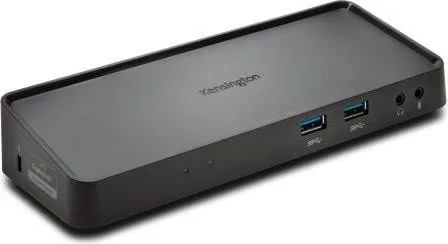
2x USB 3.0, 4x USB 2.0, 1x HDMI, 1x DVI, 1x Gb LAN, 2x Jack
Power Supply
external
Features
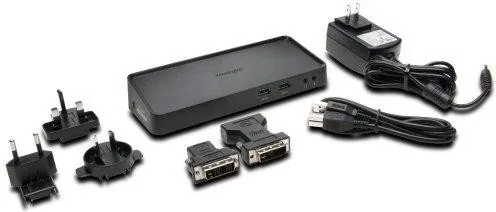
Security lock (Kensington), incl. HDMI/DVI adapter
Product Description
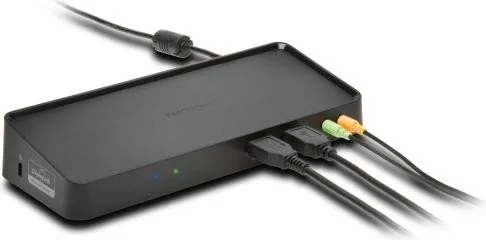
Kensington SD3600 USB 3.0 Universal docking station Manual
Overview
The Kensington SD3600 USB 3.0 Universal docking station is a compact, versatile hub designed to expand laptop connectivity for productivity-focused users. It turns a single USB 3.0 port into multiple interfaces—video outputs, Ethernet, USB ports, and audio—making it ideal for home offices, hot desks, and small workspaces. Built for broad compatibility, the SD3600 supports common operating systems and leverages USB 3.0 bandwidth for reliable peripheral performance.
Key Features and Use
The docking station offers HDMI and DisplayPort video outputs (or dual-monitor configurations depending on the model), gigabit Ethernet for stable wired networking, and several USB ports for keyboards, mice, external drives, and other accessories. Audio in/out makes it convenient for headsets and speakers. The SD3600 emphasizes plug-and-play simplicity with driver support through Windows Update and downloadable utilities for enhanced compatibility.
Its sturdy, compact design fits easily on a desk or in a bag, and Kensington’s compliance with regional regulations and recycling guidance reflects a focus on global distribution and environmental responsibility. The dock is targeted at professionals who need to quickly connect laptops to full desk setups without fumbling with multiple adapters.
Practical Benefits
For commuters and remote workers, the SD3600 reduces setup time—connect one cable and gain access to monitors, wired networking, and peripherals. It supports faster data transfer rates via USB 3.0 and provides backward compatibility with USB 2.0 devices. The included support resources and widespread technical support make troubleshooting straightforward across many regions.
Notes
- Verify your laptop’s USB port capabilities and operating system compatibility before purchase. Some features depend on host OS and driver availability.
- For dual-monitor setups, check specific model output combinations (HDMI/DisplayPort) and resolution limits.
- Power delivery may vary by model; some setups require separate AC power or may not charge high-power laptops through the dock.
Pros and Cons
Pros:
- Universal expansion: multiport connectivity from one USB 3.0 connection.
- Gigabit Ethernet: stable wired networking for low-latency tasks.
- Video outputs: supports external monitors for improved productivity.
- Compact design: easy to transport and fits small workspaces.
- Broad support: drivers available via Windows Update and Kensington resources.
Cons:
- Limited power delivery: may not charge all laptops through USB alone.
- Driver reliance: full functionality can depend on OS drivers and updates.
- Bandwidth sharing: multiple high-speed devices may contend for USB 3.0 bandwidth.
- Model variations: exact port combos and dual-monitor capability differ by SKU.
- Not universal for every OS: advanced features may be limited on macOS or older systems.
Most Important Results
- Single-cable convenience: transforms one USB 3.0 port into video, Ethernet, audio, and multiple USB ports for fast workstation setup.
- Network reliability: integrated gigabit Ethernet delivers stable wired connectivity suitable for video calls and large file transfers.
- Multi-display support: HDMI/DisplayPort outputs enable external monitor setups, boosting multitasking and productivity.
- Portable form factor: compact, durable build for easy transport between work locations.
- Broad driver support: leverages Windows Update and Kensington downloads for compatibility across many Windows versions.
FAQ
-
Question: Which operating systems work best with the SD3600? Answer: The dock is primarily optimized for Windows (Windows 7, 8, 8.1, 10) with driver availability via Windows Update and Kensington downloads; functionality on macOS or Linux may be limited and could require third-party drivers or restricted features.
-
Question: Can the SD3600 power-charge my laptop? Answer: Most SD3600 models provide limited or no laptop charging over USB 3.0. Power delivery depends on the specific SKU; high-power laptops usually require a separate AC adapter.
-
Question: Does it support dual monitors and what resolutions? Answer: Dual-monitor capability depends on the model and host USB bandwidth; many setups support 1080p easily, while higher resolutions (1440p/4K) may be limited or require single-monitor configurations via DisplayPort or HDMI.
-
Question: How do I get drivers and support? Answer: Drivers and compliance documentation are available through Kensington support pages and Windows Update; international technical support numbers are provided by Kensington for region-specific assistance.
-
Question: Is the docking station compatible with USB 2.0 ports? Answer: The SD3600 is backward compatible with USB 2.0 but will operate at reduced data transfer speeds and may limit video or multi-device performance.
-
Question: What networking features are included? Answer: The dock includes a gigabit Ethernet port for wired network access, offering more reliable connectivity than typical Wi-Fi in congested environments.
-
Question: How should I dispose of the dock when upgrading? Answer: Follow local electronic waste regulations; the product is marked for proper recycling in EU and other regions—contact local waste services or the retailer for disposal guidance.
Search for 67,732 Manuals online


Type-in Brand or Model