
Kensington Presenter Expert Red Laser with Cursor Control Manual
PDF manual · 16 Pages
English



Quick check
Incorrect answer, please try again.
Chat with your Kensington Presenter Expert Red Laser with Cursor Control manual using AI
Get instant AI answers from your Kensington Presenter Expert Red Laser with Cursor Control manual
Ask anything about the Kensington Presenter Expert Red Laser with Cursor Control. Answers come from this manual, with the pages they are based on.
Ask a Question
Do you recommend Presenter Expert Red Laser with Cursor Control?
Yes NoFrequently Asked Questions
Up to one year with average use patterns.
Is this answer helpful?
Roughly 150 feet or 50 meters without interruption.
Is this answer helpful?
No, never point at eyes, Class 2 safety standards apply.
Is this answer helpful?
No, modifications might void warranty authority provided.
Is this answer helpful?
LED turns red when you press a button to show low.
Is this answer helpful?
Yes, free for registered users except long distance calls.
Is this answer helpful?
2.402GHz to 2.478GHz for stable transmission.
Is this answer helpful?
Advantages and Disadvantages
Advantages

- Red laser pointer helps guide audience attention effectively.
- Joystick control offers precision like a mouse.
- Long range up to 150 feet without interruption.
- LED indicator shows battery status clearly.
- Black screen button aids focus management.
Disadvantages

- Requires standard batteries instead of rechargeable.
- Laser safety risks if pointed at eyes.
- Backlight turns off after three minutes.
- Cannot disassemble without voiding warranty.
- Frequency interference possible in crowded areas.
Product Specification
Function
Mouse, Laser Pointer, Presenter
Buttons
5
Connection
Wireless (2.40 GHz)
Power Supply
2x AAA
Dimensions (WxHxD)
1.61x1.18x4.41 in
Weight
0.20 lbs
Product Description
Presentation Made Easier With Kensington Presenter Expert
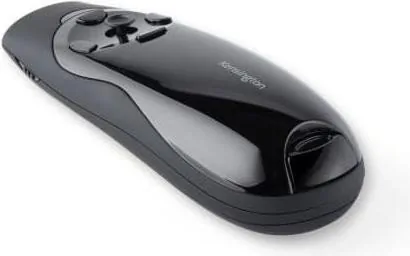
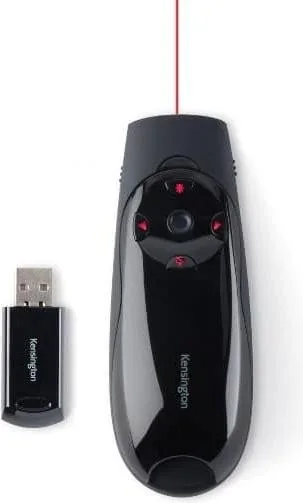
Unlock your potential during public speaking with the Kensington Presenter Expert Red Laser system. This device offers a seamless experience for professionals who demand absolute reliability and performance. The wireless connection utilizes a plug-in USB receiver to ensure compatibility with your current hardware setup. The Kensington red laser & joystick Presenter, USB Manual details are included for reference. You will find that the built-in joystick control adds significant precision to your navigation across the screen. Unlike simple clickers, this tool functions like a standard mouse while you walk freely across the stage during your keynotes.
Core Features And Functionality
The red laser pointer is specifically designed to guide audience attention effectively to specific slides or images. Safety is paramount here, adhering strictly to Class 2 laser standards for public safety. Maximum power output stays within safe visual limits for viewing without causing damage. The joystick allows you to highlight text or draw attention without switching to a separate device. Navigate forward or backward through your deck easily with dedicated buttons on the palm. A black screen function helps you regain focus quickly after making a specific point to the audience. The LED indicator provides clear visual feedback regarding remaining battery levels so you never get caught off guard during important meetings.
Durability And Wireless Range
Wireless signals travel reliably up to 150 feet without interruption or dropouts. This range ensures you stay connected even when you move from across the room. The device uses standard batteries that can last for up to a year based on average usage patterns reported by users. An automatic energy saving feature turns off the button backlight after three minutes of inactivity to preserve stored energy power. Users should avoid pointing the laser towards reflective surfaces to prevent potential eye hazards from reflection. Do not allow minors to use the pointer without supervision to ensure they follow strict safety protocols.
Technical Support And Compliance
Registered customers receive free technical assistance. Contact details are provided on the back page. The equipment complies with FCC and CE regulations. Operating frequency sits between 2.402GHz and 2.478GHz. Modifications might void warranty. Dispose correctly.
Notes
Do not disassemble the device under any circumstances or risk exposure. Use only within the specified temperature range of 0 to 40 degrees Celsius. Avoid prolonged exposure to extreme heat or cold environments that damage electronics.
Search for 67,732 Manuals online


Type-in Brand or Model