
Kensington Expert Mouse Wired K64325 Manual
PDF manual · 14 Pages
English



Quick check
Incorrect answer, please try again.
Chat with your Kensington Expert Mouse Wired K64325 manual using AI
Get instant AI answers from your Kensington Expert Mouse Wired K64325 manual
Ask anything about the Kensington Expert Mouse Wired K64325. Answers come from this manual, with the pages they are based on.
Ask a Question
Do you recommend Expert Mouse Wired K64325?
Yes NoFrequently Asked Questions
The Expert Mouse Optical supports wired USB connectivity and legacy PS/2 connections, providing compatibility with modern PCs and older systems that still use PS/2 ports.
Is this answer helpful?
Periodically remove and wipe the trackball and housing with a soft, dry cloth or lightly dampened cloth if needed. CAUTION: Never spray liquid cleaner directly on the trackball or into the device to avoid damage.
Is this answer helpful?
Yes. The device features four customizable buttons and a scroll ring; Kensington software or OS-level input mapping can be used to assign shortcuts and functions to enhance productivity.
Is this answer helpful?
Follow basic troubleshooting: unplug and replug the device, try a different USB port, restart your computer, and if possible test the trackball on another machine. If problems persist, contact Kensington technical support after registering your product.
Is this answer helpful?
The Expert Mouse is designed to minimize arm movement and includes a wrist rest to promote ergonomic positioning. However, Kensington advises users to maintain proper posture, take breaks, and consult a health professional for persistent symptoms.
Is this answer helpful?
Yes. The Expert Mouse complies with FCC Class B, Industry Canada, and CE directives. Kensington provides compliance documentation and worldwide technical support information.
Is this answer helpful?
Visit Kensington support at www.support.kensington.com for FAQs, drivers or configuration tools, and contact details for telephone support available to registered users.
Is this answer helpful?
Advantages and Disadvantages
Advantages

- Large central trackball reduces arm movement and supports ergonomic posture.
- DiamondEye™ optical tracking offers precise, responsive cursor control across surfaces.
- Four customizable buttons and scroll ring boost productivity with programmable shortcuts.
- Dual connectivity (USB and PS/2) increases compatibility with modern and legacy systems.
- Included wrist rest and sculpted design help minimize wrist strain during prolonged use.
Disadvantages

- Wired design limits mobility compared with wireless solutions.
- Large footprint may consume more desk space than a standard mouse.
- Trackball cleaning is required periodically to maintain optimal performance.
- Some users may need time to adapt from a conventional mouse to trackball control.
- PS/2 connectors are legacy and may be unnecessary for many modern systems.
Product Specification
Type
Trackball
Buttons
4 (4x programmable)
Connectivity
wired, USB, PS/2
Power supply
USB, PS/2
Weight
0.75 lb
Special features
Palm rest
Product Description
Kensington Expert Mouse Optical — Comfort and Precision with PS/2 & USB
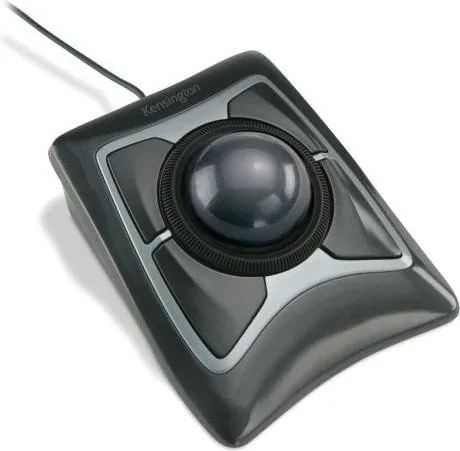
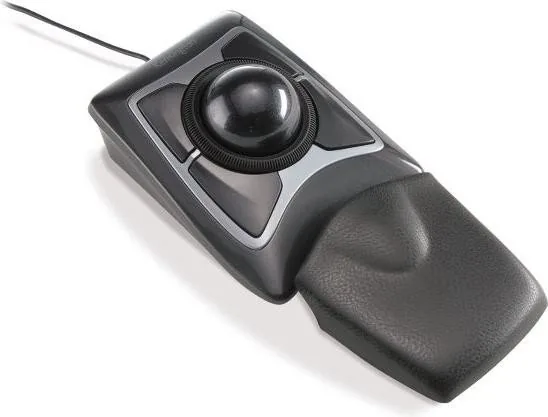
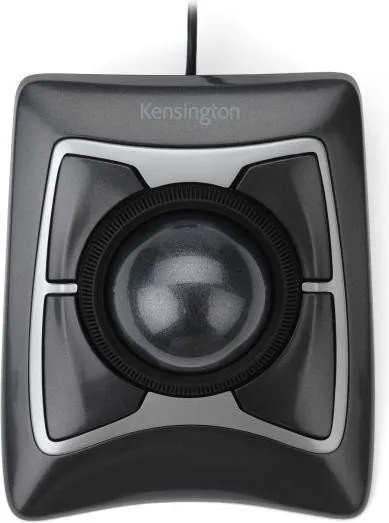
The Kensington Expert Mouse Optical is a wired trackball designed for users who prioritize comfort, accuracy, and customizable control. Equipped with a large central ball, four programmable buttons, a scroll ring, and DiamondEye™ optical tracking, the device delivers smooth cursor movement and precise tracking across different surfaces. Connectivity options include USB and legacy PS/2 support, making it compatible with a wide range of desktops and workstations.
Ergonomic design is central to the Expert Mouse experience. The sculpted body and included wrist rest help reduce wrist strain and encourage a more relaxed hand posture during extended use. The large trackball reduces arm movement compared with traditional mice, which can be beneficial for users seeking to limit repetitive motion. Kensington emphasizes health and safety guidance, recommending proper posture and periodic breaks to reduce the risk of repetitive stress injuries.
Performance-wise, DiamondEye™ optical technology provides responsive tracking without moving parts that require frequent maintenance. The scroll ring surrounds the ball for intuitive vertical navigation, while the four customizable buttons allow users to map shortcuts and improve productivity in browsers, design apps, and office suites. The device supports straightforward troubleshooting steps—reconnect, switch ports, restart the computer, or test on another system—and Kensington offers web and telephone technical support for registered users.
Built to meet regulatory standards, the Expert Mouse complies with FCC, Industry Canada, and CE requirements. The product includes guidance on cleaning (do not spray cleaners directly on the ball) and environmental considerations for responsible disposal. With global technical support resources and comprehensive safety warnings, Kensington positions this trackball as a reliable option for professional and power users who want precision input with ergonomic benefits.
Notes:
- Clean the trackball periodically for optimal performance; avoid spraying liquid directly on the ball.
- Follow ergonomic best practices—maintain good posture, use the wrist rest, and take breaks to lower RSI risk.
- If issues occur, try unplugging/replugging, switching USB ports, restarting the computer, or testing the device on another PC.
Quick summary
Kensington Expert Mouse Optical combines a comfortable ergonomic form, DiamondEye optical tracking, a scroll ring, four customizable buttons, and PS/2/USB compatibility to deliver precise, low-fatigue control suitable for long sessions and varied systems.
Search for 67,732 Manuals online


Type-in Brand or Model
DoloremBlanditiis56
8 months ago
Does this Kensington trackball have a proper scroll ring, and how reliable is it long-term? Also, is it easy to clean if hair collects around the ring?
Manual.ly
8 months ago
Yes. This model includes a continuous scroll ring around the trackball, which many users rely on for usable scrolling compared to trackballs without a ring. Reviews report strong long-term reliability (years of daily use) with consistent feel. For cleaning: remove the ball periodically and wipe away dust from the glide areas. If hair or debris accumulates near the scroll ring, gently clean the ring area and re-seat the ball. Users also note that occasional inspection helps prevent the cursor from sticking due to dust buildup.